Idea Statica
  • Steel
  • Concrete
  • BIM & Workflows
  • Support & Learning
  • Pricing
  • Company
  • Steel overview
  • Connection design
  • Member design
  • Parametric design
  • Steel case studies
  • Concrete overview
  • Walls and D-regions
  • Anchoring design
  • Concrete case studies
  • BIM Overview
  • Supported integrations
  • Checkbot
  • Viewer
  • APIs
  • Support Center
  • E-learning & certification
  • Blog
  • Downloads & Licensing
  • Plans
  • Free community tool
  • Enterprise customers
  • Students & educators
  • How much will you save?
  • About us
  • Contact
  • Research & development
  • Authorized resellers
  • Meet our customers
  • Career
  • Steel
    Steel overviewConnection designMember designParametric designSteel case studies
  • Concrete
    Concrete overviewWalls and D-regionsAnchoring designConcrete case studies
  • BIM & Workflows
    BIM OverviewSupported integrationsCheckbotViewerAPIs
  • Support & Learning
    Support CenterE-learning & certificationBlogDownloads & Licensing
  • Pricing
    PlansFree community toolEnterprise customersStudents & educatorsHow much will you save?
  • Company
    About usContactResearch & developmentAuthorized resellersMeet our customersCareer
14-Day Trial
14-Day Trial

Subscribe to our newsletter

Company

  • About us
  • Partners
  • Careers
  • Patent

Resources

  • Customer projects
  • Case studies
  • Connection Library
  • Verification books

Legal

  • EULA
  • Global privacy policy
  • California Privacy
  • TOS Viewer
  • Licensing

Help

  • Contact
  • Quote request
  • Resellers
  • Downloads
FacebookInstagramLinkedInYouTube

ยฉ IDEA StatiCa 2009-2026

Trusted and used worldwide by engineers, fabricators & consultants.

Support CenterKnowledge Base ArticlesHow to fill in the table of internal forces in RCS module?
How to fill in the table of internal forces in RCS module?
RCS - Action stages
Plane of strains on the composite section
How to fill in the table of internal forces in RCS module
ConcreteReinforced concretePrestressed concreteKnowledge baseRCS

How to fill in the table of internal forces in RCS module?

This article is also available in
ENCZDEESFRITPTNLHUROKRPLTHTRVIZH

Dive into this article to find out all the option of inputting Internal forces to various types of cross-sections. You will learn how to use the Table editor for inputting of internal forces, how to import internal forces from Action stages, and more.

There are two possible cases for the input if internal forces. Letยดs start with an easier one โ€“ reinforced section and after that, we will explain it for the staged and prestressed cross-section.

Reinforced cross-section

Input for reinforced sections is easy to understand. Just fill in the design values of internal forces (partial factors are included) in the proper section and extreme.
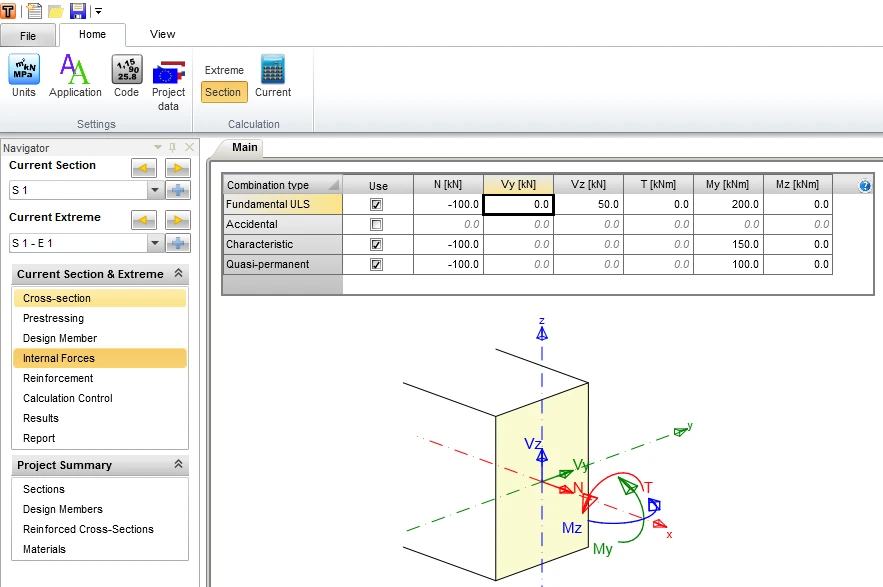
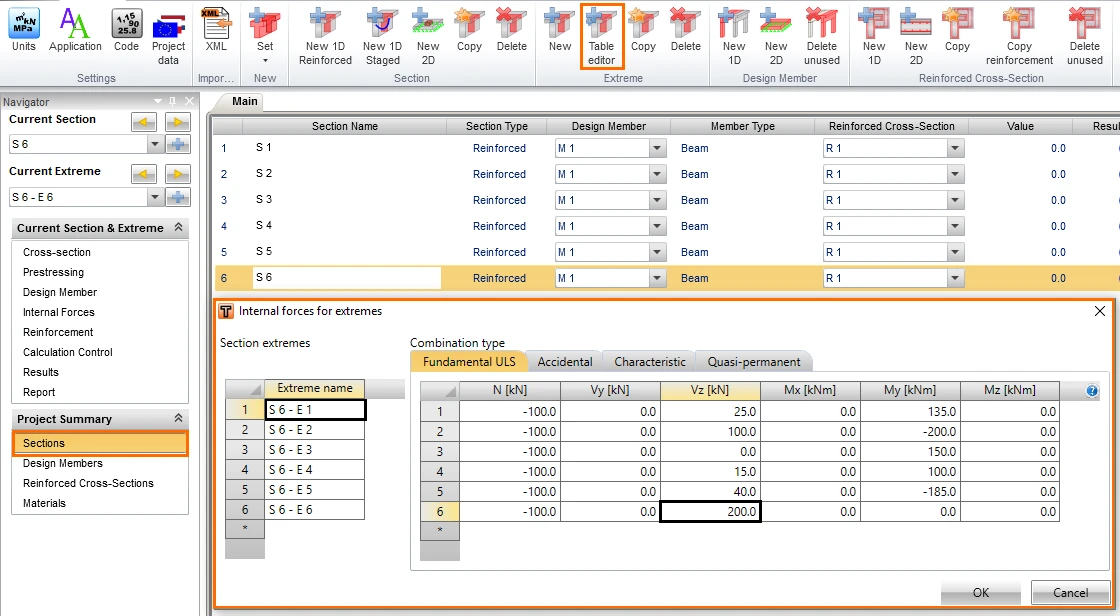
Complex projects require lots of sections and extremes. For such big data, it is useful to use table input in Section menu. Start with creating the desired number of extremes and then run Table editor and a dialog as on the following picture will appear. ULS and SLS values of internal forces can be filled in one place.
Staged or prestressed cross-sections

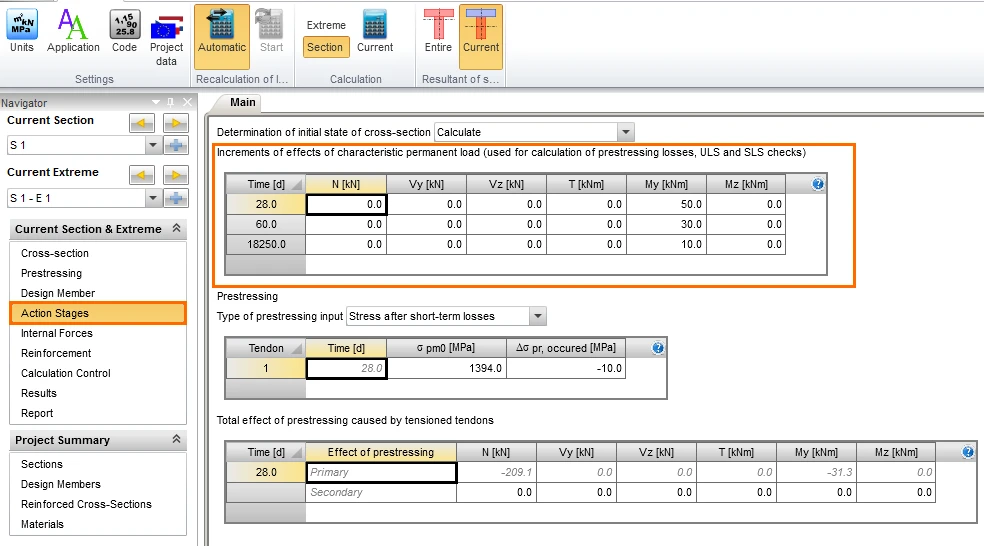
To make a proper input, we need to start in the Action stages tab. The first table is for the input of increments of effects (internal forces) from characteristic values of permanent loads and these are used for the so-called initial state of the cross-section for ULS, SLS, and tendon losses calculations.

Read a detailed article describing all the methods and options for filling the Action stages, including a more detailed description of the Initial state.
  • RCS - Action stages

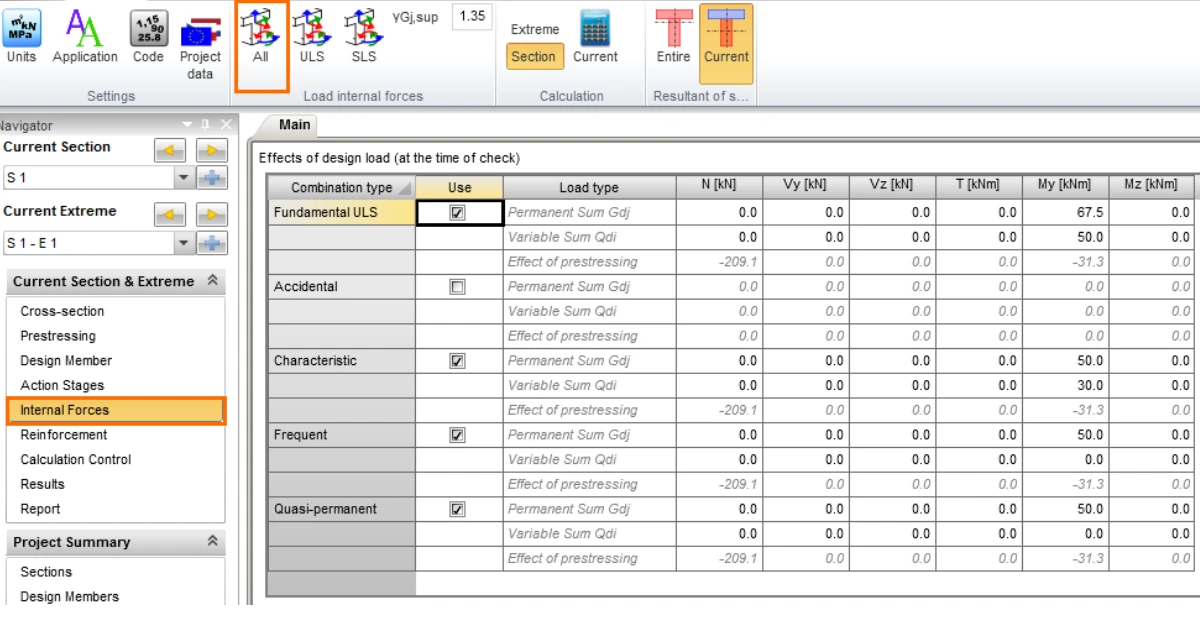
We will switch to the Internal forces tab after that and transfer the internal forces from the previous step to the initial state by clicking on All icon.
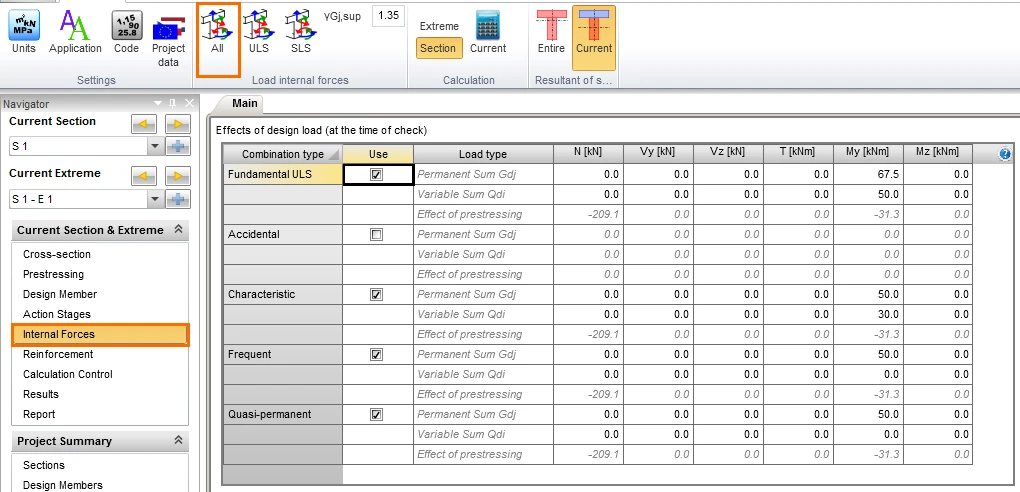
This step transfers all permanent and prestressing effects, and automatically multiply them by a proper gamma partial factor to obtain the design values.

The only thing that remains is to fill in variable load already in design values and we are done.

Take the latest version of IDEA StatiCa for a test drive today

Get 14 days of full access, completely free.

Check out IDEA StatiCa for free
Related articles

ULS results in RCS - Capacity N-M-M, Shear, Torsion, Interaction, Response N-M-M
  • Concrete
  • RCS
  • EN (Eurocode)
  • ULS
  • +4
  • Concrete
  • RCS
  • EN (Eurocode)
  • ULS

Knowledge base

ULS results in RCS - Capacity N-M-M, Shear, Torsion, Interaction, Response N-M-M

Read more
SLS results in RCS - Stress Limitation, Crack Width, Detailing
  • Concrete
  • RCS
  • EN (Eurocode)
  • SLS
  • +4
  • Concrete
  • RCS
  • EN (Eurocode)
  • SLS

Knowledge base

SLS results in RCS - Stress Limitation, Crack Width, Detailing

Read more
Action stages - RCS, Initial state
  • Concrete
  • RCS
  • Prestressed members
  • Prestressing losses
  • EN (Eurocode)
  • Load effects
  • +6
  • Concrete
  • RCS
  • Prestressed members
  • Prestressing losses
  • EN (Eurocode)
  • Load effects

Knowledge base

RCS - Action stages

Read more
Plane of the strains
  • Concrete
  • RCS
  • EN (Eurocode)
  • BIM link
  • Load effects
  • Composite beam
  • +6
  • Concrete
  • RCS
  • EN (Eurocode)
  • BIM link
  • Load effects
  • Composite beam

Knowledge base

Plane of strains on the composite section

Read more