Idea Statica
  • Steel
  • Concrete
  • BIM & Workflows
  • Support & Learning
  • Pricing
  • Company
  • Steel overview
  • Connection design
  • Member design
  • Parametric design
  • Steel case studies
  • Concrete overview
  • Walls and D-regions
  • Anchoring design
  • Concrete case studies
  • BIM Overview
  • Supported integrations
  • Checkbot
  • Viewer
  • APIs
  • Support Center
  • E-learning & certification
  • Blog
  • Downloads & Licensing
  • Plans
  • Free community tool
  • Enterprise customers
  • Students & educators
  • How much will you save?
  • About us
  • Contact
  • Research & development
  • Authorized resellers
  • Meet our customers
  • Career
  • Steel
    Steel overviewConnection designMember designParametric designSteel case studies
  • Concrete
    Concrete overviewWalls and D-regionsAnchoring designConcrete case studies
  • BIM & Workflows
    BIM OverviewSupported integrationsCheckbotViewerAPIs
  • Support & Learning
    Support CenterE-learning & certificationBlogDownloads & Licensing
  • Pricing
    PlansFree community toolEnterprise customersStudents & educatorsHow much will you save?
  • Company
    About usContactResearch & developmentAuthorized resellersMeet our customersCareer
14-Day Trial
14-Day Trial

Subscribe to our newsletter

Company

  • About us
  • Partners
  • Careers
  • Patent

Resources

  • Customer projects
  • Case studies
  • Connection Library
  • Verification books

Legal

  • EULA
  • Global privacy policy
  • California Privacy
  • TOS Viewer
  • Licensing

Help

  • Contact
  • Quote request
  • Resellers
  • Downloads
FacebookInstagramLinkedInYouTube

ยฉ IDEA StatiCa 2009-2026

Trusted and used worldwide by engineers, fabricators & consultants.

Support CenterKnowledge Base ArticlesHow to input imperfections in Member
IDEA StatiCa Member for steel
Why is 5% plastic strain limit used in material diagram for EN?
Why is 5% plastic strain limit used in material diagram for AISC?
Member analysis - Interpretation of MNA and GMNIA results
How to input imperfections in Member
Singularity detection in Member
What is the singularity warning?
3D visualization of deformations
Smooth results with precise meshing
How to input imperfections in Member
Member designSteelKnowledge baseMemberAISC (USA)

How to input imperfections in Member

This article is also available in
ENCZDEESFRITPTNLHUROKRPLTHTRVIZH

An imperfection is an inaccuracy in supports, residual stresses in members, variable thicknesses of plates, out-of-straightness of members, etc. All these imperfections are replaced and simulated by an equivalent geometrical imperfection.

All kinds of imperfections are described in the Theoretical background for IDEA StatiCa Member. In short, the global imperfection is applied to the whole structural model, and local imperfection is applied to single beams, columns, or frames.

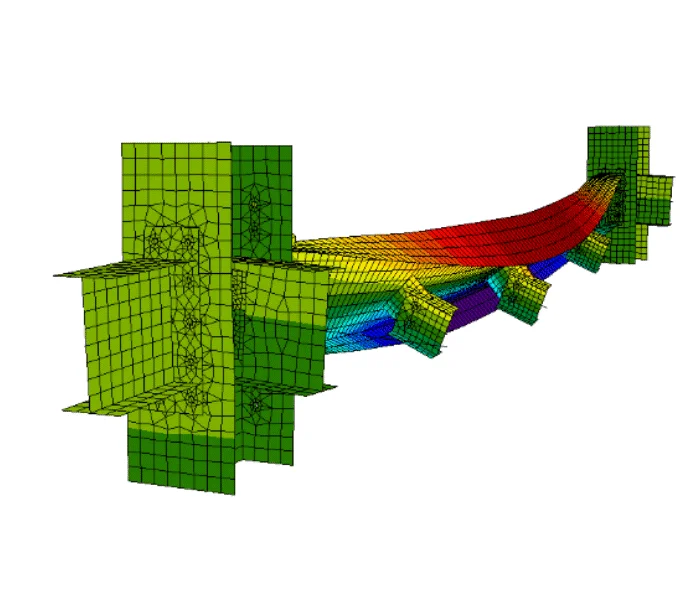
IDEA StatiCa Member allows the application of the local imperfections to the buckling shapes with amplitudes e0 in millimeters determined by the user. The e0 value is calculated as a relative valueย related to the member length. If both directions are possible for deflection, it is crucial to analyze both buckling shapes - with positive + and negative - signs of e0.

Usually, the ๏ฌrst buckling shape with the maximum amplitude according to relevant guidelines is enough. More buckling mode shapes should be analyzed for models with multiple analyzed members.

There are guidelines for each code on how to determine imperfections, which you input in Member for the GMNIA analysis.

For instance, in Eurocode, it is described in EN 1993-1-1, Cl.5.3.2 (3). The imperfection amplitude e0 is calculated in Table 5.1, where the plastic analysis should be used.
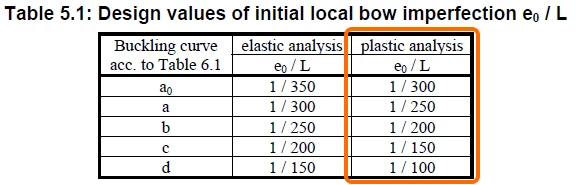
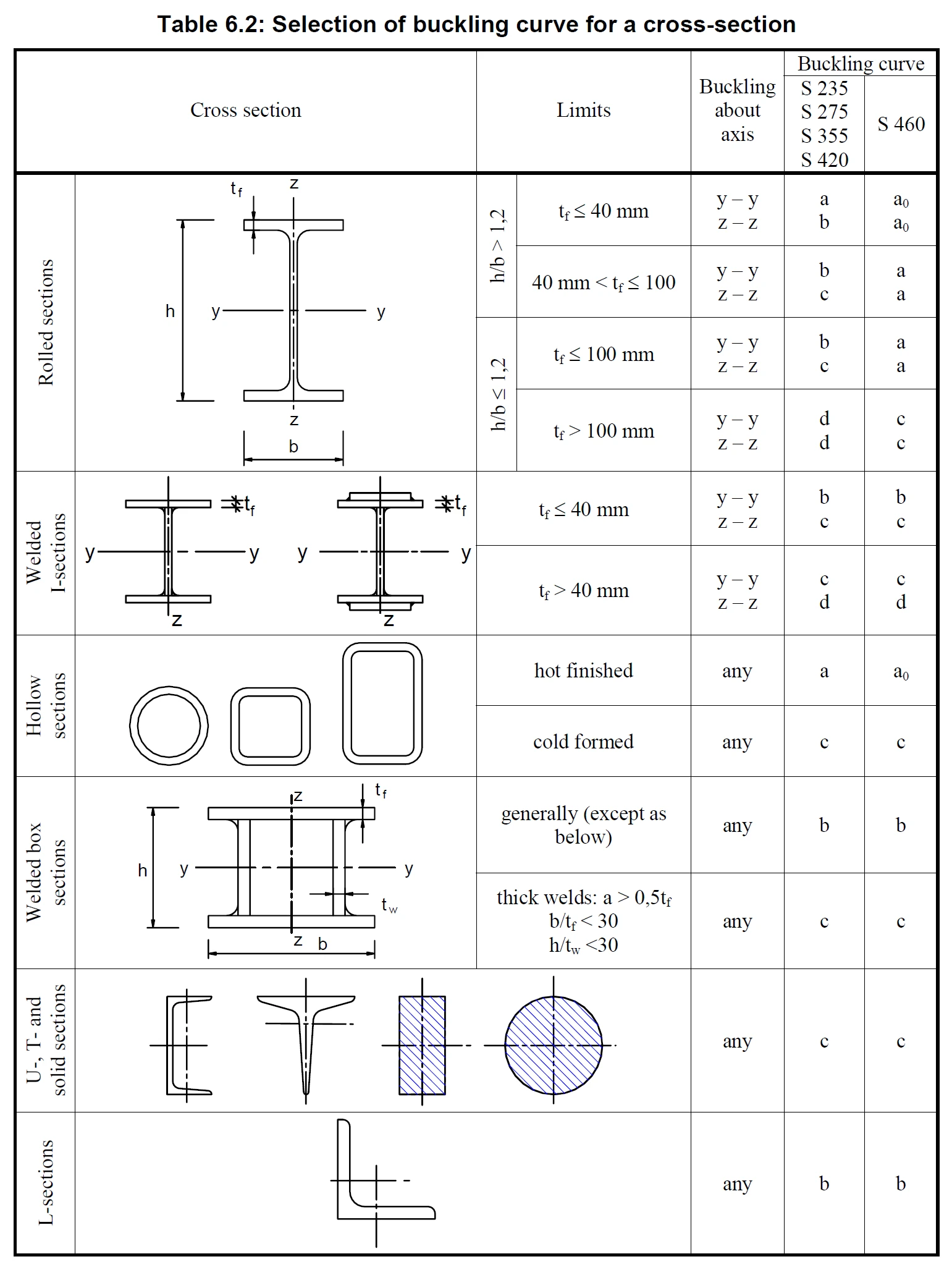
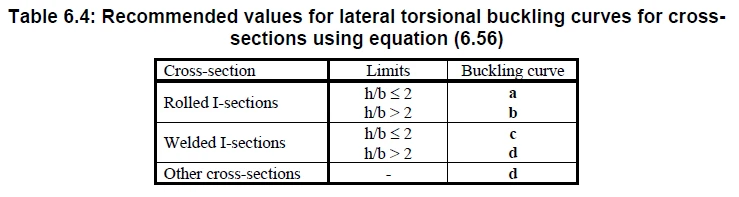
To determine the buckling curve in the tab, you need to decide, based on the displayed buckling shape in LBA analysis in Member, whether:

  • Member is predominantly compressed where ๏ฌ‚exural, torsional, or torsional-๏ฌ‚exural buckling is expected, and use Table 6.2,
  • Or if the member is predominantly bent and the main failure mode is lateral-torsional buckling, and use Table 6.4.
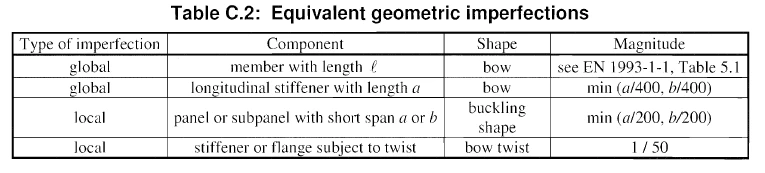
For buckling of panels (beam web), flanges, and stiffeners, table C.2 from EN 1993-1-5 should be used to calculate the imperfection values.
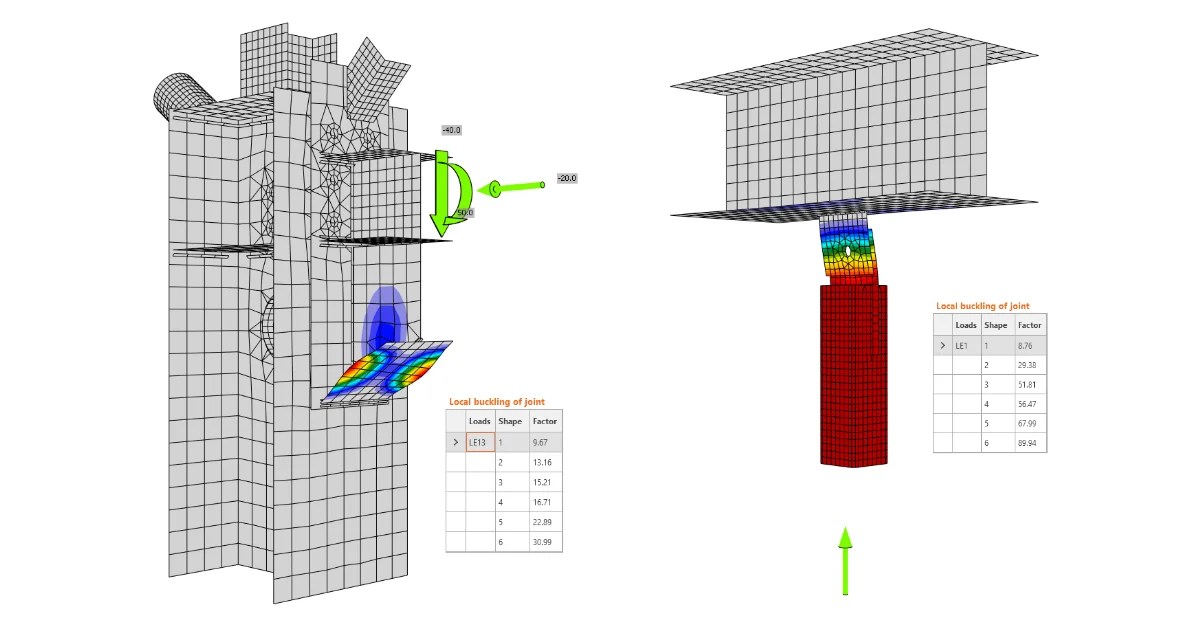
The determined imperfection amplitudes can be input in the tab after the LBA (linear buckling analysis) and before the 2nd order GMNIA analysis (geometrically and materially nonlinear analysis with imperfections).

Positive + and negative - values of imperfections e0 should be applied consecutively, and the more dangerous results should be considered relevant. If imperfections are applied to more buckling shapes, all possible combinations of + and - imperfection values should be calculated.

Related articles

How to evaluate the buckling results in detail
  • Steel
  • Connection
  • AISC (USA)
  • Overall check
  • Buckling
  • EN (Eurocode)
  • +6
  • Steel
  • Connection
  • AISC (USA)
  • Overall check
  • Buckling
  • EN (Eurocode)

Knowledge base

Global buckling vs. local buckling. What does it mean?

Read more
Why IDEA StatiCa Member?
  • Steel
  • Member
  • AISC (USA)
  • CBFEM
  • EN (Eurocode)
  • +5
  • Steel
  • Member
  • AISC (USA)
  • CBFEM
  • EN (Eurocode)

FAQ

Why IDEA StatiCa Member?

Read more
IDEA StatiCa Member โ€“ stability of members
  • Steel
  • Member
  • AISC (USA)
  • AS (Australia)
  • CSA (Canada)
  • EN (Eurocode)
  • IS (India)
  • GB (China)
  • HKG (Hong Kong)
  • Buckling
  • SP 16 (Russia)
  • +11
  • Steel
  • Member
  • AISC (USA)
  • AS (Australia)
  • CSA (Canada)
  • EN (Eurocode)
  • IS (India)
  • GB (China)
  • HKG (Hong Kong)
  • Buckling
  • SP 16 (Russia)

Theoretical background

IDEA StatiCa Member โ€“ stability of members

Read more
Member model organization
  • Steel
  • Member
  • Geometry
  • CBFEM
  • Modeling
  • +5
  • Steel
  • Member
  • Geometry
  • CBFEM
  • Modeling

Knowledge base

Member model organization

Read more