Idea Statica
  • Steel
  • Concrete
  • BIM & workflows
  • Support & Learning
  • Pricing
  • Company
  • Steel overview
  • Connection design
  • Member design
  • Parametric design
  • Steel case studies
  • Concrete overview
  • Walls and D-regions
  • Anchoring design
  • Members & cross-sections
  • Concrete case studies
  • BIM overview
  • Supported integrations
  • Checkbot
  • Viewer
  • APIs
  • Support Center
  • E-learning & certification
  • Blog
  • Downloads & Licensing
  • Plans
  • Free community tool
  • Enterprise customers
  • Students & educators
  • How much will you save?
  • About us
  • Contact
  • Research & development
  • Authorized resellers
  • Meet our customers
  • Career
  • Steel
    Steel overviewConnection designMember designParametric designSteel case studies
  • Concrete
    Concrete overviewWalls and D-regionsAnchoring designMembers & cross-sectionsConcrete case studies
  • BIM & workflows
    BIM overviewSupported integrationsCheckbotViewerAPIs
  • Support & Learning
    Support CenterE-learning & certificationBlogDownloads & Licensing
  • Pricing
    PlansFree community toolEnterprise customersStudents & educatorsHow much will you save?
  • Company
    About usContactResearch & developmentAuthorized resellersMeet our customersCareer
14-Day Trial
14-Day Trial
  • Steel
  • Concrete
  • BIM & workflows
  • Support & Learning
  • Pricing
  • Company

Subscribe to our newsletter

Company

  • About us
  • Partners
  • Careers
  • Patent

Resources

  • Customer projects
  • Case studies
  • Connection Library
  • Verification books

Legal

  • EULA
  • Privacy policy
  • California Privacy
  • TOS Viewer
  • Licensing

Help

  • Contact
  • Quote request
  • Resellers
  • Downloads
FacebookInstagramLinkedInYouTube

© IDEA StatiCa 2009-2026

Trusted and used worldwide by engineers, fabricators & consultants.

Support CenterKnowledge Base ArticlesAutomatic weld sizing to capacity estimation
Weld sizing to capacity estimation
SteelConnection designKnowledge basev24.0Welds

Automatic weld sizing to capacity estimation

This article is also available in
ENCZDEESFRITPTNLHUROKRPLTHTRVIZH

Automatic weld sizing addresses the challenge of manually adjusting each weld size, which is both tedious and time-consuming. By automating this, IDEA StatiCa significantly helps you speed up the design process and fosters more consistent weld designs across projects.

This article contains outdated information. Please refer to the updated version.

Simply put, weld sizing to capacity estimation enables you to, with one click, optimize the size of each weld across the whole connection model with a preset utilization level! Such easiness in user execution makes this feature the most advanced weld optimization tool on the market.

Machine learning technology

This feature for Eurocode (EN) projects performs the capacity estimation of all welds in the model, leveraging the machine learning data containing thousands of weld models with various loading scenarios. The capacity estimation routine considers both connection design and the load effects.

First, the Connection model is calculated with the original welds, and then these results are compared to the vast library of machine-learned results database, and weld sizes are optimized.
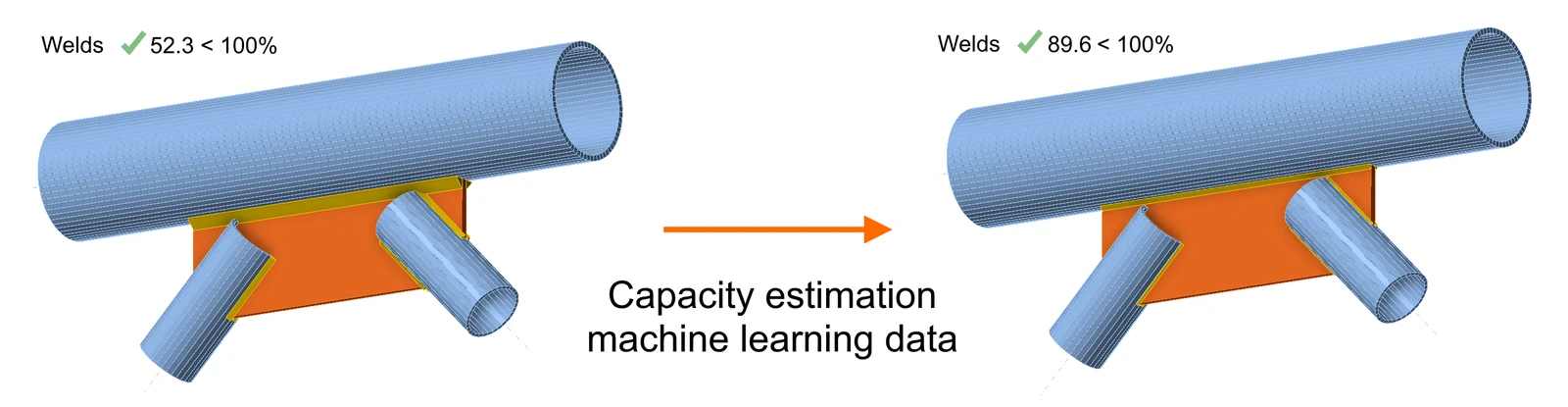
More about capacity estimation weld sizing in the article Welds – autodesign, input, warnings, visualization.

How to perform the capacity estimation weld sizing

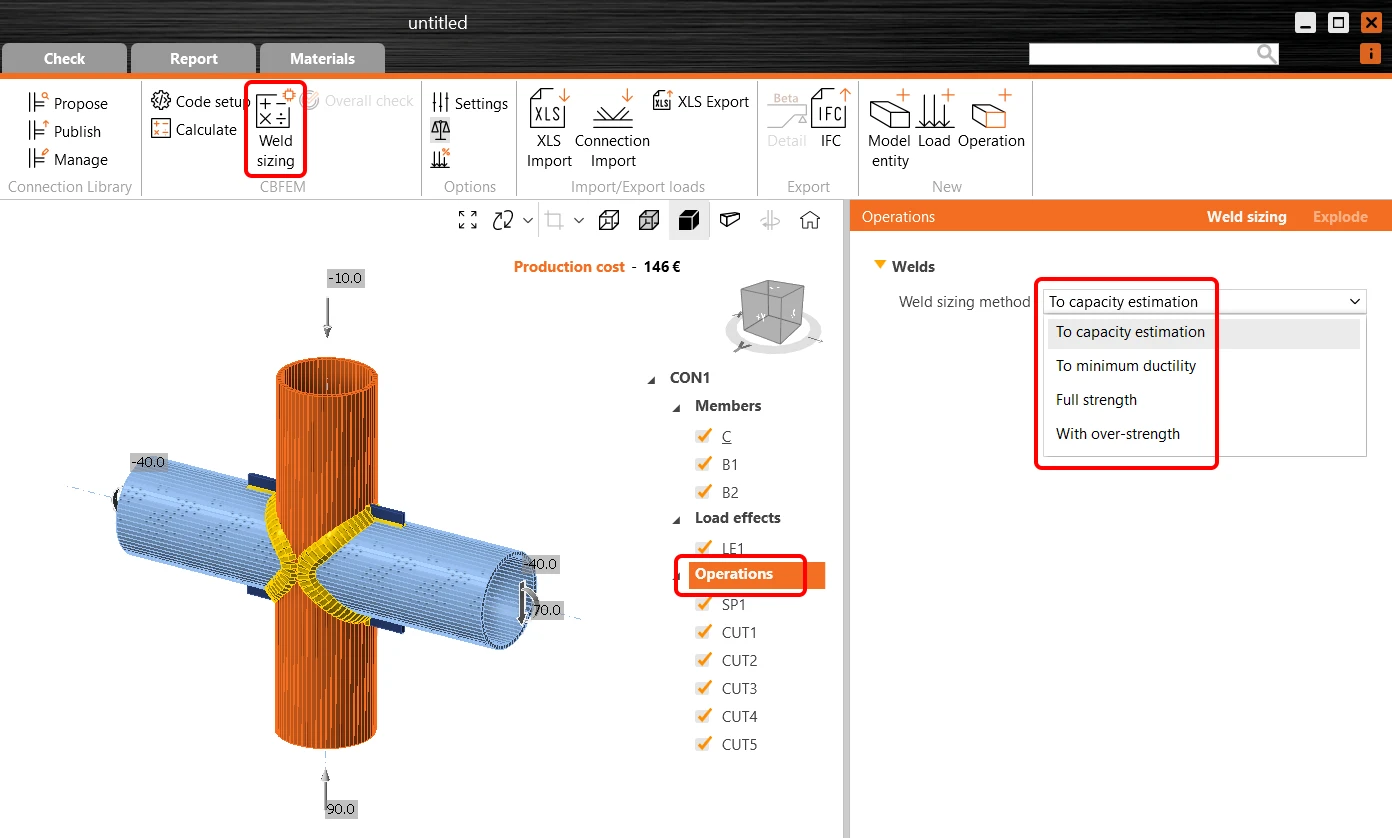
To execute the automatic weld sizing, click the Operations in the tree menu, select To capacity estimation weld sizing method, and run the Weld sizing command in the ribbon.
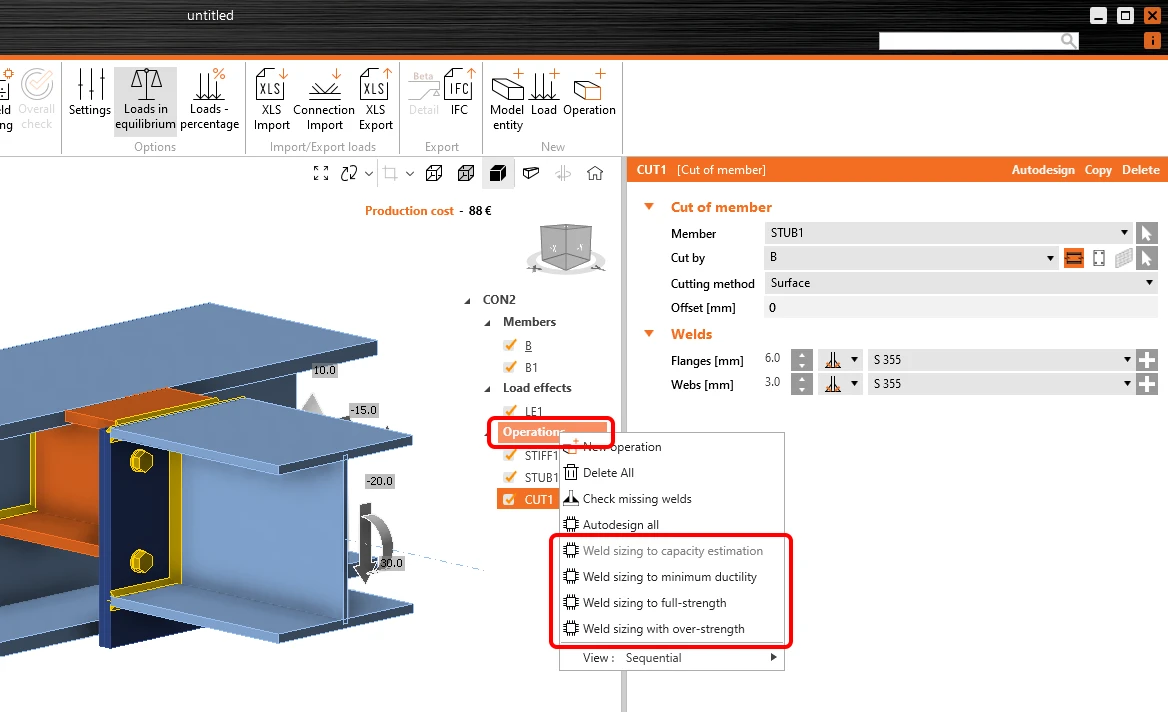
Alternatively, you can right-click the Operations item in the tree menu and carry out the weld sizing from here. For To capacity estimation, you must first run the standard Calculation.
Utilization level and precision settings

Welds are automatically adjusted based on utilization using this method to calculate the optimized throat thickness:

Throat thicknessopt = Throat thickness * Utc / Target utilization

The utilization value is displayed in Check under the Welds tab in the Utc column. More about Utc and welds in this article.

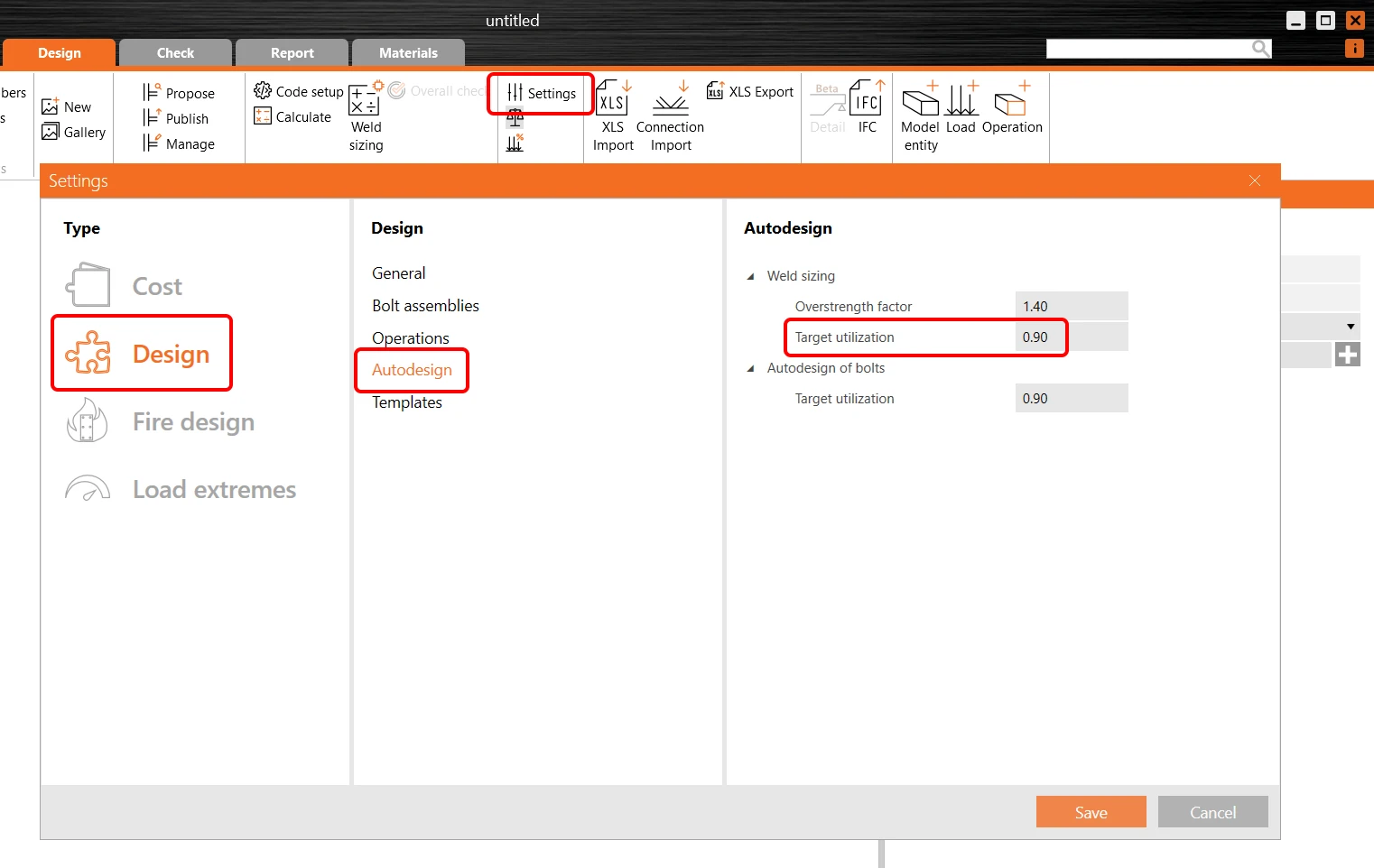
Welds utilization level can be controlled in the project Settings/Design/Autodesign/Target utilization.
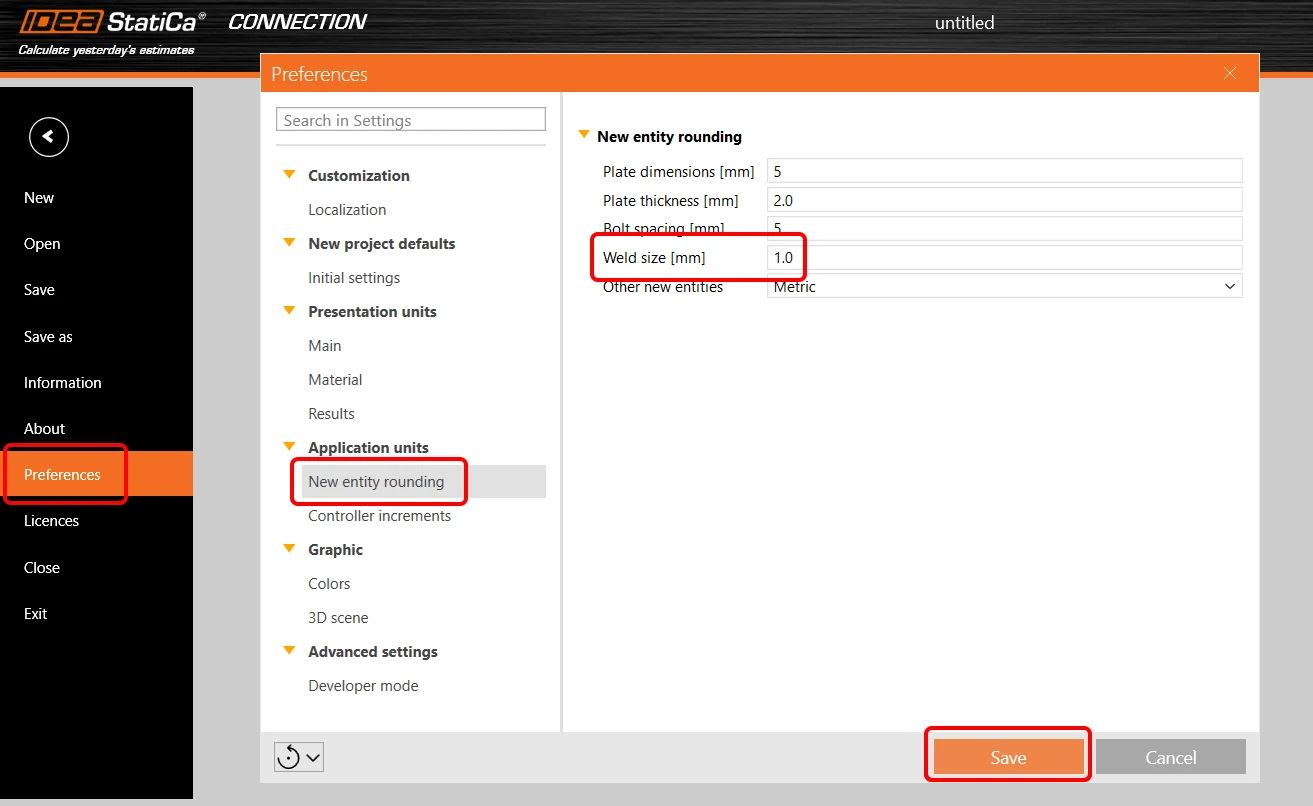
Welds size rounding up can be defined in the application Preferences/New entity rounding/Weld size.
Detailing requirements are taken into account regarding the weld sizing.

Read more about weld sizing in the Theoretical background.

Note: Weld sizing to capacity estimation is available for Eurocode (EN) only.

Released in IDEA StatiCa version 24.0.

Take the latest version of IDEA StatiCa for a test drive today

Get 14 days of full access, completely free.

Check out IDEA StatiCa for free
Related articles

Release notes IDEA StatiCa 24.0
  • Steel
  • Concrete
  • v24.0
  • +3
  • Steel
  • Concrete
  • v24.0

Release notes

Release notes IDEA StatiCa 24.0

Read more
Weld / Welds in IDEA StatiCa
  • Steel
  • Connection
  • Member
  • Welds
  • EN (Eurocode)
  • AISC (USA)
  • AS (Australia)
  • CSA (Canada)
  • IS (India)
  • GB (China)
  • HKG (Hong Kong)
  • SP 16 (Russia)
  • +12
  • Steel
  • Connection
  • Member
  • Welds
  • EN (Eurocode)
  • AISC (USA)
  • AS (Australia)
  • CSA (Canada)
  • IS (India)
  • GB (China)
  • HKG (Hong Kong)
  • SP 16 (Russia)

Knowledge base

Weld / Welds in IDEA StatiCa

Read more
Weld sizing
  • Steel
  • Welds
  • Connection
  • Plates
  • +4
  • Steel
  • Welds
  • Connection
  • Plates

Knowledge base

Weld sizing

Read more