Idea Statica
  • Steel
  • Concrete
  • BIM & Workflows
  • Support & Learning
  • Pricing
  • Company
  • Steel overview
  • Connection design
  • Member design
  • Parametric design
  • Steel case studies
  • Concrete overview
  • Walls and D-regions
  • Anchoring design
  • Concrete case studies
  • BIM Overview
  • Supported integrations
  • Checkbot
  • Viewer
  • APIs
  • Support Center
  • E-learning & certification
  • Blog
  • Downloads & Licensing
  • Plans
  • Free community tool
  • Enterprise customers
  • Students & educators
  • How much will you save?
  • About us
  • Contact
  • Research & development
  • Authorized resellers
  • Meet our customers
  • Career
  • Steel
    Steel overviewConnection designMember designParametric designSteel case studies
  • Concrete
    Concrete overviewWalls and D-regionsAnchoring designConcrete case studies
  • BIM & Workflows
    BIM OverviewSupported integrationsCheckbotViewerAPIs
  • Support & Learning
    Support CenterE-learning & certificationBlogDownloads & Licensing
  • Pricing
    PlansFree community toolEnterprise customersStudents & educatorsHow much will you save?
  • Company
    About usContactResearch & developmentAuthorized resellersMeet our customersCareer
14-Day Trial
14-Day Trial

Subscribe to our newsletter

Company

  • About us
  • Partners
  • Careers
  • Patent

Resources

  • Customer projects
  • Case studies
  • Connection Library
  • Verification books

Legal

  • EULA
  • Global privacy policy
  • California Privacy
  • TOS Viewer
  • Licensing

Help

  • Contact
  • Quote request
  • Resellers
  • Downloads
FacebookInstagramLinkedInYouTube

ยฉ IDEA StatiCa 2009-2026

Trusted and used worldwide by engineers, fabricators & consultants.

Support CenterKnowledge Base ArticlesLicense check interval (1-1000 hours)
Licensing
What licensing system does IDEA StatiCa use?
IDEA StatiCa User portal
How to create a new support case
User Portal โ€“ last time active, version tracking
Enhanced User Portal
License usage analytics in the User Portal
License usage analytics
License check interval (1-1000 hours)
LicensingKnowledge baseLicensingLicense Seat Not AvailableLicense Token Expired

License check interval (1-1000 hours)

This article is also available in
ENCZDEESFRITPTNLHUROKRPLTHTRVIZH

It is possible to change the license check interval in the User portal. To enter the portal, click on the login icon, sign in with your IDEA StatiCa credentials and navigate to the tab License & Users.

Any user with administrator rights can change theย check interval, which can be set as 1-1000 hours. This affects the whole license and cannot be set for each user separately. The number represents how long the license will work on a computer after it is turned offline from the internet.

When any user opens IDEA StatiCa on his computer then during this interval, the license activation is consumed from the license pool and can not be used by anybody else. After the interval is over, the consumed license activation is automatically returned to the account pool, unless the user continues using IDEA StatiCa.

This combination of online and offline allows for various scenarios, e.g.:

Shared license โ€“ set 1 hour to make sure that the license is not stuck on any PC. If it's not used there anymore, it is returned to the server one hour after closing IDEA StatiCa.

Business trip โ€“ set 200 hours when going for a business trip, where the license needs to be active without an internet connection.

Change of the check interval affects only the following launches of IDEA StatiCa, not the currently running sessions. A forgotten license activation with a long interval on a user computer can not be reset by any other user or administrator.

Tags: #Licensing #LicenseTokenExpired #LicenseSeatNotAvailable

Related articles

IDEA StatiCa User Portal
  • Licensing
  • +1
  • Licensing

Blog post

Experience the IDEA StatiCa User portal

Read more
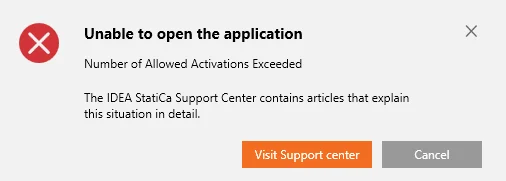
Error message โ€“ Number of Allowed Activations Exceeded
  • Licensing
  • License Seat Not Available
  • +2
  • Licensing
  • License Seat Not Available

Knowledge base

Error message โ€“ Number of Allowed Activations Exceeded

Read more