Idea Statica
  • Steel
  • Concrete
  • BIM & Workflows
  • Support & Learning
  • Pricing
  • Company
  • Steel overview
  • Connection design
  • Member design
  • Parametric design
  • Steel case studies
  • Concrete overview
  • Walls and D-regions
  • Anchoring design
  • Concrete case studies
  • BIM Overview
  • Supported integrations
  • Checkbot
  • Viewer
  • APIs
  • Support Center
  • E-learning & certification
  • Blog
  • Downloads & Licensing
  • Plans
  • Free community tool
  • Enterprise customers
  • Students & educators
  • How much will you save?
  • About us
  • Contact
  • Research & development
  • Authorized resellers
  • Meet our customers
  • Career
  • Steel
    Steel overviewConnection designMember designParametric designSteel case studies
  • Concrete
    Concrete overviewWalls and D-regionsAnchoring designConcrete case studies
  • BIM & Workflows
    BIM OverviewSupported integrationsCheckbotViewerAPIs
  • Support & Learning
    Support CenterE-learning & certificationBlogDownloads & Licensing
  • Pricing
    PlansFree community toolEnterprise customersStudents & educatorsHow much will you save?
  • Company
    About usContactResearch & developmentAuthorized resellersMeet our customersCareer
14-Day Trial
14-Day Trial

Subscribe to our newsletter

Company

  • About us
  • Partners
  • Careers
  • Patent

Resources

  • Customer projects
  • Case studies
  • Connection Library
  • Verification books

Legal

  • EULA
  • Global privacy policy
  • California Privacy
  • TOS Viewer
  • Licensing

Help

  • Contact
  • Quote request
  • Resellers
  • Downloads
FacebookInstagramLinkedInYouTube

© IDEA StatiCa 2009-2026

Trusted and used worldwide by engineers, fabricators & consultants.

Support CenterKnowledge Base ArticlesSliding option for a concrete foundation block
IDEA StatiCa Member for steel
Member model organization
Modeling wizard for typical use-cases in Steel Member
Member wizard models available for AISC and AS
Empty connections in Member
Member – rigid support member (RSM)
Sliding option for a concrete foundation block
Sliding option for foundation block
SteelKnowledge baseMemberSupportAnchoring

Sliding option for a concrete foundation block

This article is also available in
ENCZDEESFRITPTNLHUROKRPLTHTRVIZH

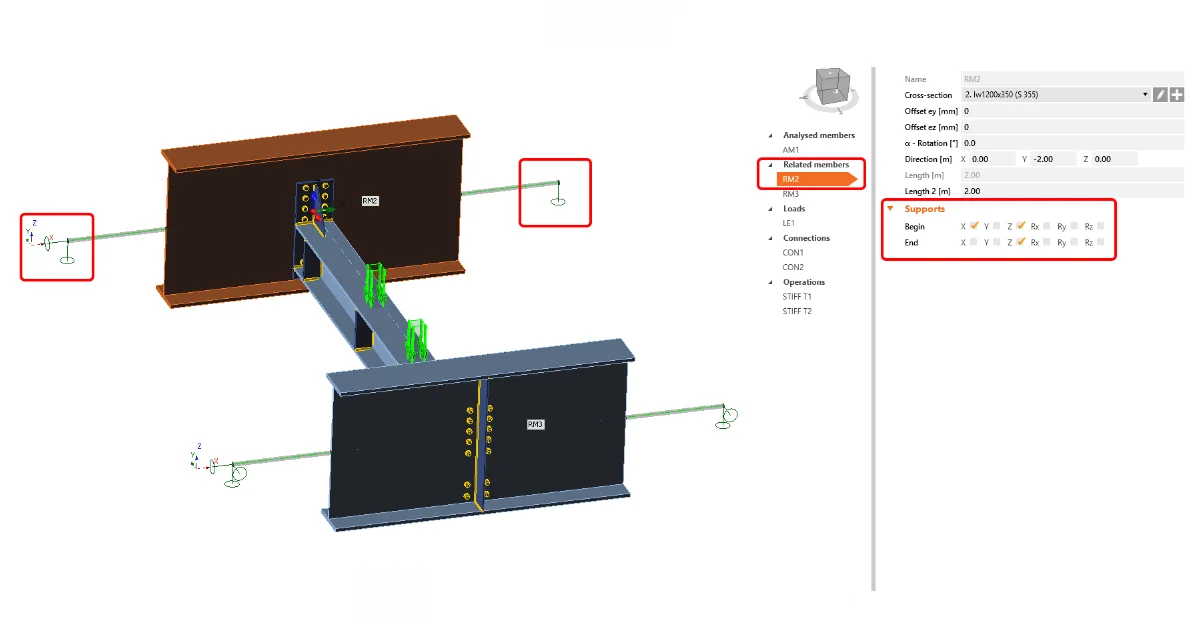
Having the option of shear force transfer for a foundation concrete block enables the simulation of a sliding hinge support model in a Member project.

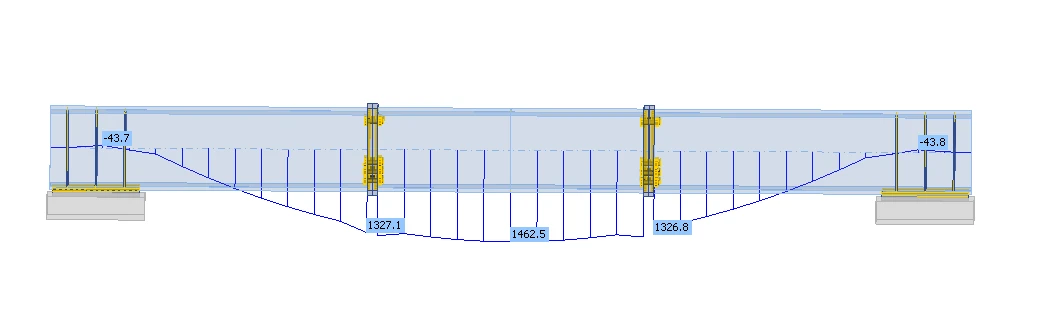
When modeling a simply supported beam in IDEA StatiCa Member, you can use this option for defining the roller (sliding hinge). This option keeps the "close-to-zero" bending moment at the ends of the beam supported by a concrete block.
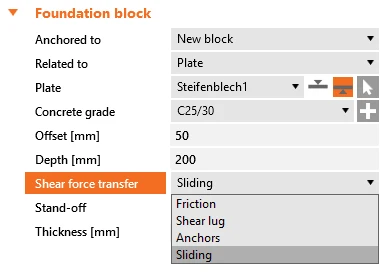
From Member, open the connection at one end of the beam. Define the anchoring/foundation concrete block and switch the Shear force transfer option to Sliding. Also, remove all the anchors in the Editor.
Please note that the other side of the beam must stay active to transfer forces in both directions so that the static system remains determined.

The Sliding option is specifically designed to be used in IDEA StatiCa Member. Although this setting also works in Connection, where it can be used in combination with another base plate.

This feature was released in the IDEA StatiCa 23.1.1 patch.

Take the latest version of IDEA StatiCa for a test drive today

Get 14 days of full access, completely free.

Check out IDEA StatiCa for free
Related articles

Release notes IDEA StatiCa 24.0
  • Steel
  • Concrete
  • v24.0
  • +3
  • Steel
  • Concrete
  • v24.0

Release notes

Release notes IDEA StatiCa 24.0

Read more
Member – rigid support member (RSM)
  • Steel
  • Member
  • Geometry
  • Support
  • v23.1
  • +5
  • Steel
  • Member
  • Geometry
  • Support
  • v23.1

Knowledge base

Member – rigid support member (RSM)

Read more
Boundary conditions on related member
  • Steel
  • Member
  • Geometry
  • Support
  • CBFEM
  • GMNA
  • MNA
  • +7
  • Steel
  • Member
  • Geometry
  • Support
  • CBFEM
  • GMNA
  • MNA

Knowledge base

Member - boundary conditions

Read more