Idea Statica
  • Steel
  • Concrete
  • BIM & Workflows
  • Support & Learning
  • Pricing
  • Company
  • Steel overview
  • Connection design
  • Member design
  • Parametric design
  • Steel case studies
  • Concrete overview
  • Walls and D-regions
  • Anchoring design
  • Concrete case studies
  • BIM Overview
  • Supported integrations
  • Checkbot
  • Viewer
  • APIs
  • Support Center
  • E-learning & certification
  • Blog
  • Downloads & Licensing
  • Plans
  • Free community tool
  • Enterprise customers
  • Students & educators
  • How much will you save?
  • About us
  • Contact
  • Research & development
  • Authorized resellers
  • Meet our customers
  • Career
  • Steel
    Steel overviewConnection designMember designParametric designSteel case studies
  • Concrete
    Concrete overviewWalls and D-regionsAnchoring designConcrete case studies
  • BIM & Workflows
    BIM OverviewSupported integrationsCheckbotViewerAPIs
  • Support & Learning
    Support CenterE-learning & certificationBlogDownloads & Licensing
  • Pricing
    PlansFree community toolEnterprise customersStudents & educatorsHow much will you save?
  • Company
    About usContactResearch & developmentAuthorized resellersMeet our customersCareer
14-Day Trial
14-Day Trial

Subscribe to our newsletter

Company

  • About us
  • Partners
  • Careers
  • Patent

Resources

  • Customer projects
  • Case studies
  • Connection Library
  • Verification books

Legal

  • EULA
  • Global privacy policy
  • California Privacy
  • TOS Viewer
  • Licensing

Help

  • Contact
  • Quote request
  • Resellers
  • Downloads
FacebookInstagramLinkedInYouTube

© IDEA StatiCa 2009-2026

Trusted and used worldwide by engineers, fabricators & consultants.

Support CenterKnowledge Base ArticlesOut of surface load warning in Member
IDEA StatiCa Member for steel
Member model organization
Modeling wizard for typical use-cases in Steel Member
Member wizard models available for AISC and AS
Out of surface load warning in Member
Strengthening of existing steel members
Out of surface load warning in Member
Member designKnowledge baseMemberLoad effectsv24.0

Out of surface load warning in Member

This article is also available in
ENCZDEESFRITPTNLHUROKRPLTHTRVIZH

This warning in IDEA StatiCa Member ensures that the full magnitude of the load is applied to the analyzed member.

When applying a surface load on one of the member's plates, it may happen that part of the load already lies outside of the plate's surface. In such a case, the full magnitude of the load would not be applied – part of the load would not be transferred and used in the calculation. This might be unsafe and unintuitive, that's why there is a warning message.
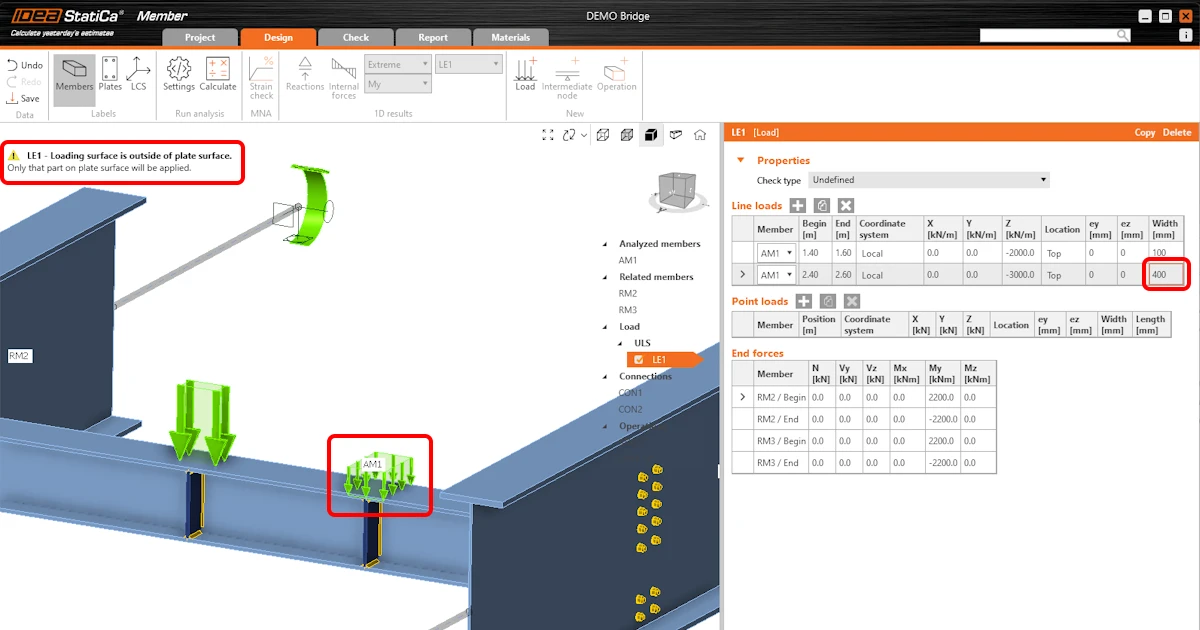
Out of surface load warning in Member

When a line or point load distribution area is larger than the plate assigned, a warning is displayed in the top left corner of the screen, and you should adjust the position or the area of action of the load. 

This warning helps you overcome these situations and, therefore, improves the safety of the model.

Released in the IDEA StatiCa 23.1.1 patch.

Take the latest version of IDEA StatiCa for a test drive today

Get 14 days of full access, completely free.

Check out IDEA StatiCa for free
Related articles

Release notes IDEA StatiCa 24.0
  • Steel
  • Concrete
  • v24.0
  • +3
  • Steel
  • Concrete
  • v24.0

Release notes

Release notes IDEA StatiCa 24.0

Read more
Release notes IDEA StatiCa 23.1
  • Concrete
  • Steel
  • Connection
  • Detail 2D
  • Member
  • Checkbot
  • Viewer
  • RCS
  • IDEA Open Model (API)
  • ACI (USA)
  • AISC (USA)
  • BIM link
  • EN (Eurocode)
  • v23.1
  • +14
  • Concrete
  • Steel
  • Connection
  • Detail 2D
  • Member
  • Checkbot
  • Viewer
  • RCS
  • IDEA Open Model (API)
  • ACI (USA)
  • AISC (USA)
  • BIM link
  • EN (Eurocode)
  • v23.1

Release notes

Release notes IDEA StatiCa 23.1

Read more