Idea Statica
  • Steel
  • Concrete
  • BIM & Workflows
  • Support & Learning
  • Pricing
  • Company
  • Steel overview
  • Connection design
  • Member design
  • Parametric design
  • Steel case studies
  • Concrete overview
  • Walls and D-regions
  • Anchoring design
  • Concrete case studies
  • BIM Overview
  • Supported integrations
  • Checkbot
  • Viewer
  • APIs
  • Support Center
  • E-learning & certification
  • Blog
  • Downloads & Licensing
  • Plans
  • Free community tool
  • Enterprise customers
  • Students & educators
  • How much will you save?
  • About us
  • Contact
  • Research & development
  • Authorized resellers
  • Meet our customers
  • Career
  • Steel
    Steel overviewConnection designMember designParametric designSteel case studies
  • Concrete
    Concrete overviewWalls and D-regionsAnchoring designConcrete case studies
  • BIM & Workflows
    BIM OverviewSupported integrationsCheckbotViewerAPIs
  • Support & Learning
    Support CenterE-learning & certificationBlogDownloads & Licensing
  • Pricing
    PlansFree community toolEnterprise customersStudents & educatorsHow much will you save?
  • Company
    About usContactResearch & developmentAuthorized resellersMeet our customersCareer
14-Day Trial
14-Day Trial

Subscribe to our newsletter

Company

  • About us
  • Partners
  • Careers
  • Patent

Resources

  • Customer projects
  • Case studies
  • Connection Library
  • Verification books

Legal

  • EULA
  • Global privacy policy
  • California Privacy
  • TOS Viewer
  • Licensing

Help

  • Contact
  • Quote request
  • Resellers
  • Downloads
FacebookInstagramLinkedInYouTube

© IDEA StatiCa 2009-2026

Trusted and used worldwide by engineers, fabricators & consultants.

Support CenterKnowledge Base ArticlesNew style of applications in 25.0
New style of applications in 25.0
SteelConnection designMember designReinforced concretePrestressed concrete

New style of applications in 25.0

This article is also available in
ENCZDEESFRITPTNLHUROKRPLTHTRVIZH

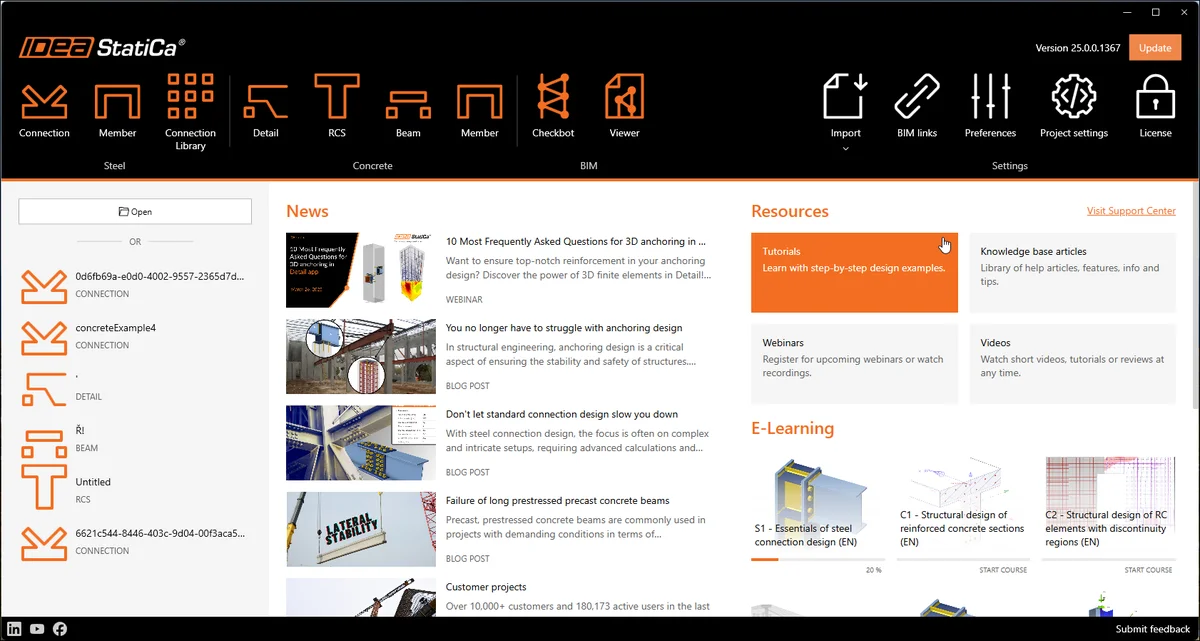
A refreshed visual style has been applied across all IDEA StatiCa apps, offering a consistent interface, updated components, and improved navigation – aligned with the new Launcher and designed to support clarity in technical workflows.

A unified visual style has been rolled out across all core applications, including Connection, Detail, Checkbot, and Member. This update introduces consistent headers, footers, fonts, and tab designs, along with a refined ribbon and improved backstage view. The interface now features a full black strip with a refreshed logo, simplified controls, and a modernized search box, all aligned with the new Launcher design. This uniformity helps users move between applications more comfortably, without adjusting to differing layouts or styles.

In support of the Checkbot-driven workflow, the Connection app has also received a tailored update. When launched from Checkbot, Connection now adopts a gray color scheme with a lighter header, following the Single Check app concept. This clarifies its role as a design tool within the broader checking process, helping users focus on modeling. 

Take the latest version of IDEA StatiCa for a test drive today

Get 14 days of full access, completely free.

Check out IDEA StatiCa for free
Related articles

Release notes IDEA StatiCa 25.0
  • Steel
  • Concrete
  • v25.0
  • +3
  • Steel
  • Concrete
  • v25.0

Release notes

Release notes IDEA StatiCa 25.0

Read more
New Launcher application
  • Steel
  • Concrete
  • v25.0
  • +3
  • Steel
  • Concrete
  • v25.0

Knowledge base

New Launcher application

Read more
project items and material management
  • Steel
  • v24.1
  • Connection
  • Material settings
  • +4
  • Steel
  • v24.1
  • Connection
  • Material settings

Knowledge base

Project item and material management

Read more
Keyboard shortcuts (hotkeys) in IDEA StatiCa apps
  • Steel
  • Concrete
  • v24.0
  • Connection
  • Detail 2D
  • Checkbot
  • Member
  • Beam
  • RCS
  • +9
  • Steel
  • Concrete
  • v24.0
  • Connection
  • Detail 2D
  • Checkbot
  • Member
  • Beam
  • RCS

Knowledge base

Keyboard shortcuts (hotkeys) in IDEA StatiCa apps

Read more