
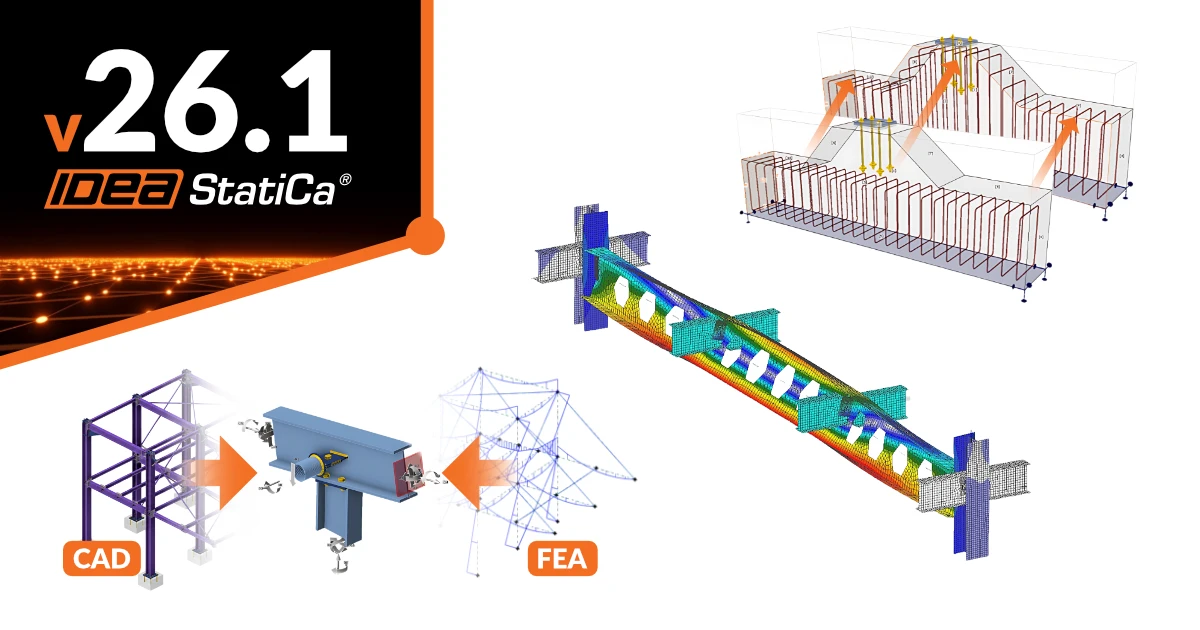
Along with the highlights in version 26.1, read the full list of new functionalities here.
Concrete Design
Anchoring in reinforced concrete with minimum limitations
With release 26.1, anchoring design reaches a major milestone: a complete set of capabilities, covering all the standard steel-to-concrete connections. Explore the latest improvements and put them to work in your next project.
Reinforcement Design in 3D Detail and Reinforcement Templates
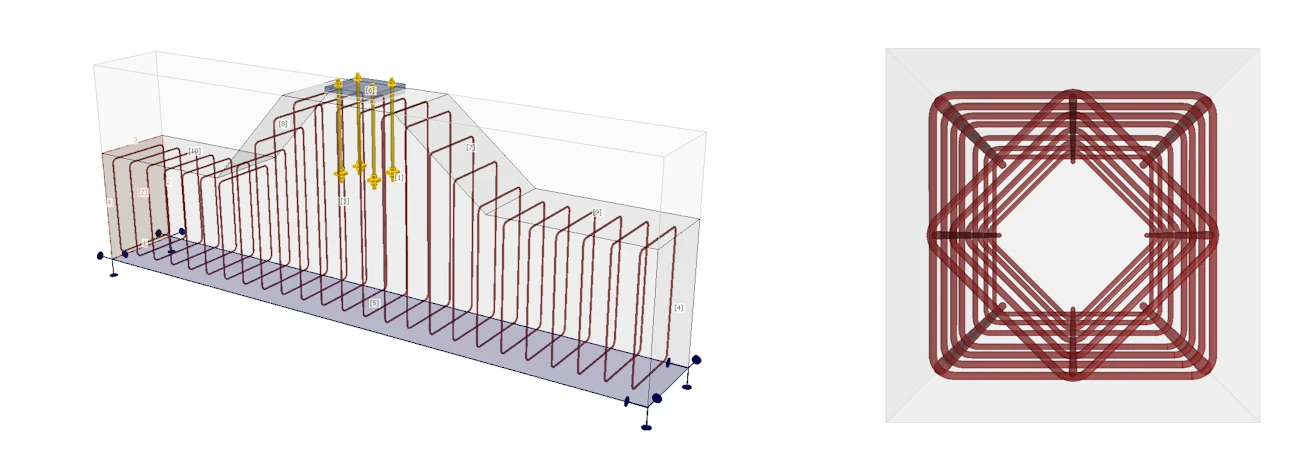
Reinforcement design has been improved to be more intuitive. Also, the advanced options have been added for easy modeling of complex details. Such as referencing reinforcement to a negative volume or a working plane. Options to set up closed stirrups or irregular spacing, and more.
See the full range of modeling options.
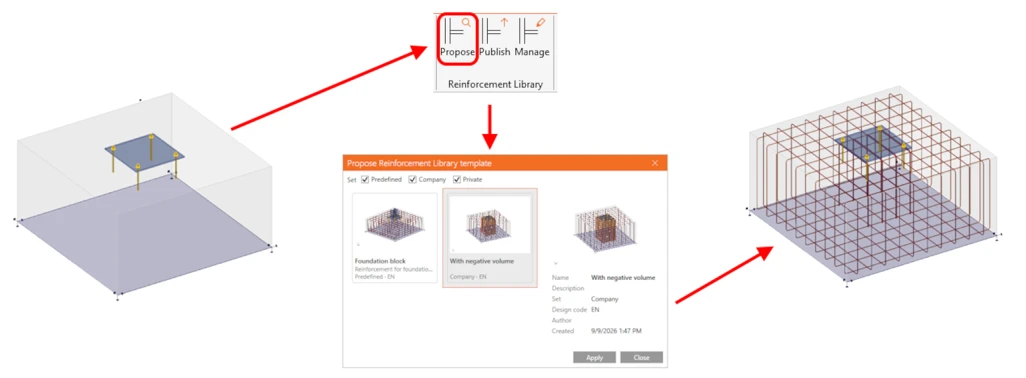
To further simplify the workflow, we're also piloting a project reinforcement templates library. For iterative work on similar models, you no longer need to model everything from scratch — you can apply an already-designed template instead.
Learn more about reinforcement templates in this article.
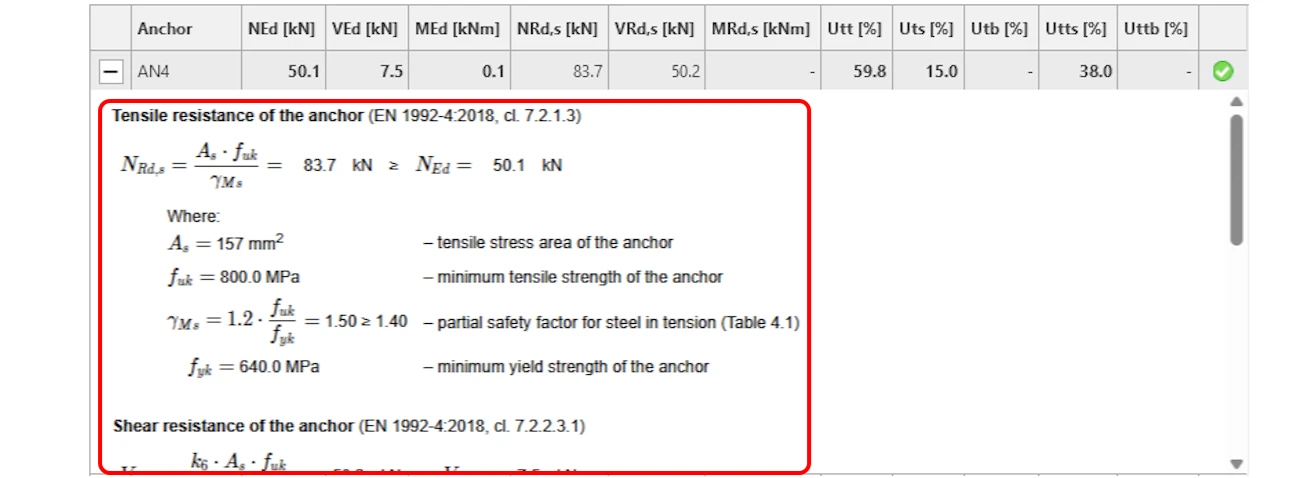
Transparent equation-based results for anchor checks
Detail 3D features fully expanded, equation-based result presentation for anchor code checks, eliminating the "black box" approach and replacing standalone numerical outputs. Every row in the anchor check table can be expanded to display the exact mathematical formula, substituted project values, intermediate calculations, and precise code references. This transparency extends directly into the generated reports, allowing engineers, reviewers, and checking agencies to easily verify the complete derivation of anchor resistance—including tension, shear, bending, and their interaction—without needing to manually cross-reference external theoretical backgrounds. See the dedicated article to understand the results.
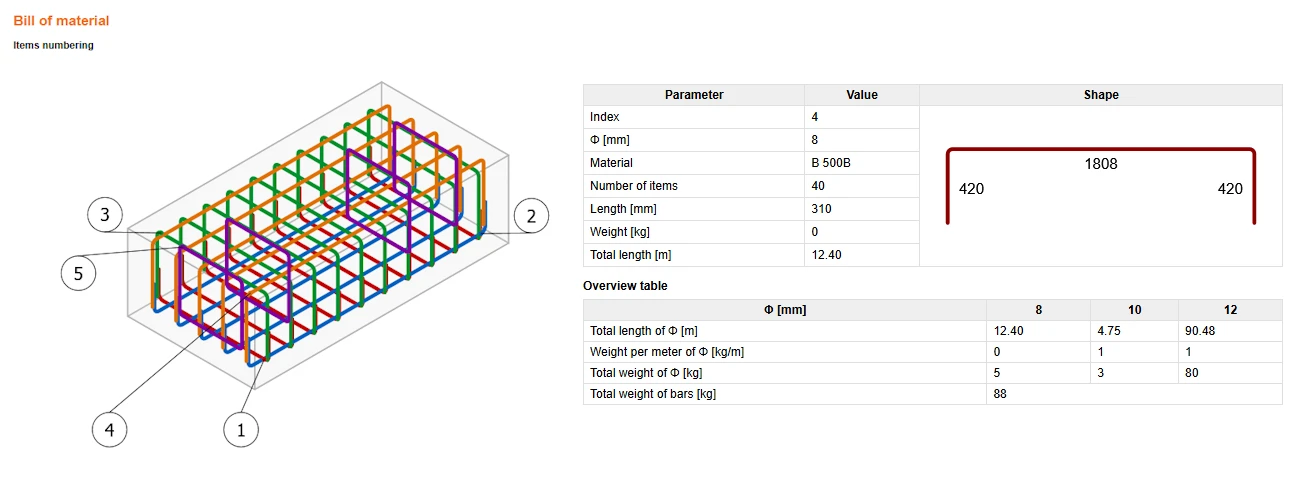
Bill of materials as part of the report
Detail 3D's report comes with a full bill of materials, making the output far more usable for everyday practice — total weight, an itemized bar scheme with shapes and dimensions... No more manual quantity take-offs in a spreadsheet. The scheme can also be exported straight to DXF for CAD, so it's ready to hand off to others. Learn more in the knowledge base article.
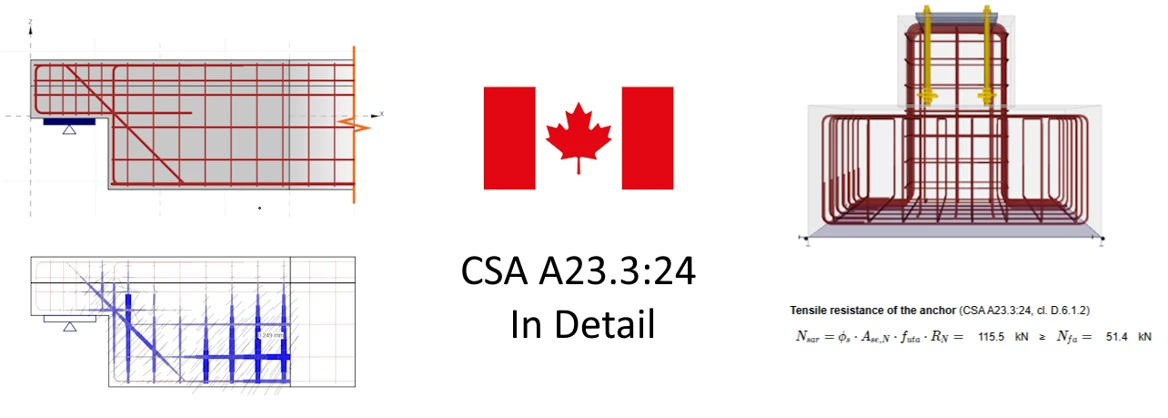
Canadian code CSA A23.3:24 in Detail
Version 26.0 introduces native support for CSA A23.3:24 in Detail across both 2D and 3D models, removing the need to approximate Canadian projects under ACI 318. The implementation provides a complete, code-aligned workflow—including full 3D anchor verification per CSA A23.3 Annex D and CSA S16—supported by dedicated templates and a material database containing CSA concrete grades, CSA G30.18 bar sizes (10M, 15M, etc.), and Canadian detailing rules. All strength, serviceability, and anchoring checks follow the familiar interface, delivering fully verifiable reports tailored directly to Canadian engineering practice. More details are addressed in Theoretical Background under the CSA chapter separately for 2D and 3D solution.
Dutch national annex
Next to the Canadian code, a new Dutch national annex (NEN-EN 1991-2+C1:2015/NB:2019 nl) has been implemented in the RCS and Beam apps.
General improvements
This release brings a significantly improved user experience in Detail. Input and check output tables across both Detail 2D and 3D are now fully compatible with Excel, enabling seamless two-way copy-pasting, multi-cell selection, and multi-edit. Engineers can easily bring in complex load sets or export results into custom spreadsheets for verification without manual retyping.
Additionally, Detail 3D introduces dimension lines directly in the model for clearer geometry definition, along with updates to the numerical model that enhance overall calculation stability and accuracy.
Section BETA – An application for the new Eurocodes generation
Reinforcement editor
The editor is rebuilt as a general reinforcement modeler inside the application UI, where reinforcement is a tree entity with its own data view. Bars and stirrups are defined with commands that match real detailing practice. Cloud templates, parameters, and shared rebar assemblies help when reusing.
SLS checks
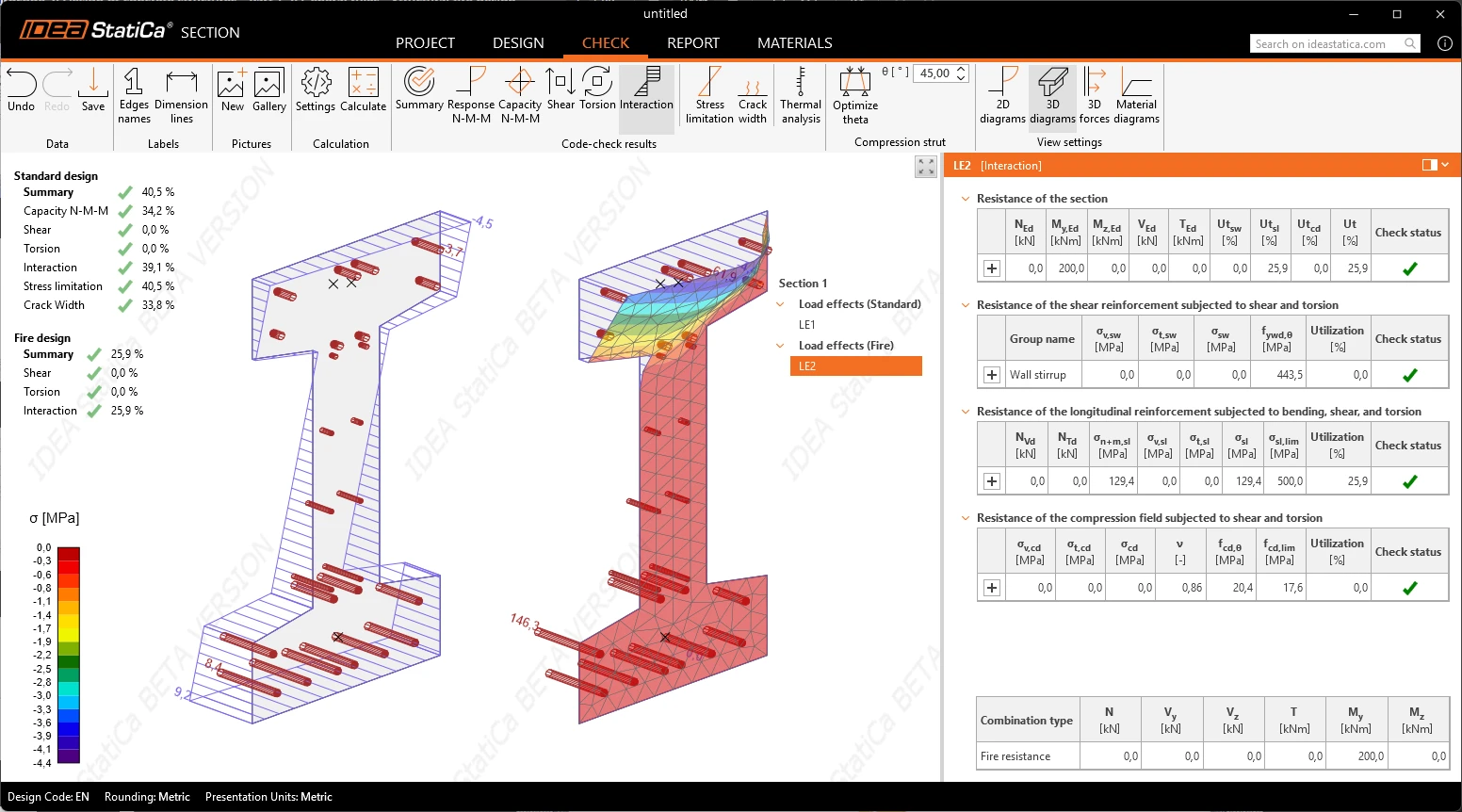
Serviceability code checks according to EN 1992-1-1:2023. Stress limitation checks limit stress in concrete and reinforcement for the characteristic and quasi-permanent combinations, per Chapter 9. Creep is built into the concrete material diagram itself and cracked or uncracked state is evaluated by the check, not declared by the user. Crack width verifies calculated crack width against its limit on the cracked section, with the effective tension area determined automatically per Figure 9.3 and re-resolved whenever the section or layout changes.
Fire/Thermal Analysis
Section app calculates the temperature field in a reinforced concrete cross-section, reduces material properties accordingly, and delivers fire design checks per EN 1992-1-2:2023, in the same application and workflow as the ambient-temperature checks. Instead of a conservative yes/no from a table, engineers get a real utilization, meaning leaner new designs and, in refurbishment, existing members that pass without strengthening.
Stability-sensitive steel structures
The new Stability app brings structural modeling, connection design, and advanced stability analysis into one workflow, helping engineers assess steel members and substructures where buckling governs the design.
Quick modeling: Create structural models with connected members, supports, loads, and realistic boundary conditions to capture the behavior of the entire substructure.
Connection design and analysis: Design and check steel connections using CBFEM, accounting for their stiffness and influence on the overall structural stability.
Linear Buckling Analysis (LBA): Identify critical load factors and buckling modes to understand potential instability and select the most critical shapes for further analysis.
GMNIA: Perform advanced nonlinear analysis with geometric imperfections, second-order effects, and material nonlinearity to verify structural resistance and stability.
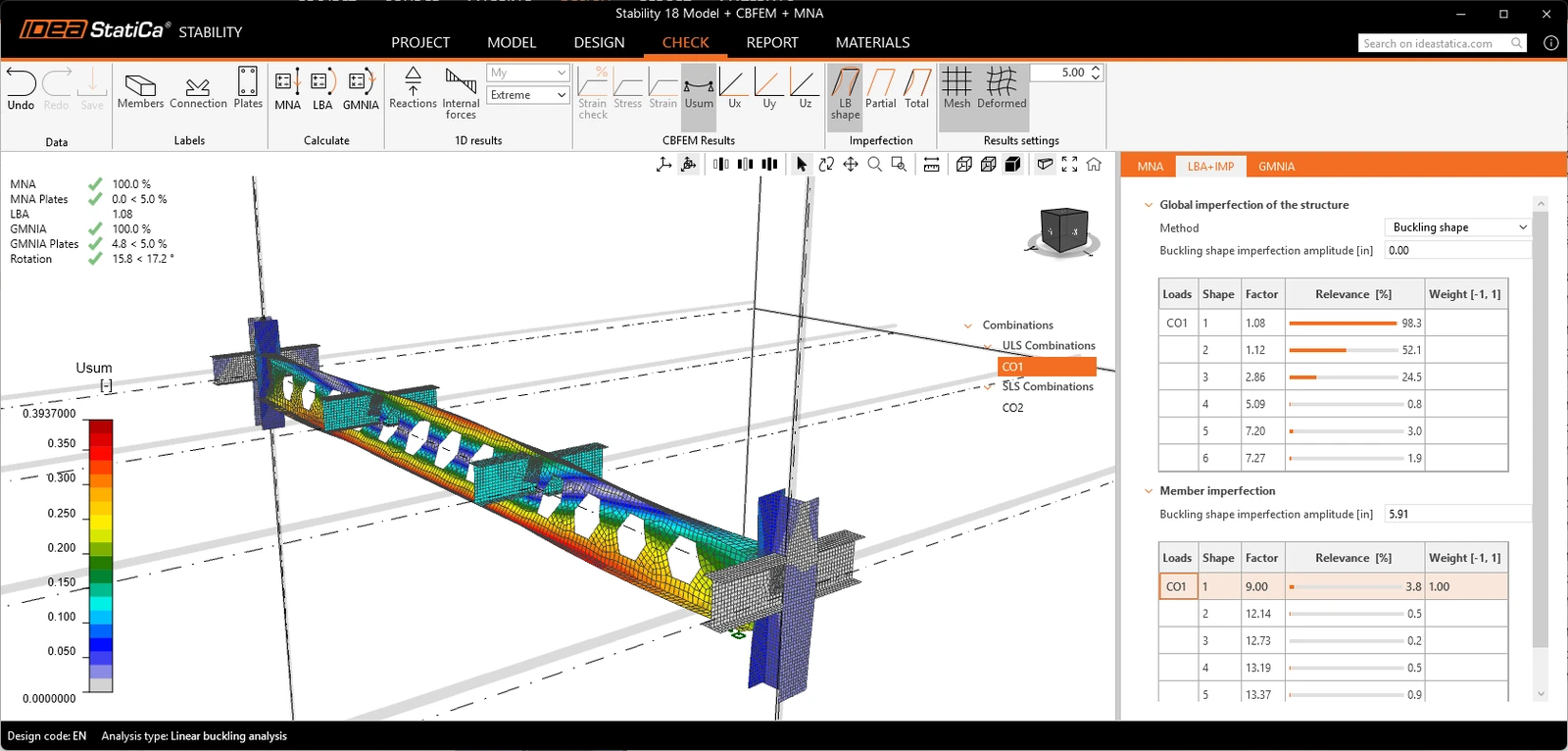
All within a single application, from modeling to final report.
Explore the dedicated article to learn more about the new Stability app.
Steel Connection design
2nd generation of Eurocode
Checks of bolts, welds, and their detailing are covered for the new EC3 generation 1993-1-8:2024). This allows the engineer to verify the project against both editions to see exactly what the new generation changes.
The new EC generation becomes valid for projects in 2027, but IDEA users can be ready well ahead and be sure which designs will satisfy the new requirements.
Regional and UX improvements
AISC code users open the connection wizard with US-specific templates — including complex connections. The focus is on the default bolt assembly and imperial rounding.
Applications localized for Korea and Vietnam. More info here.
Several Connection app functionalities were upgraded for easier work, such as the measuring tool with the option of snapping bolt, anchor, and pin axis points, or added machine-learned templates with clearer visibility of dataset boundaries.
Automation with Connection API
Improvements to the IDEA StatiCa Connection API bring full automation of connection creation and calculation without ever opening the desktop application. Users can now build adjustable design parameters directly through code and link them to model properties, such as plate dimensions or bolt positions, easily turning any connection into a reusable template.
The calculation process is no longer a cryptic operation without feedback. Users can track calculation progress for individual load cases in real time, cancel an ongoing run at any time, and run analyses on selected critical load cases rather than evaluating the entire list. Complex joints with dozens of load cases can now be tested in seconds on a single load effect before launching a complete run.
The new interface also allows a complete joint design to be authored entirely from scratch. Built using thirteen fundamental operations—such as plates, cuts, fastener grids, welds, and work planes—automated scripts can combine these basic building blocks to create virtually any real-world connection detail, from base plates to end plates or splices, without any manual modeling in the user interface.
See the Connection API documentation.
Parametric Templates
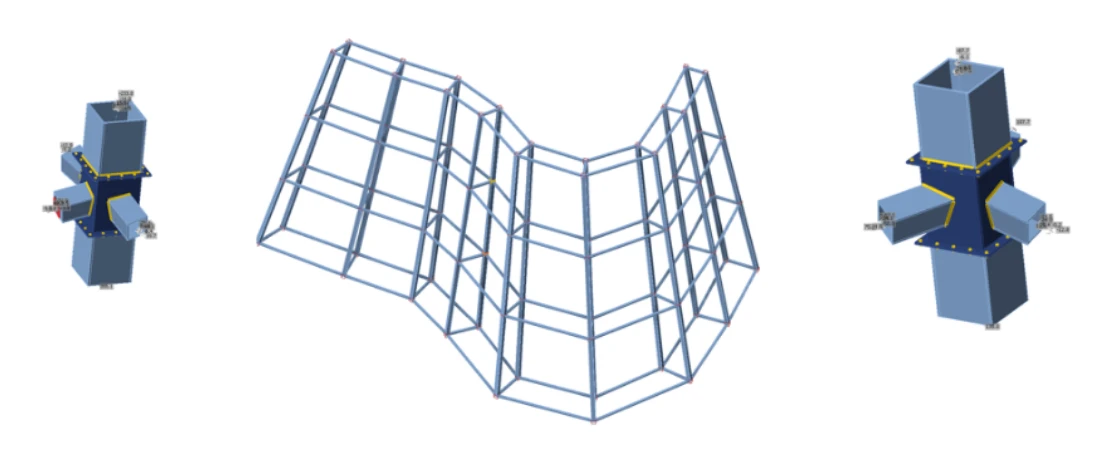
In the latest release, UX improvements to the parametric template make creating and using connection templates faster, smoother, and far less error-prone. Instead of relying on memorized syntax or hidden tooltips, template authors in the Developer tab can now write expressions with IntelliSense-style auto-completion, link model properties with clear inline context, select bolt assemblies directly via an integrated fastener picker, and organize parameters into named, collapsible groups.
See the article for specific improvements to parametric templates.
Grasshopper
In version 26.1, the Grasshopper plugin enables the complete creation, design, and calculation of a steel connection directly within Rhino and Grasshopper, removing the need to manually set up a model in the desktop application. The toolkit expands with 22 new components—bringing the total to 137—to fully align the plugin with the Connection REST API.
Instead of starting from a pre-made file saved on disk, we can build the entire model, including member geometry, load effects, and materials, from scratch within a single parametric definition. The plugin also introduces the ability to query the active design code's material library directly inside Grasshopper, allowing users to select valid material names without guessing or cross-referencing the desktop interface. Once calculated, finished connections can be saved as reusable templates or exported as raw result data for custom post-processing.
Enterprise installer including links
The updated enterprise deployment framework enables IT administrators to silently roll out IDEA StatiCa and all required BIM links using a single elevated installation process. Configured via a central file rather than a user interface, this file-based approach eliminates background setup hangs, removes the need for local admin rights on user workstations, and ensures standardized, repeatable software deployment across global fleets via tools like Microsoft Intune or internal company app stores.
BIM and Checkbot
Model Coordinator (BETA)
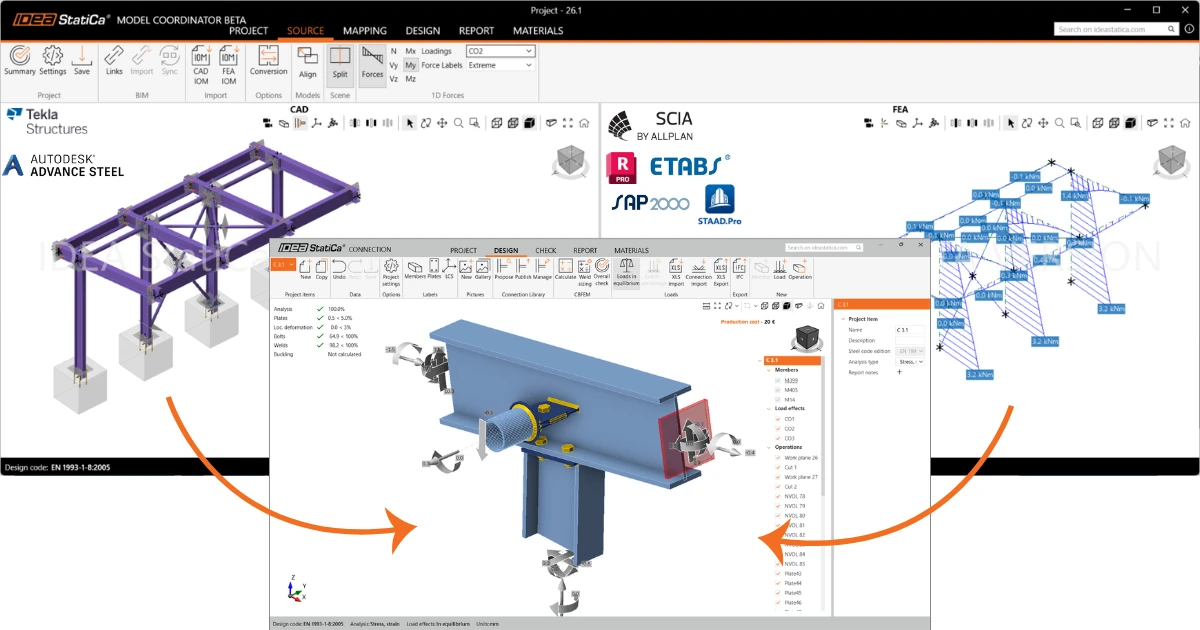
Model Coordinator (BETA) is a new tool inside IDEA StatiCa Checkbot that lets you import an FEA model and a CAD model of the same structure together. It automatically matches members between the two models and transfers internal forces from the FEA model into the CAD-based connections, so you can design and code-check directly in IDEA StatiCa Connection without transferring forces by hand.
Learn more about Model Coordinator.
Opening a Checkbot project multiple times is blocked
Version 26.1 solves possible data clashes or corruption previously caused by accidental multi-sessions when working with Checkbot projects.
Application tracks this automatically, and if the appropriate Checkbot project is already running, IDEA StatiCa switches to the existing instance instead of attempting to open it again.
Faster imports
We continue improving import speed across BIM links.
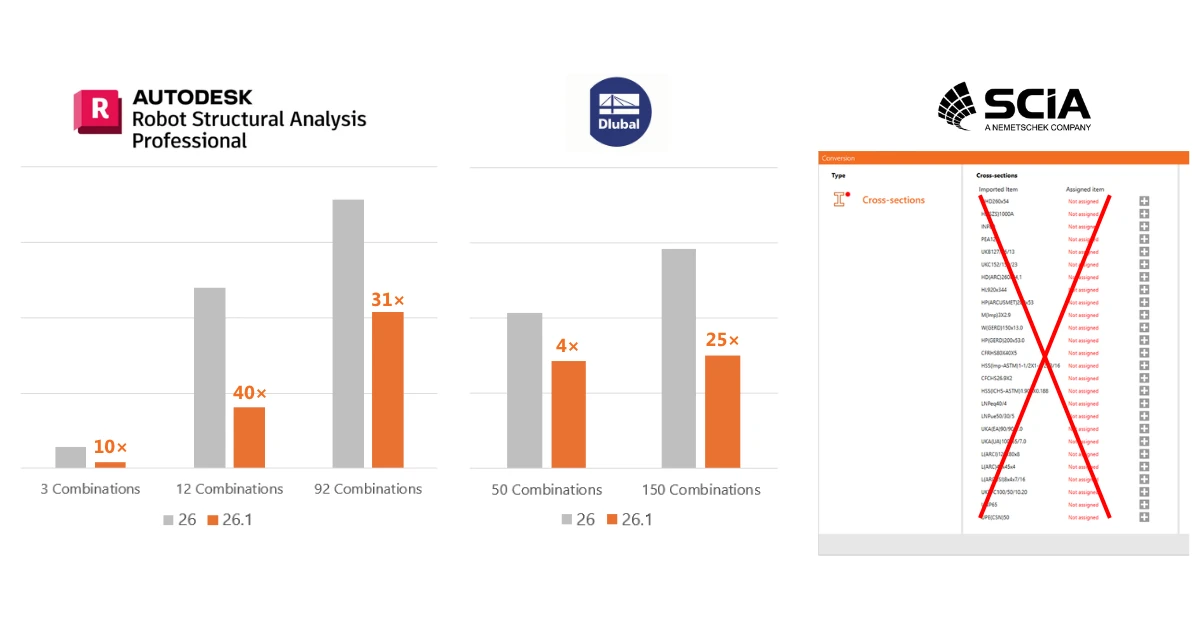
For Autodesk Robot, reading results was slow when a model had many load cases and combinations. We reduced the number of API calls used to read results, making imports more than 10× faster.
We also released a new Dlubal API-based BIM link for RFEM6/RSTAB9, replacing the previous webservice (SOAP) connection. Thanks to the new API, imports and synchronizations are now more than 4× faster.
Learn more about the RFEM/RSTAB BIM link in this tutorial.
BIM link for SCIA Engineer has been improved. We extended the list of automatically mapped cross-sections to reduce mapping effort needed after import.
MIDAS GEN NX - BIM link improvements
The BIM link for MIDAS GEN and CIVIL NX can now distinguish between ULS and SLS combinations.
Learn more in the MIDAS GEN NX tutorial.
Updated BIM links with FEA and CAD apps
We have updated the BIM links to match the latest versions of the connected 3rd-party FEA and CAD software. BIM links are also continuously updated with each subsequent IDEA StatiCa patch.
IDEA StatiCa - Steel 26.1
| Application | Supported | In development | Obsolete |
| Advance Design | 2026, 2027 | - | 2025 |
| Advance Steel | 2026, 2027 | - | 2025 |
| AxisVM | X7.3, X8.1 | - | - |
| ETABS | 22, 23 | - | - |
| MIDAS Civil | 2024, 2025 | - | - |
| MIDAS Civil NX | 2025, 2026 | - | 2024 |
| MIDAS GEN | 2024, 2026 | - | - |
| MIDAS GEN NX | 2026 | - | - |
| RAM Structural System | 24, 25 | - | - |
| Revit | 2026, 2027 | - | 2025 |
| RFEM / RSTAB | 5.41 / 8.41, 6.14 / 9.14, 6.15 / 9.15 | - | 5.40 / 8.40, 6.12 / 9.12, 6.13 / 9.13 |
| Rhino/Grasshopper | 7, 8 | - | - |
| Robot Structural Analysis | 2026, 2027 | - | 2025 |
| SAP2000 | 26, 27 | - | - |
| SCIA Engineer | 25, 26 | - | - |
| SDS2 | 2026, 2026-1 | - | - |
| STAAD.Pro | 2025, 2026 | - | 2024 |
| Tekla Structures | 2025, 2026 | - | - |
IDEA StatiCa - Concrete 26.1
| Application | Supported | In development | Obsolete |
| Advance Design | 2026, 2027 | - | 2025 |
| AxisVM | X7.3, X8.1 | - | - |
| ETABS | 22, 23 | - | - |
| MIDAS Civil | 2024, 2025 | - | - |
| MIDAS GEN | 2024, 2026 | - | - |
| RFEM / RSTAB | 5.41 / 8.41, 6.14 / 9.14, 6.15 / 9.15 | - | 5.40 / 8.40, 6.12 / 9.12, 6.13 / 9.13 |
| Robot Structural Analysis | 2026, 2027 | - | 2025 |
| SAP2000 | 26, 27 | - | - |
| SCIA Engineer | 25, 26 | - | - |