

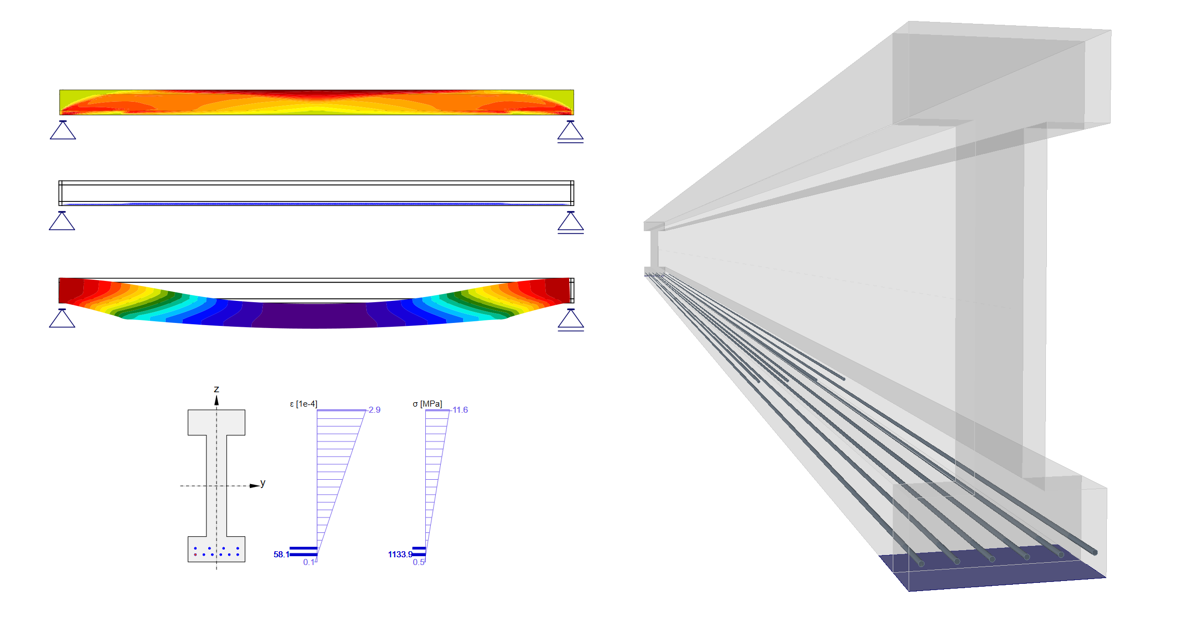
Precompressione in Detail - Trefoli pre-tesi
Introduzione e presupposti
Innanzitutto, iniziamo con una breve descrizione del nostro software di progettazione del calcestruzzo. Questo articolo riguarda principalmente la progettazione del calcestruzzo precompresso nell'applicazione Detail, che è generalmente sviluppata per la progettazione di regioni di discontinuità o per la progettazione di elementi contenenti regioni di discontinuità, come aperture, estremità tagliate, ecc.
Per confrontare i risultati, utilizzeremo l'applicazione Beam il cui scopo, come si può intuire dal nome, è la progettazione di travi in calcestruzzo.
In secondo luogo, è necessario definire alcune ipotesi e restrizioni per comprendere meglio la progettazione di travi in cemento armato precompresso in dettaglio.
- L'analisi in funzione del tempo (TDA) non è implementata nell'applicazione Detail. Per contro, la TDA è implementata nell'applicazione Beam per la progettazione di travi in cemento armato precompresso.
- La TDA può essere simulata in Detail utilizzando il coefficiente di scorrimento e gli incrementi.
- I carichi di ritiro e di temperatura non sono implementati nel Dettaglio.
- Il calcestruzzo in tensione nel Dettaglio è escluso. Quindi, per il nostro confronto, dobbiamo avere una trave senza fessure. Naturalmente, lo stesso approccio può essere utilizzato in generale per le travi affette da fessure, ma i risultati non saranno gli stessi nella Trave perché in essa è previsto solo il calcolo lineare.
Incrementi
Prima di passare all'esempio, è necessario capire come funzionano gli incrementi per la progettazione del calcestruzzo precompresso nel Dettaglio.
Ci sono 3 tipi di carico che vengono applicati al modello in tre incrementi nell'applicazione Detail.
- precompressione - per l'incremento P
- Permanente - per l'incremento G
- Variabile - per l'incremento V
Se si crea una combinazione contenente casi di carico di tutti i tipi di carico, l'intera porzione del tipo di carico Precompressione sarà applicata al primo incremento P, l'intera porzione del tipo di carico Permanenti sarà applicata al secondo incremento G e l'intera porzione del tipo di carico Variable sarà applicata al terzo incremento V.
Il motivo per cui ci sono incrementi è che per i calcoli SLE vengono utilizzati diversi modelli di materiale (diversi moduli di elasticità), per SLU c'è un solo modello di materiale definito in Material model (EN).
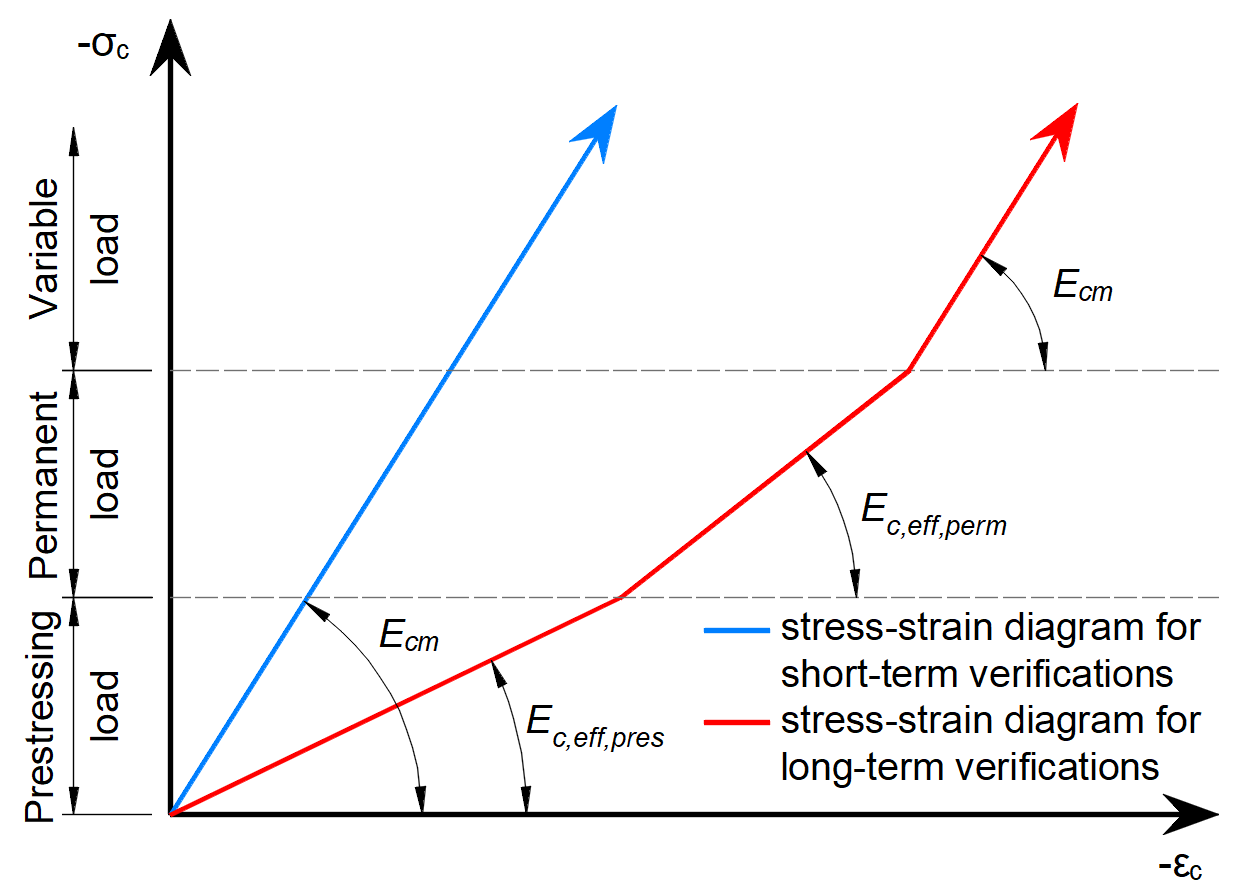
Come si può vedere, ci sono tre moduli di elasticità:
- Ec,eff,press =Ecm / (1+φpress) - Modulo di elasticità effettivo del calcestruzzo per l'incremento di P
- Ec,eff,perm =Ecm / (1+φperm) - Modulo di elasticità effettivo del calcestruzzo per l'incremento G
- Ecm - Modulo di elasticità secante del calcestruzzo
Dove φpress e φperm sono i coefficienti di scorrimento per gli incrementi P e G. I coefficienti possono essere impostati in Materiali e modelli.
Si noti che per gli effetti a breve termine si utilizza solo Ecm . È valido per tutti e tre gli incrementi. La perdita a lungo termine viene presa in considerazione solo per gli effetti a lungo termine.
I parametri della trave
Due modelli identici sono creati nelle applicazioni Beam e Detail. Sono allegati alla fine di questo articolo. Scaricateli e scorreteli mentre leggete l'articolo.
L'esempio di una trave in calcestruzzo verrà presentato nell'applicazione Beam e successivamente il confronto con Detail verrà effettuato per tre fasi costruttive.
L'esempio è una trave semplice a campata singola di sezione trasversale a I in calcestruzzo C45/50 precompressa con trefoli pre-tesi.
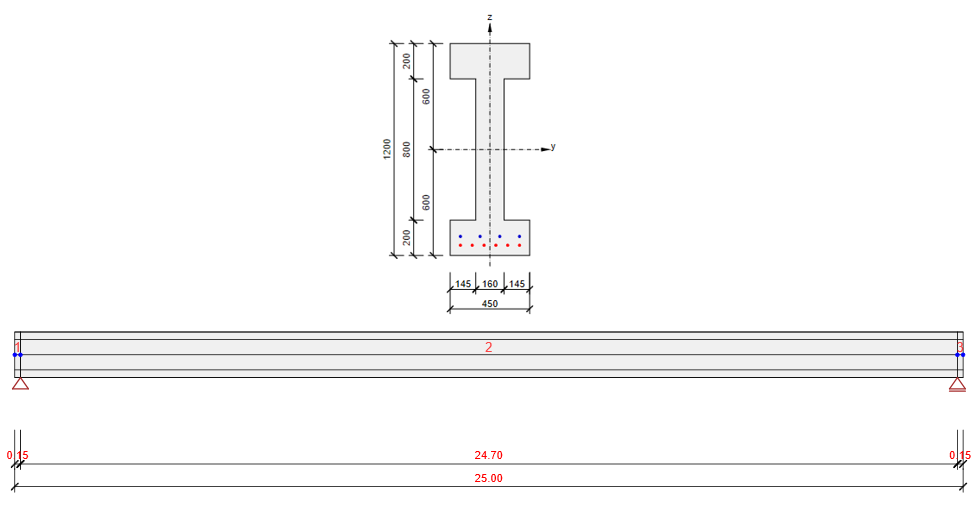
Verificheremo la trave in tre fasi costruttive:
- Trasferimento della precompressione - 2 d (subito dopo il rilascio)
- Carico permanente aggiuntivo - 60 d (inizio della vita utile di progetto)
- Fine della vita utile di progetto - 18250 d (50 anni)
Le altre fasi possono essere eseguite in modo analogo.

Noterete che abbiamo utilizzato il modulo elastico del calcestruzzo specificato dall'utente. Per ulteriori informazioni: Come inserire il valore della resistenza a compressione del calcestruzzo nella fase costruttiva?. Questo perché vogliamo mostrare come modellare la trave che è precompressa prima che il calcestruzzo raggiunga il modulo di elasticità a 28 giorni.
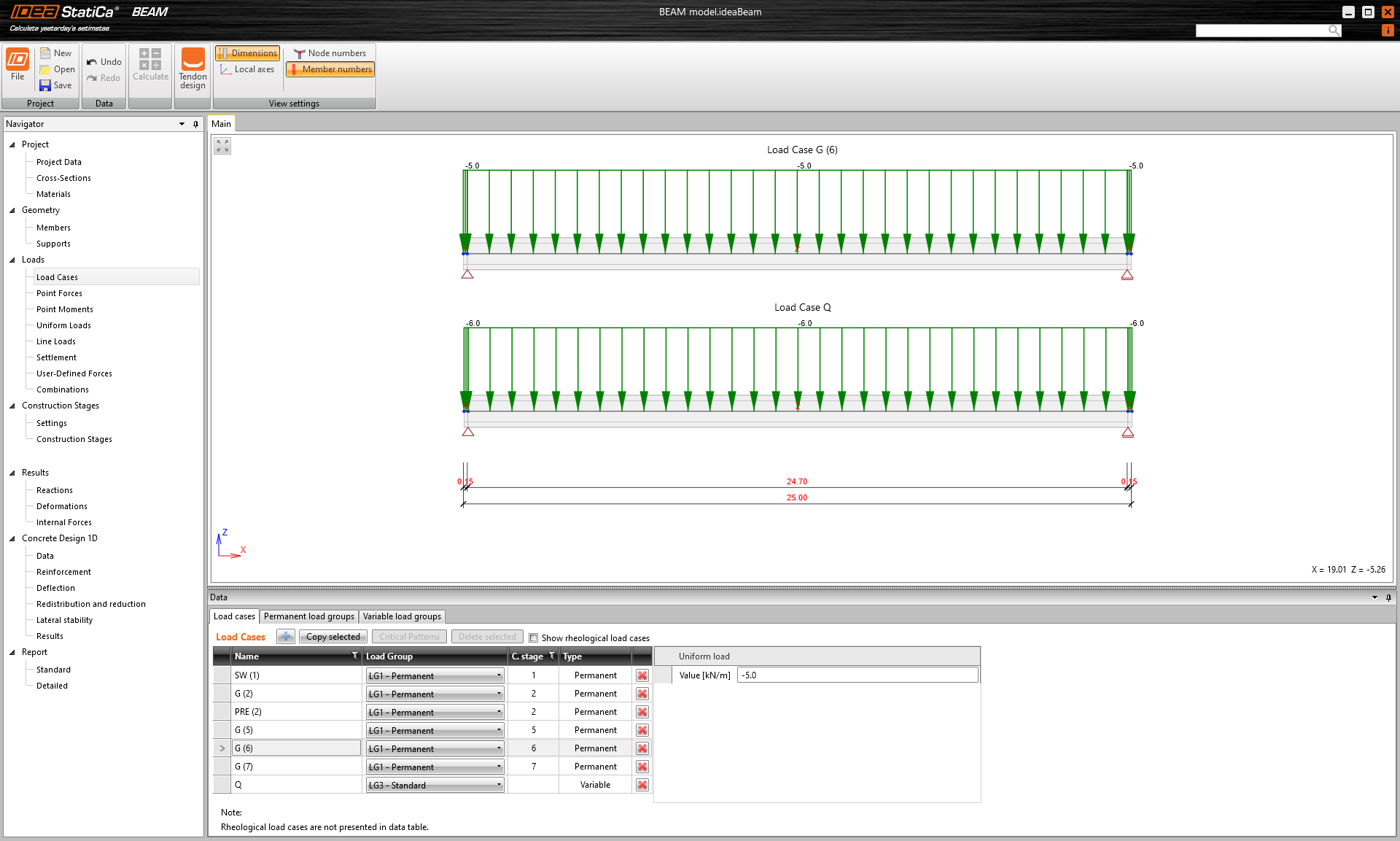
Sono inseriti solo quattro casi di carico. I numeri tra parentesi sono i numeri delle fasi costruttive in cui vengono applicati i singoli carichi.
- Peso proprio - SW (1)
- Precompressione - PRE (2)
- Carico permanente - G (6)
- Carico variabile - Q
Gli altri casi di carico sono vuoti.
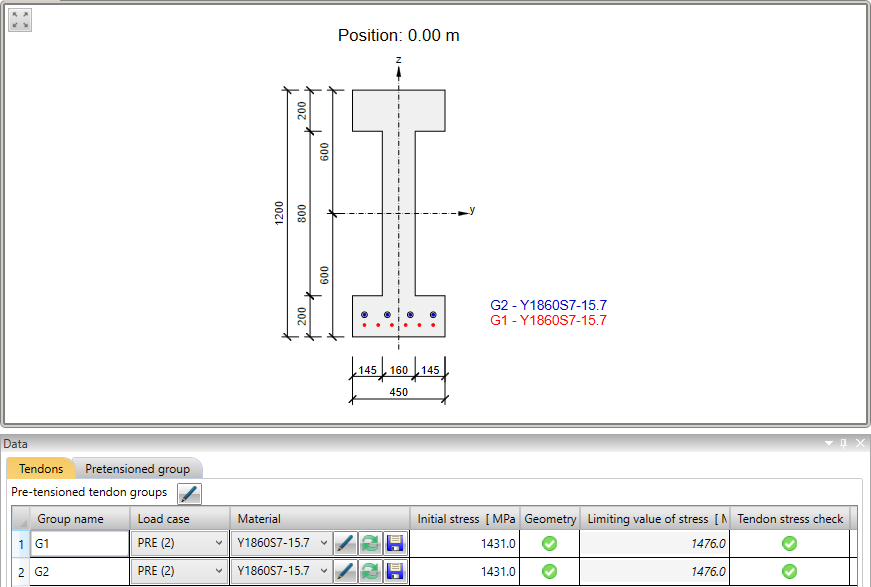
Ora diamo uno sguardo alla precompressione. Ci sono due file di trefoli. Vale la pena menzionare che la fila superiore ha una lunghezza di deviazione di 3,0 m.
Nella figura seguente è possibile vedere il grafico Tensione/Perdite nel tendine.
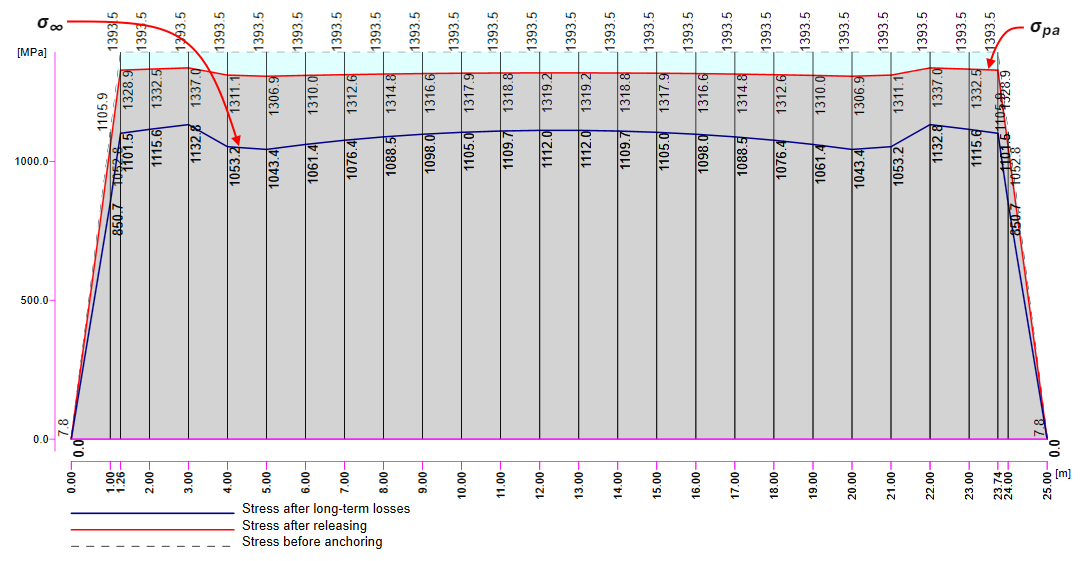
Esistono diversi valori di tensione nel tendine che devono essere controllati durante l'applicazione della precompressione. A questo punto, ci fermeremo e spiegheremo brevemente il processo di precompressione e le singole tensioni e perdite.
Processo di precompressione per trave pre-tesa
Fase 0 - messa in tensione dei trefoli -> I trefoli vengono portati nella loro posizione, ancorati su un lato e precompressi dal martinetto di tesatura sull'altro lato.
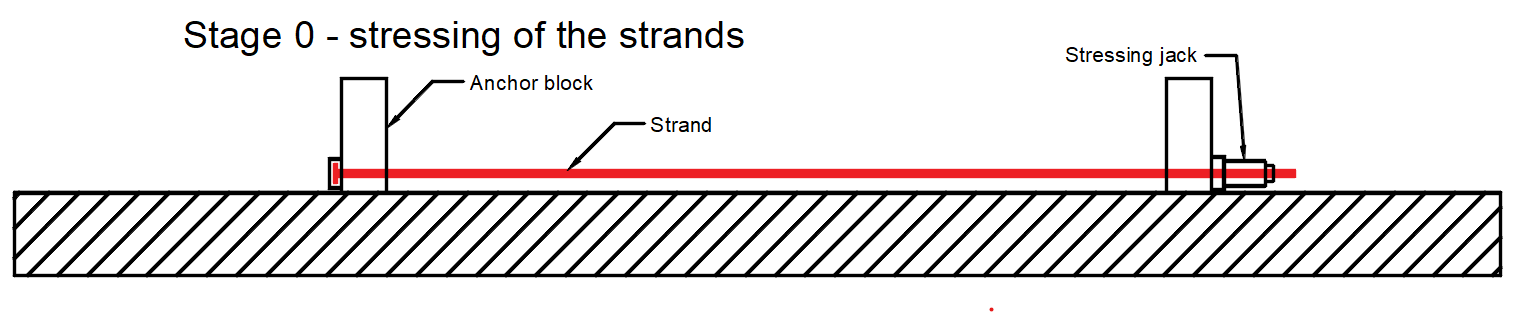
- σp,ini - Tensione iniziale - tensione massima durante la messa in tensione. Deve essere inferiore a σp,max secondo EN 1992-1-1 5.10.2.1. È la tensione al martinetto di tesatura. Nel nostro esempio σp,ini = 1431 MPa.
Fase 1 - getto -> L'elemento in calcestruzzo viene gettato attorno ai tendini precompressi in questa fase.
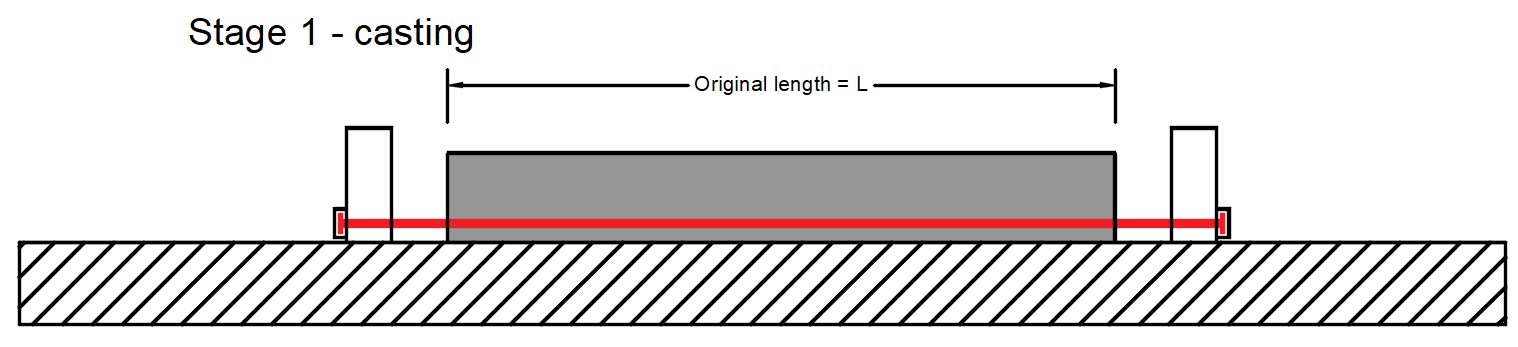
- σpr,cor - Tensione dopo il rilassamento a breve termine che include anche la perdita per assestamento dell'ancoraggio e la perdita dovuta alla deformazione delle spalle di contrasto. Nel nostro esempio σpr,cor = 1415 MPa
Fase 2 - rilascio dei trefoli -> I trefoli vengono rilasciati e si realizza la deformazione elastica immediata del calcestruzzo.
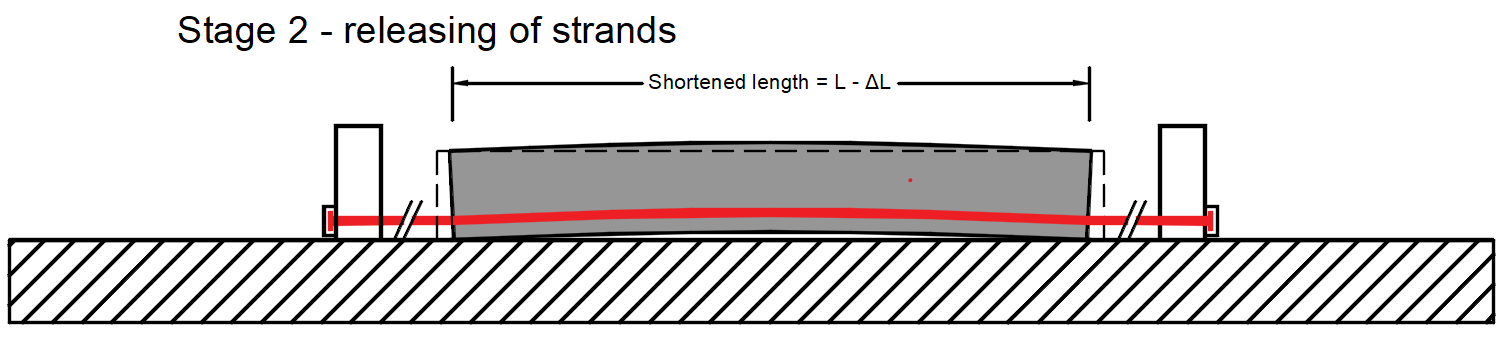
- ΔσpT - Perdita dovuta alla differenza di temperatura tra l'acciaio da precompressione e il banco di tesatura.
- σpm0 - Tensione immediatamente prima del rilascio - Questo valore è l'input per Detail. È anche la tensione prima della perdita dovuta alla deformazione elastica immediata del calcestruzzo - Δσpe. Si calcola come σpm0 = σpr,cor - ΔσpT. Nel nostro esempio σpm0 = 1386 MPa
- Δσpe - Perdita dovuta alla deformazione elastica immediata del calcestruzzo.
- σpa - Tensione dopo le perdite a breve termine. In altre parole, è la tensione dopo il trasferimento della precompressione all'elemento. Si calcola come σpa = σpr,cor - ΔσpT - Δσpe = σpm0 - Δσpe. Nel nostro esempio σpa = 1319,2 MPa
Fase 3 - fine della vita utile
- σ∞ - Tensione dopo le perdite a lungo termine
Richiamate ora la figura precedente (con il grafico Tensione/Perdite nel tendine) dove sono visualizzati i valori di σpa (linea rossa) e σ∞ (linea blu).
- Per ulteriori informazioni: Precompressione in Detail - Descrizione del modello
Fase di trasferimento della precompressione
Il modello è definito, quindi passiamo all'applicazione Detail e vediamo come impostare la prima fase. Il modello è lo stesso, abbiamo solo aggiunto staffe per il trasferimento a taglio, ma ciò non influenzerà i risultati.
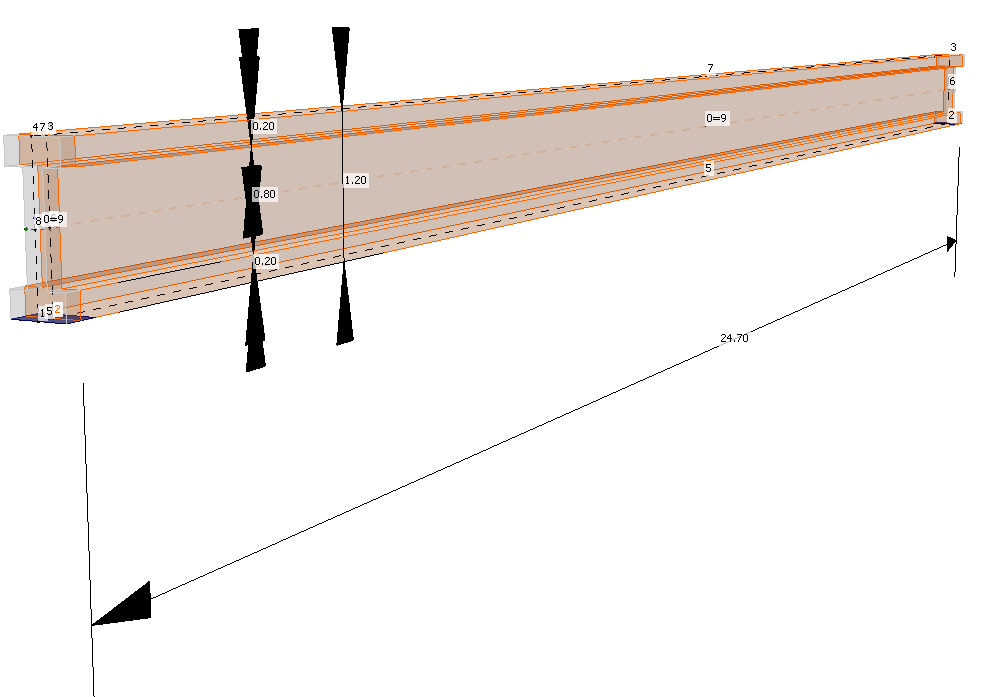
Per questa fase, ci sono solo due casi di carico:
- SW - Tipo precompressione (Peso proprio)
- P - Tipo precompressione (Precompressione)
Entrambi verranno applicati nel primo incremento di carico. Le perdite a lungo termine per le verifiche allo SLE sono impostate allo 0% come si può vedere.
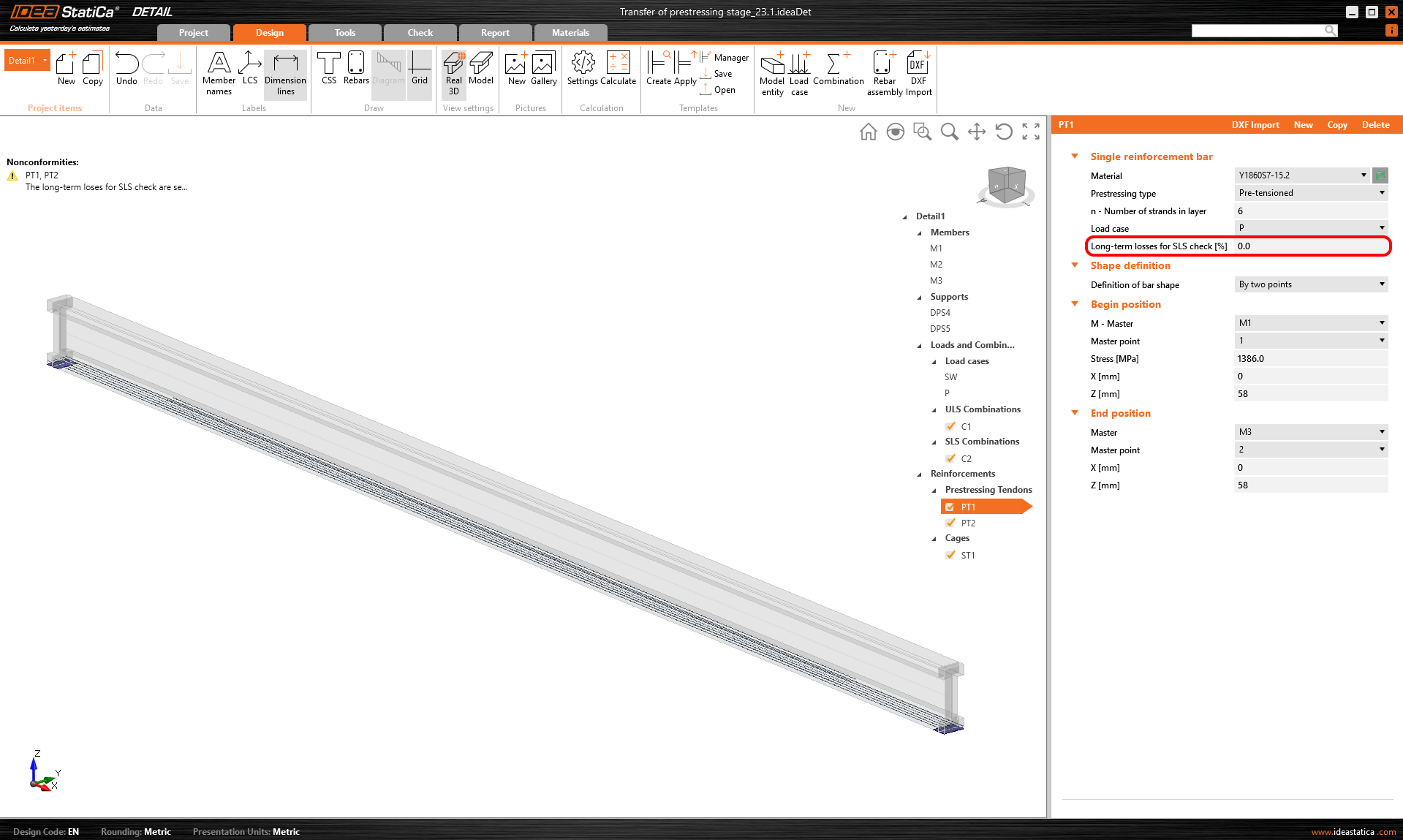
- Per ulteriori informazioni: Descrizione generale degli impulsi di carico nell'applicazione Detail
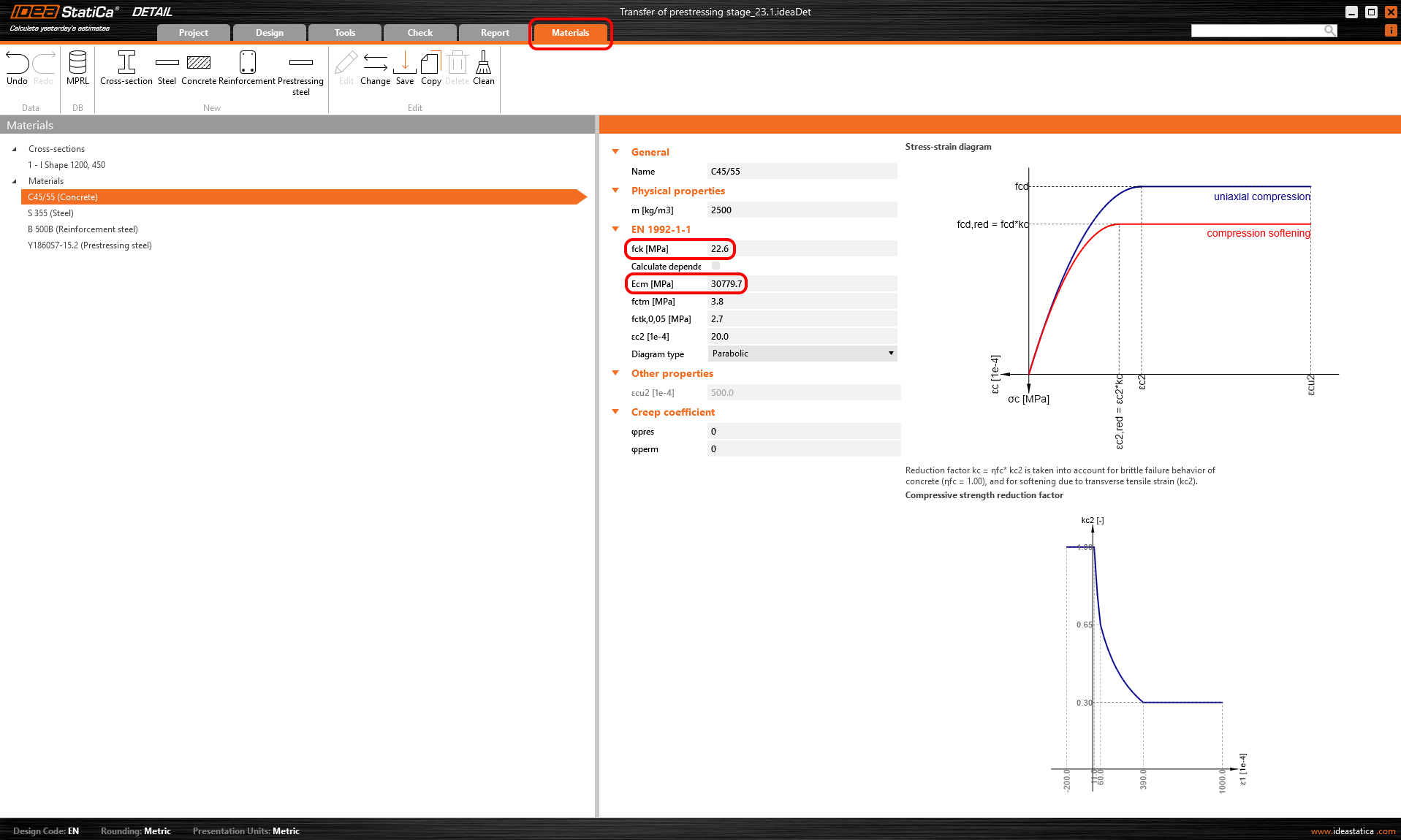
I coefficienti di viscosità sono anch'essi impostati a zero perché vogliamo valutare la fase immediatamente dopo il trasferimento della precompressione. Inoltre, si può vedere che il valore di Ecm è stato riscritto con lo stesso valore inserito nell'applicazione Beam.
Confrontiamo quindi i risultati. Poiché non abbiamo inserito alcun fattore di viscosità o perdita a lungo termine, gli effetti a lungo e a breve termine sono gli stessi.
Tensione nei tendini allo SLE:

Tensione nel calcestruzzo allo SLE:

- Per ulteriori informazioni: Descrizione generale dei risultati SLE nell'applicazione Detail
La verifica di sezione allo SLE da Beam:
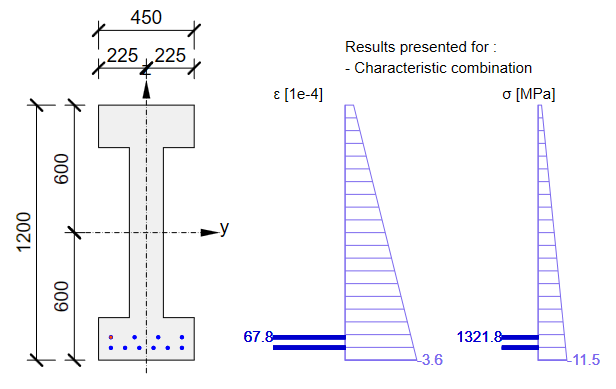

Come si può vedere, c'è una buona corrispondenza. Sembra quindi che l'input per questa fase sia stato eseguito correttamente. Si noti che i coefficienti rinf e rsup definiti in EN 1992-1-1; 5.10.9 (1) sono stati impostati come 1,0 nell'applicazione Beam.
D'altra parte, per la verifica allo SLU, possiamo aspettarci una differenza significativa tra i risultati delle applicazioni Beam e Detail. Sarà causata dalla perdita dovuta alla deformazione elastica immediata del calcestruzzo - Δσpe, che viene calcolata diversamente in Beam (approccio lineare) e in Detail (CSFM).
- Nell'approccio lineare (applicazione Beam), la perdita dovuta alla deformazione elastica immediata del calcestruzzo Δσpe è la stessa per SLU e SLE. Il motivo è che nel caso dell'approccio lineare, si utilizza il modello di materiale lineare con il modulo di elasticità Ecm, calcolato da fck, per l'intera analisi (anche per il calcolo analitico delle perdite) e solo per le verifiche di sezione allo SLU, utilizziamo il modello di materiale in cui il modulo di elasticità è calcolato da fcd.
- Nell'approccio dell'applicazione Detail, l'intero SLU è calcolato con il modello di materiale in cui il modulo di elasticità è calcolato da fcd (influenzato anche dal fattore ηfc , vedere Modelli di materiale (EN)). Ciò causa una maggiore deformazione elastica e di conseguenza una maggiore perdita Δσpe. Si ricordi che abbiamo inserito la tensione prima della perdita dovuta alla deformazione elastica immediata del calcestruzzo. Questa perdita è calcolata in base alla deformazione del modello influenzato dalle forze di precompressione (nel caso dello SLU con il modulo di elasticità inferiore).
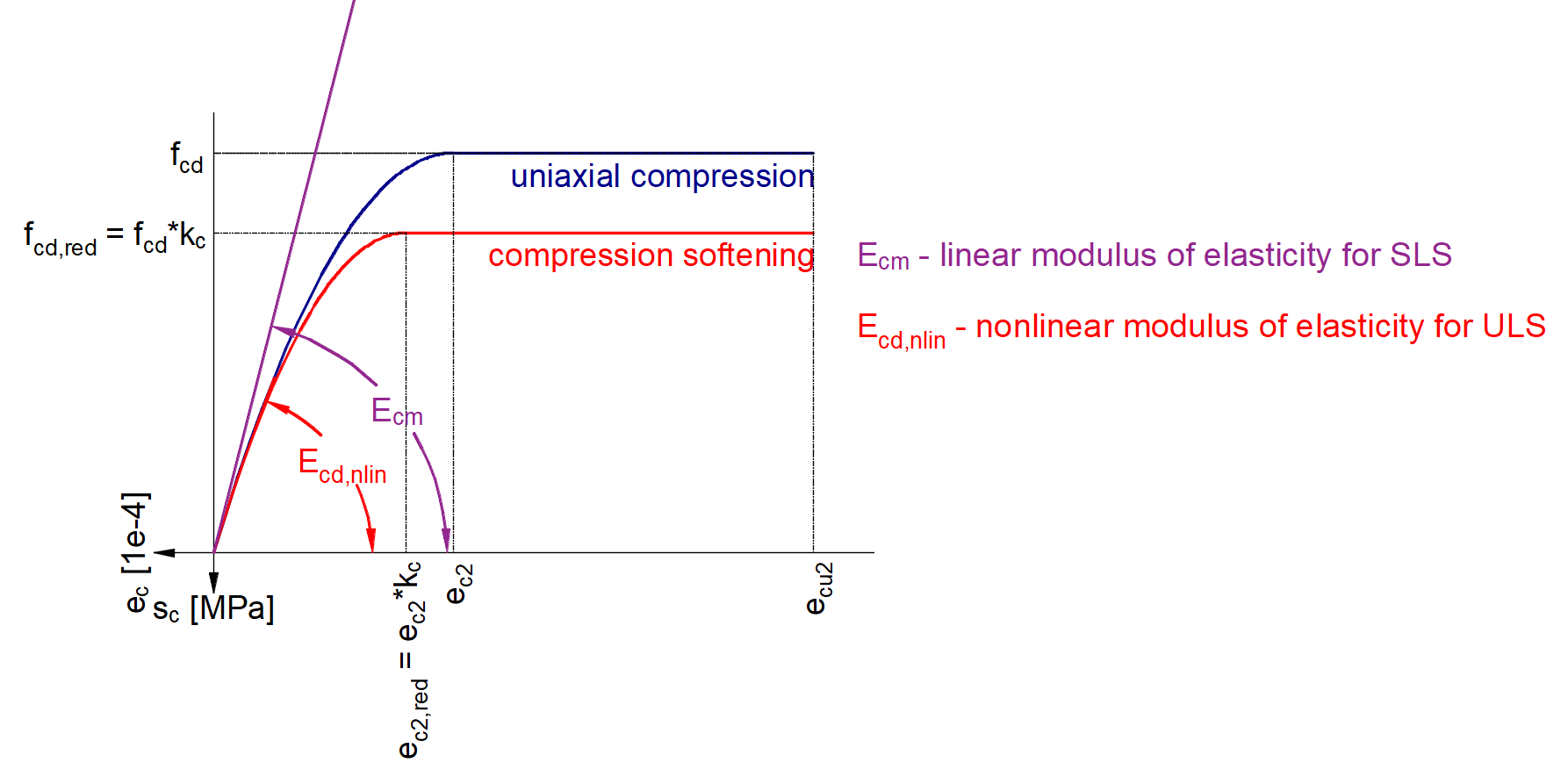
Si noti che lo SLE è calcolato nell'applicazione Detail in base a Ecm (non in base a fck). D'altra parte, lo SLU è calcolato in base a fcd da cui viene determinato il diagramma tensione-deformazione parabolico.
- Per ulteriori informazioni: Descrizione generale dei risultati SLU nell'applicazione Detail
Ora sapete come utilizzare l'applicazione Detail per la progettazione di strutture in calcestruzzo precompresso con tendini pre-tesi per la fase di trasferimento della precompressione. È sufficiente modificare la geometria e aggiungere alcune discontinuità come aperture ecc.
Fase di carico permanente aggiuntivo
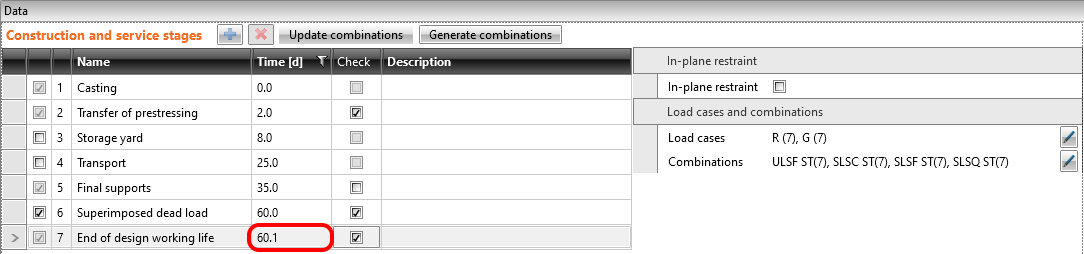
Il tempo (età del calcestruzzo) per questa fase è di 60 giorni. Lo scopo di questa fase è verificare la trave in calcestruzzo all'inizio della sua vita utile includendo i carichi permanenti e variabili. Vengono quindi aggiunti gli altri due casi di carico. Gli impulsi di carico sono naturalmente gli stessi del modello nell'applicazione Beam.
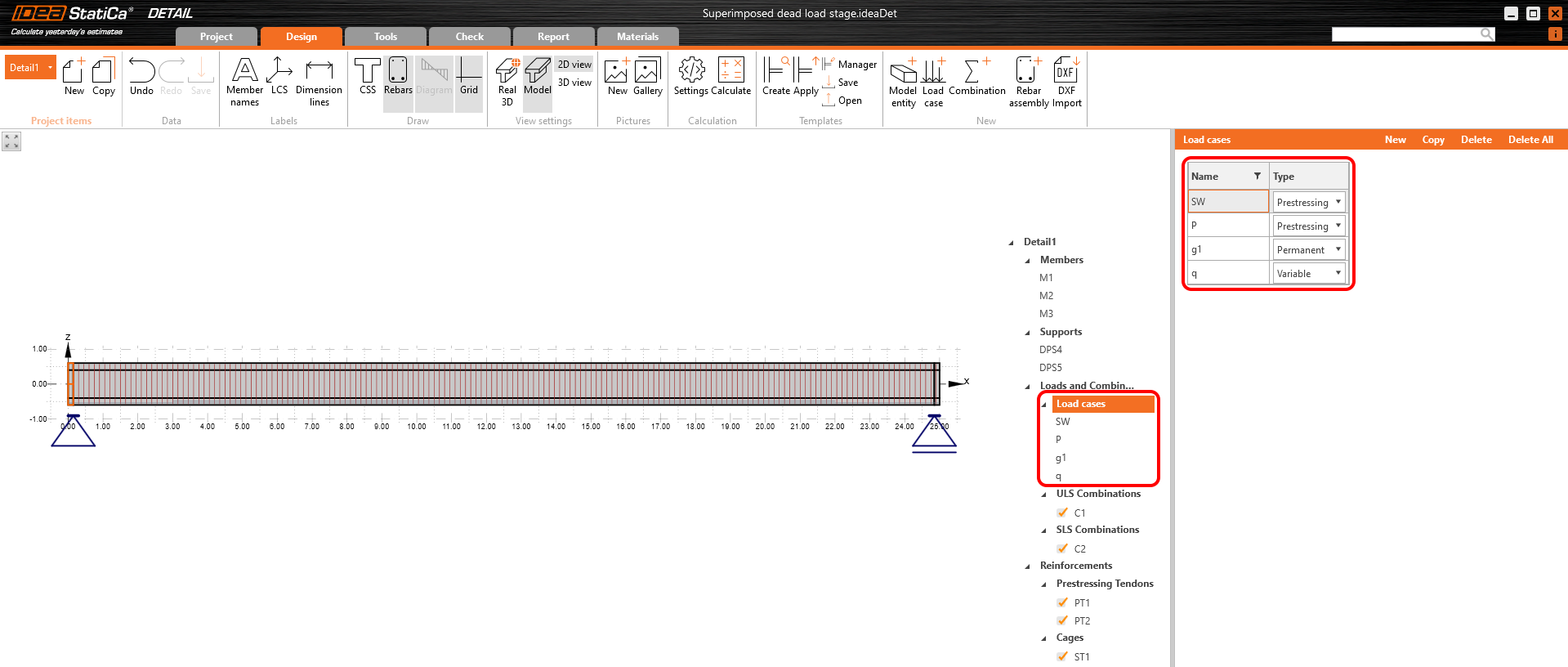
Dobbiamo determinare due valori come input per Detail.
- Coefficiente di viscosità per il periodo da 2 a 60 giorni
- Stima delle perdite a lungo termine per il periodo da 2 a 60 giorni
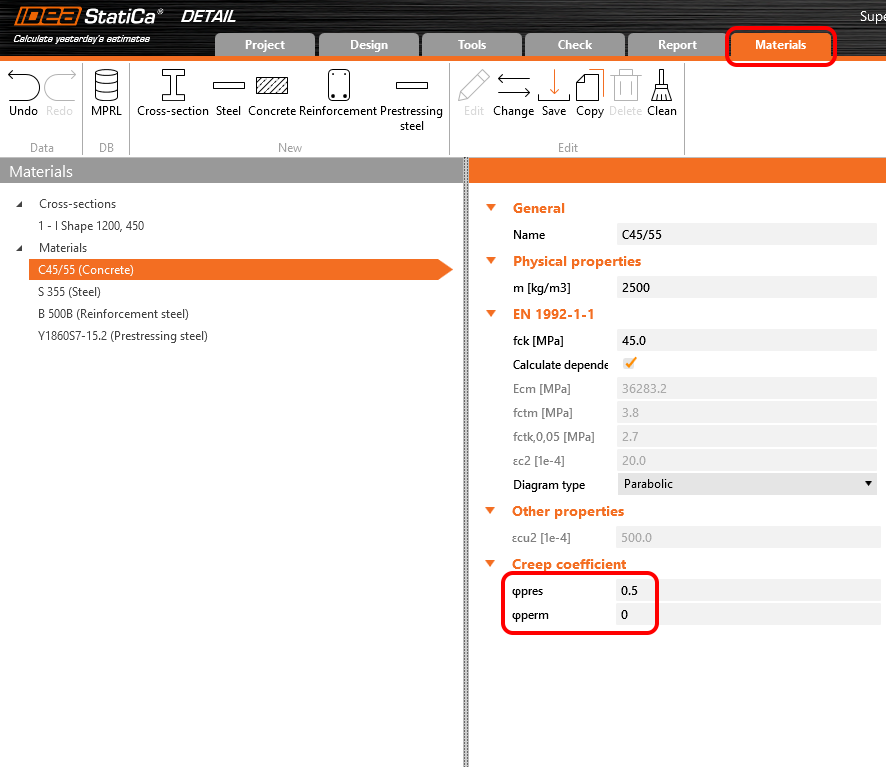
Iniziamo con il coefficiente di viscosità. Nella figura seguente è possibile vedere la funzione di viscosità da 2 a 60 giorni per la classe di calcestruzzo C45/55 e la classe di cemento R secondo l'Eurocodice. Il valore del coefficiente di viscosità è quindi φpres ≈ φ(60) - φ(2) = 0,65 - 0,15 = 0,50
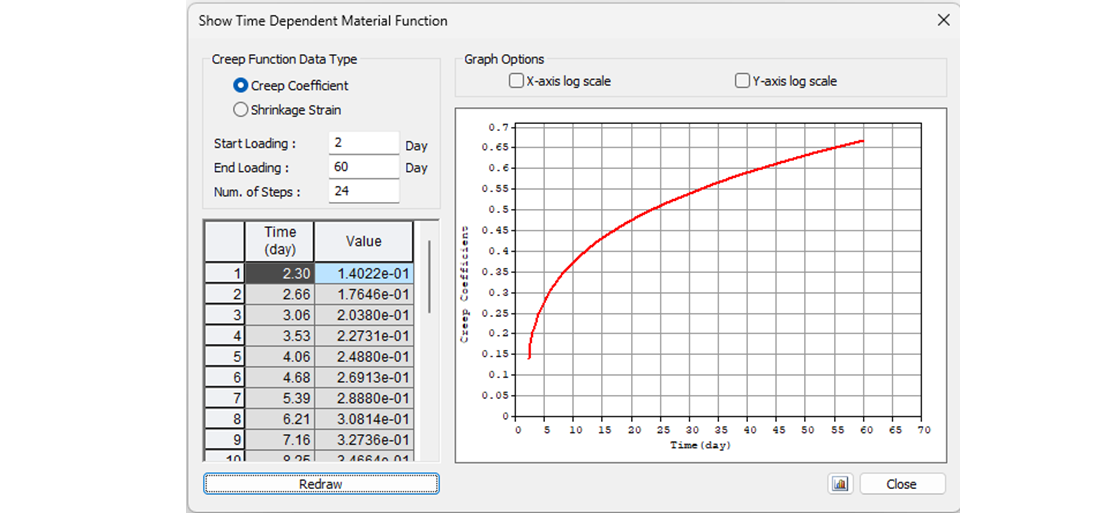
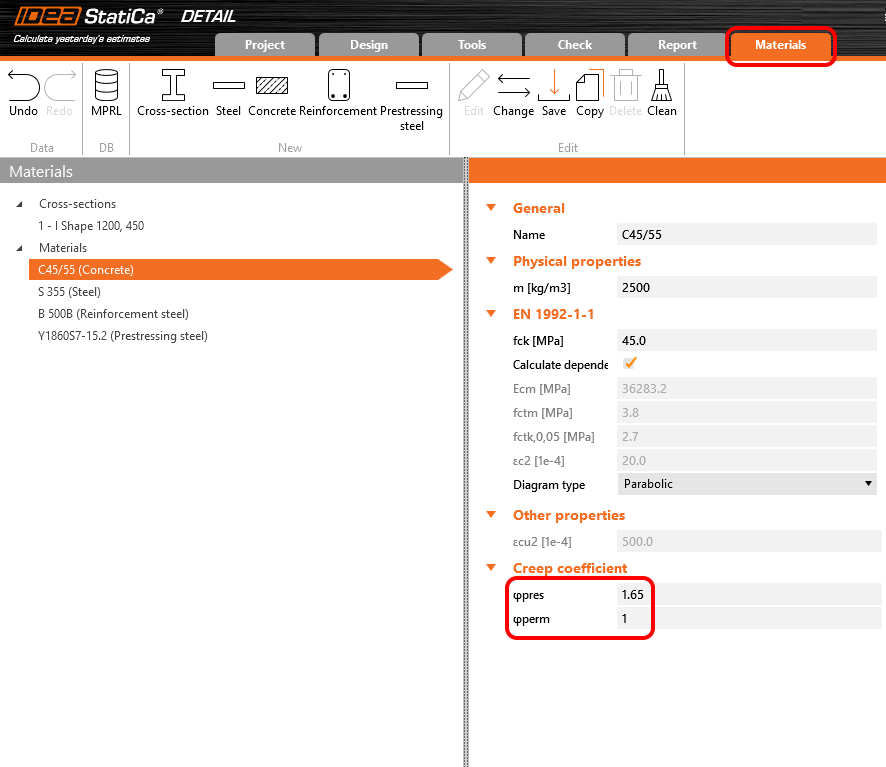
Nell'applicazione Detail, il coefficiente di viscosità può essere impostato in Materiali e modelli. È evidente che il modulo di elasticità deve essere impostato come valore predefinito Ecm (richiamare il capitolo sugli incrementi e il relativo grafico). Si noterà anche che il valore di φperm = 0,0, poiché vogliamo applicare i carichi permanenti come carichi di breve durata così come i carichi variabili.
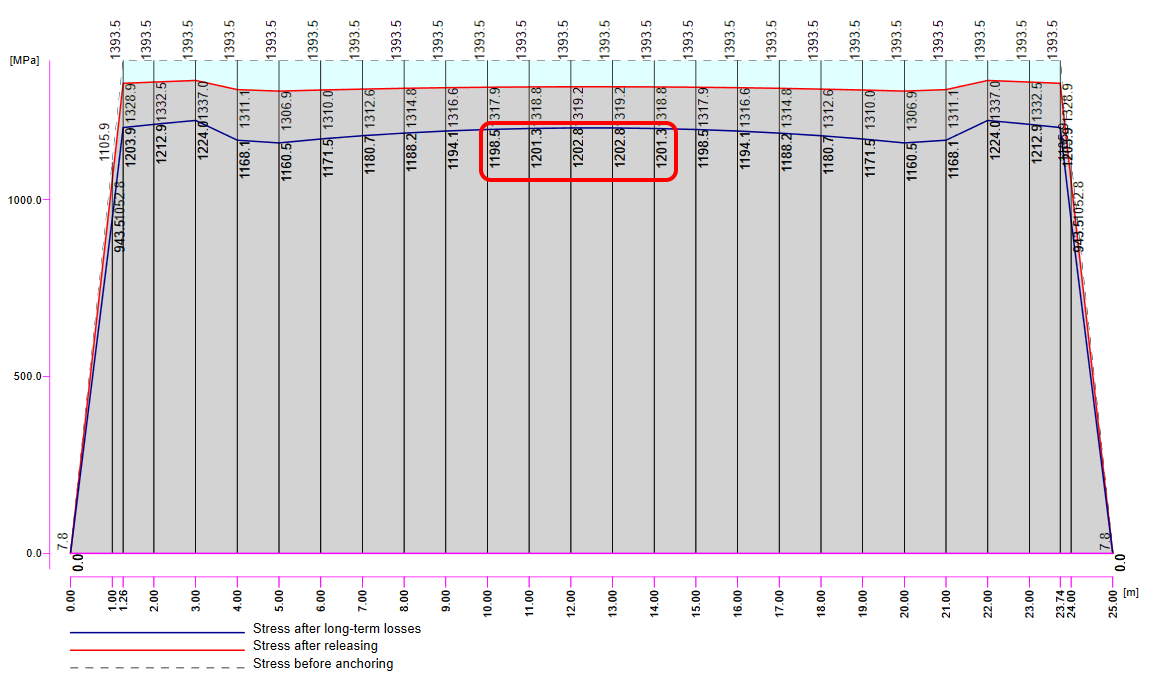
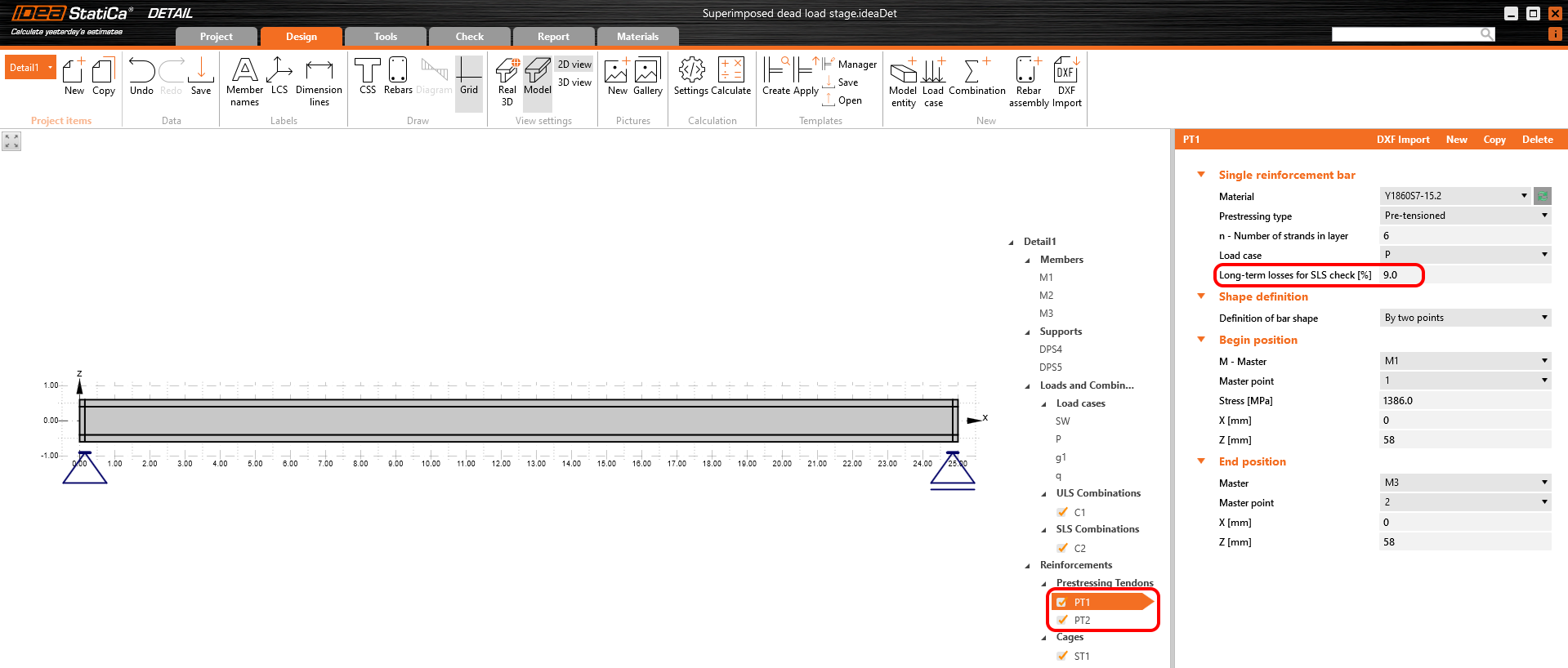
Ora è il momento delle perdite a lungo termine. Naturalmente, è possibile stimarle (la mia stima sarebbe del 10%). È il modo più semplice, ma nel nostro esempio vogliamo farlo con precisione. Abbiamo quindi calcolato σ60 - Tensione dopo le perdite a lungo termine a 60 giorni (linea blu) nell'applicazione Beam impostando il tempo finale a 60 giorni.
Il valore di σ60 = 1200 MPa come si può vedere nella figura seguente (linea blu).
Dobbiamo quindi calcolare il modello nell'applicazione Detail con il coefficiente di viscosità impostato e con perdite a lungo termine nulle per il primo incremento - P100% per determinare σdet,60. L'aspetto importante è che dobbiamo leggere i risultati per gli effetti a lungo termine per includere il coefficiente di viscosità.
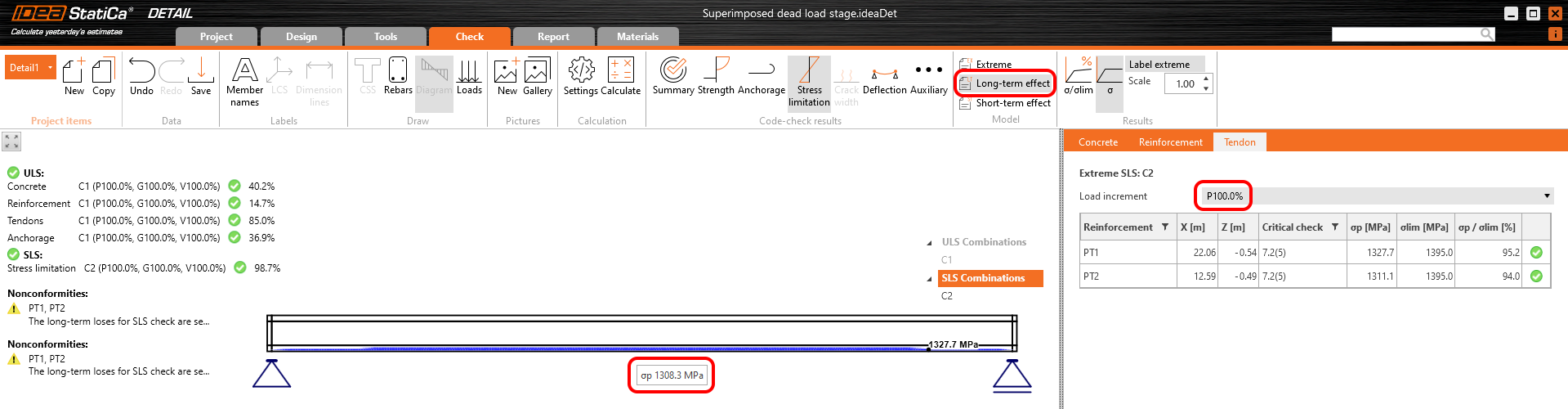
Nella figura si può vedere che σdet,60 = 1308,5 MPa.
Le perdite a lungo termine possono quindi essere calcolate come σ60 / σdet,60 = 1200 / 1308,5 = 0,91 -> la perdita a lungo termine è del 9%. Inseriamo il valore e confrontiamo i risultati.
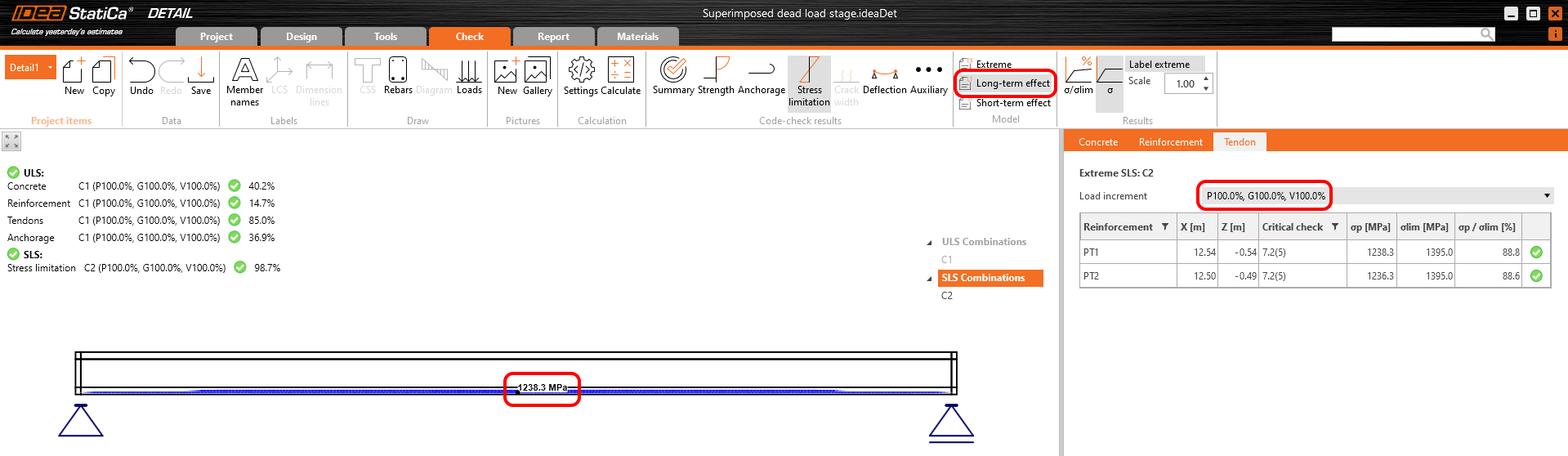
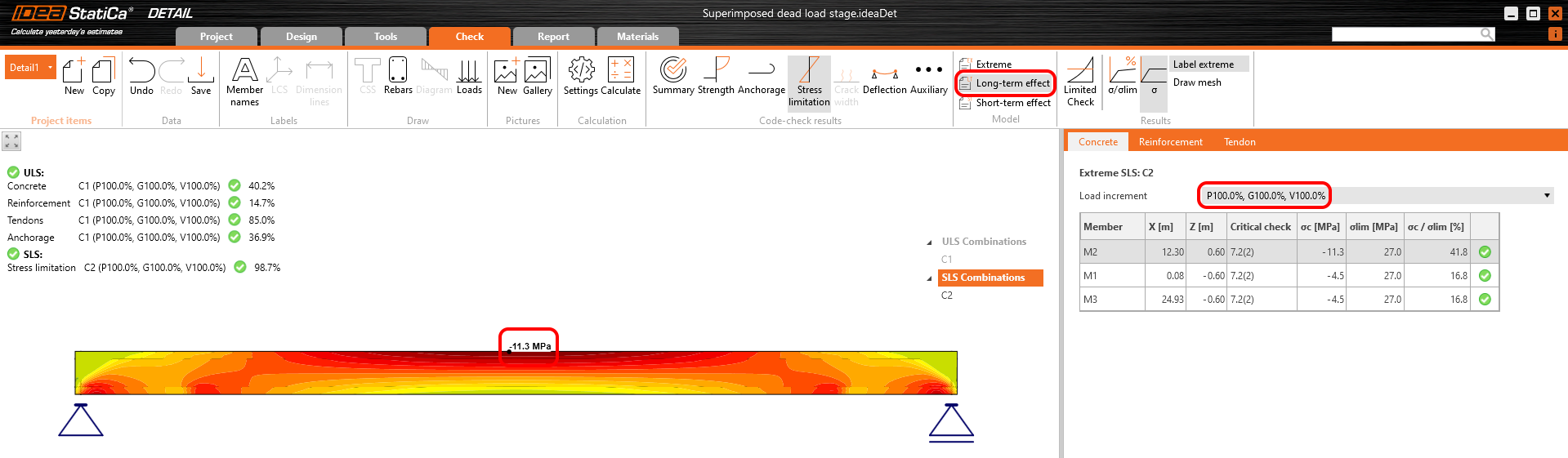
I risultati vengono letti per le perdite a lungo termine (vogliamo includere viscosità e perdite) e per tutti gli incrementi (vogliamo includere tutti i carichi).
Tensione nei tendini allo SLE:
Tensione nel calcestruzzo allo SLE:
La verifica di sezione allo SLE dall'applicazione Beam:
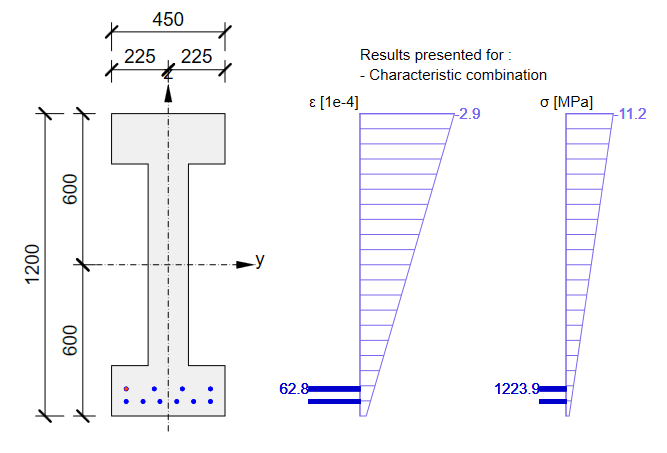

Anche in questo caso, c'è una buona corrispondenza. Sembra quindi che l'input per questa fase sia stato eseguito correttamente. Per lo SLU si presenterà la stessa problematica descritta nella fase precedente. Si noti che i coefficienti rinf e rsup definiti in EN 1992-1-1; 5.10.9 (1) sono stati impostati come 1,0 nell'applicazione Beam.
Richiamate ora l'inizio di questo articolo dove sono stati descritti gli incrementi. Nel modello dell'applicazione Detail per questa fase, è possibile scorrere i singoli incrementi per vedere l'influenza dei singoli casi di carico. È inoltre possibile verificare gli effetti a breve termine che differiranno dal precedente modello dell'applicazione Detail per la fase di trasferimento della precompressione. Il motivo è il diverso modulo di elasticità Ecm utilizzato in questi modelli.
Ciò che si può effettivamente vedere nel modello per la fase di carico permanente aggiuntivo negli effetti a breve termine è una fase di trasferimento della precompressione in cui t=28 giorni. Quindi, se non è necessario precomprimere la trave prima di 28 giorni, non è necessario creare un modello speciale per la progettazione di travi in calcestruzzo precompresso nella fase di trasferimento della precompressione.
Fine della vita utile di progetto
L'approccio sarà lo stesso della fase precedente. Prima di tutto, dobbiamo determinare i coefficienti di viscosità. Nella figura seguente è possibile vedere la funzione del coefficiente di viscosità.
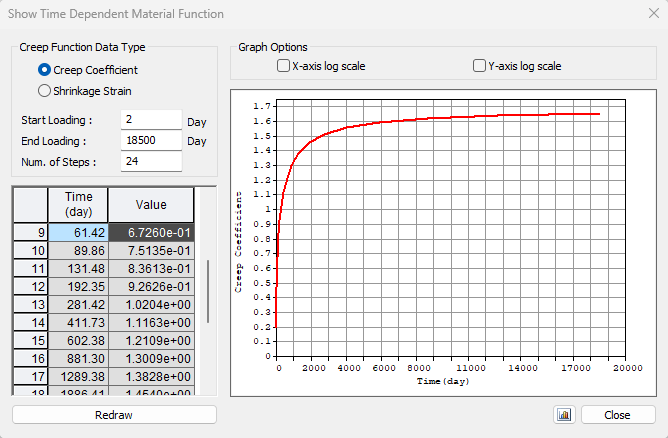
Il valore φpres ≈ 1,65 per il periodo da 2 a 18250 giorni per la classe di cemento R secondo l'Eurocodice. Il valore φperm = φ(18250) - φ(60) ≈ 1,65 - 0,65 = 1,00 per il periodo da 60 a 18250 giorni. Si noti il valore evidenziato φ(60) nella tabella precedente.
In secondo luogo, abbiamo bisogno delle perdite a lungo termine. Ancora una volta, abbiamo utilizzato lo stesso approccio: abbiamo calcolato il modello nell'applicazione Detail con i coefficienti di viscosità impostati e con perdite a lungo termine nulle per il primo incremento - P100%. L'aspetto importante è che dobbiamo leggere i risultati per le perdite a lungo termine per includere il coefficiente di viscosità.
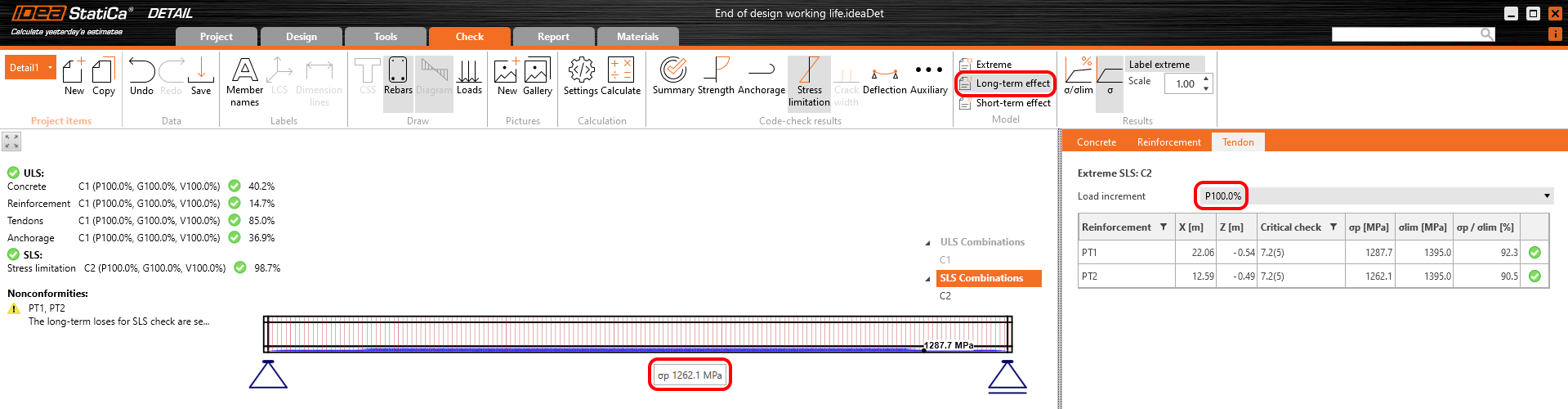
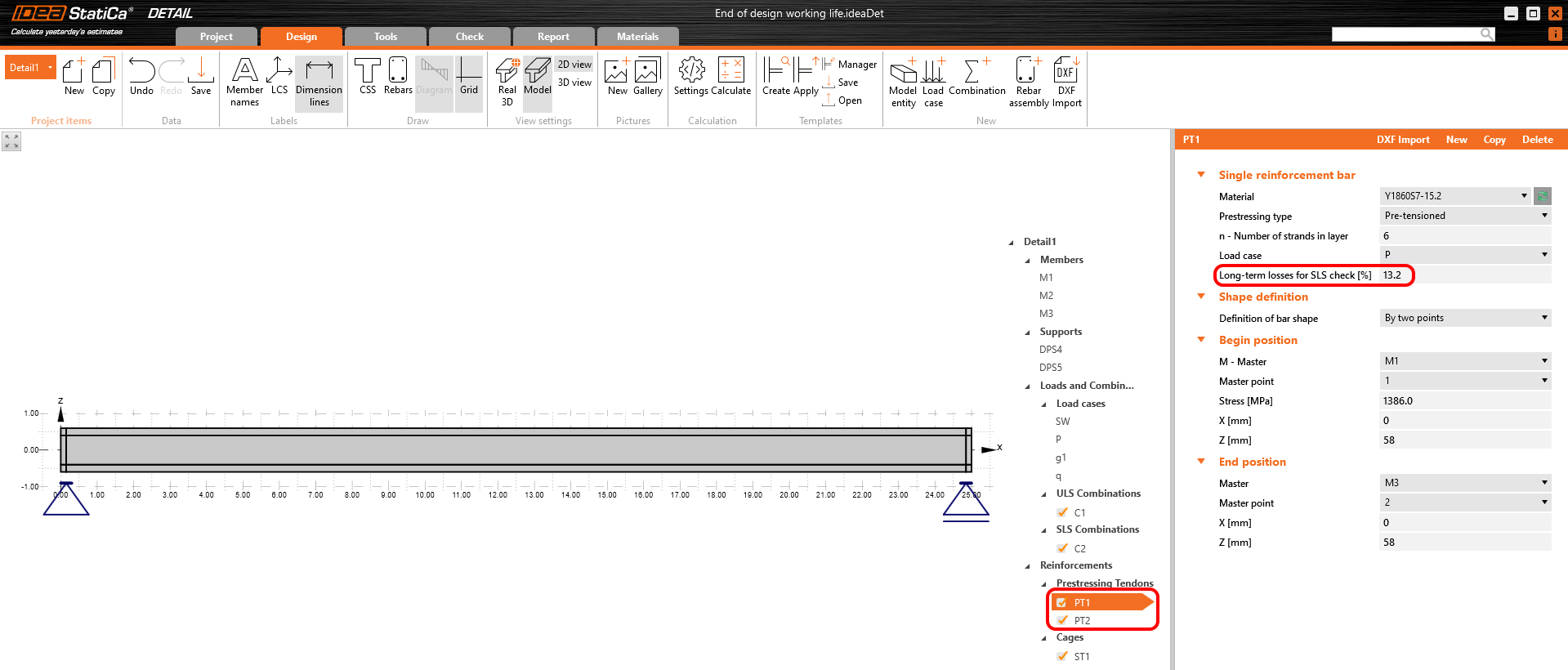
Le perdite a lungo termine possono essere calcolate come σ∞ / σdet,∞ = 1100 / 1267 = 0,868 -> la perdita a lungo termine è del 13,2%. Il valore di σ∞ è determinato nel capitolo I parametri della trave nel grafico Tensione/Perdite nel tendine. Inseriamo il valore e confrontiamo i risultati.
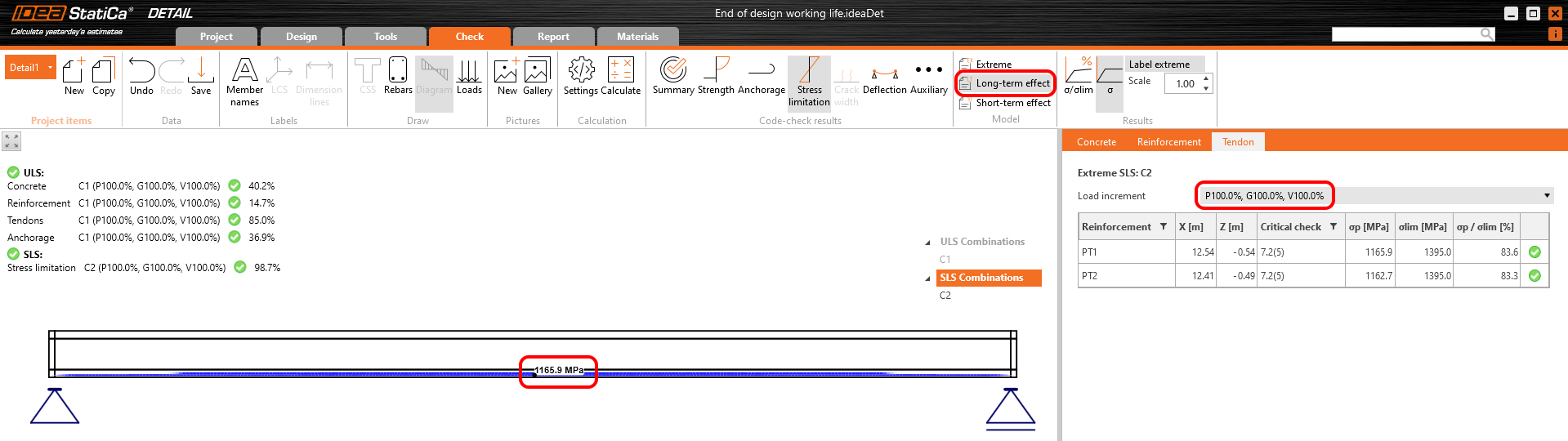
Tensione nei tendini allo SLE:
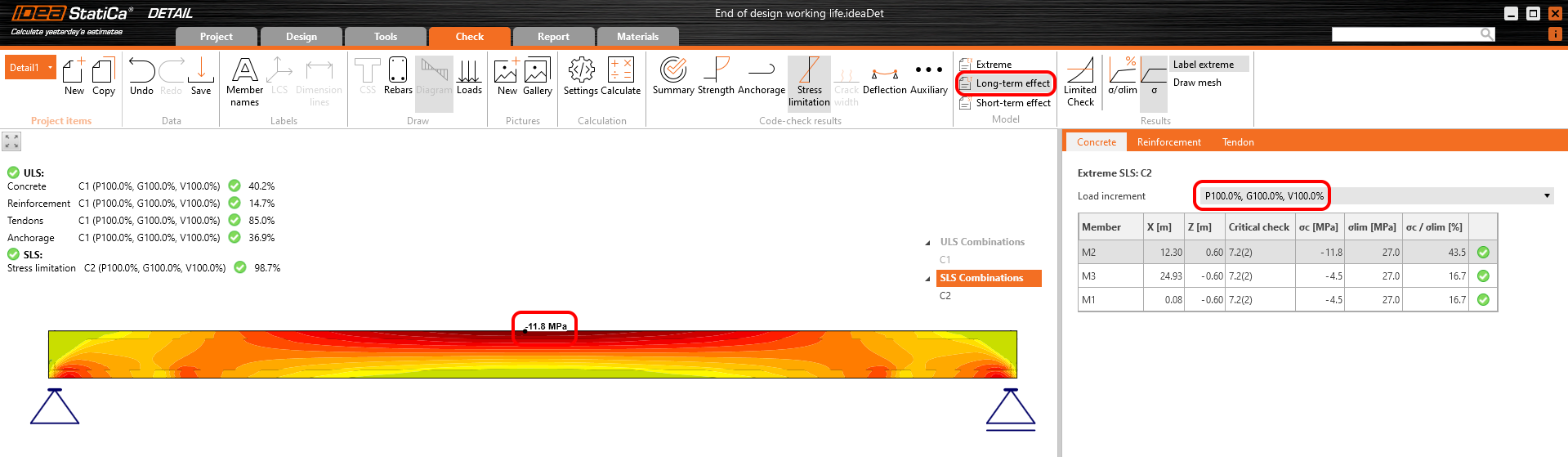
Tensione nel calcestruzzo allo SLE:
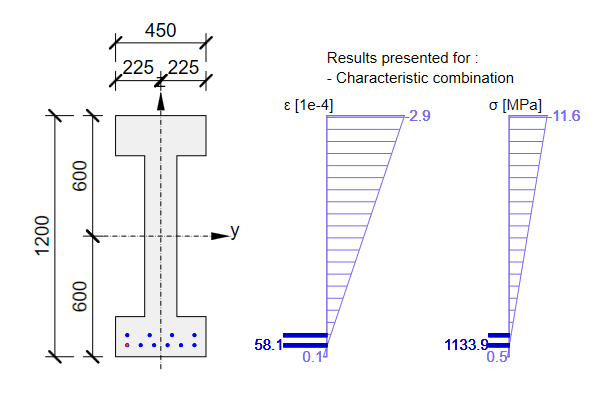
La verifica di sezione allo SLE da Beam:

Conclusione
Infine, ecco un semplice flusso di lavoro in cui è possibile trovare la procedura sopra descritta per la progettazione di strutture in calcestruzzo precompresso nell'applicazione Detail utilizzando tendini pre-tesi.
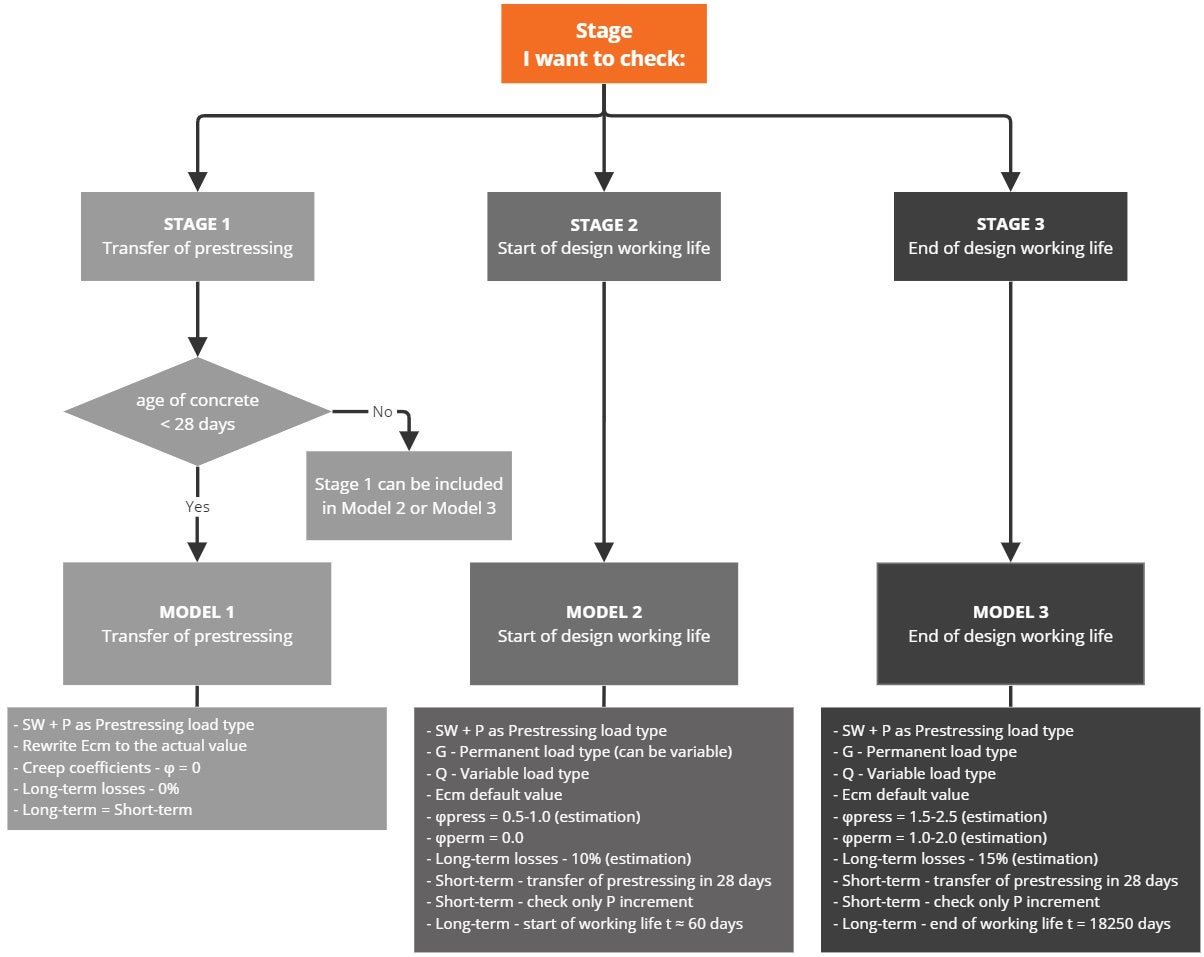
Vale la pena ripetere che per i trefoli pre-tesi deve essere inserita la tensione immediatamente dopo il rilascio (ma prima della perdita dovuta alla deformazione elastica immediata del calcestruzzo). Deve essere inserita una stima delle perdite a lungo termine dovute al ritiro e al rilassamento. Le perdite per viscosità vengono calcolate automaticamente.
Da quanto precede, per il Modello 2 e il Modello 3 per gli effetti a breve termine, deve essere considerato solo il primo incremento P (poiché nessun altro carico permanente né carico variabile verrà applicato durante l'applicazione della precompressione). Ciò è valido solo se l'età del calcestruzzo al momento dell'applicazione della precompressione è superiore a 28 giorni; in caso contrario, è necessario creare un modello speciale per la Fase 1 (per gli effetti a breve termine).
Le perdite a lungo termine per lo SLU devono essere impostate come fattore di combinazione. La stima delle perdite a lungo termine che può essere impostata nell'armatura viene presa in considerazione solo per le verifiche allo SLE. L'input per la stima del 15% dovrebbe essere simile a questo:
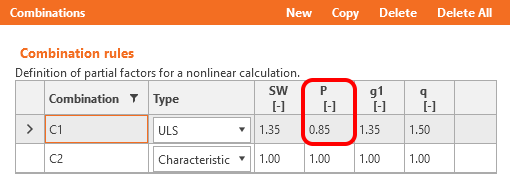
I coefficienti rinf e rsup definiti in EN 1992-1-1; 5.10.9 (1) per gli effetti della precompressione allo SLE devono essere presi in considerazione anche nelle combinazioni. Ciò significa che è necessario creare almeno due combinazioni. Vedere la figura.
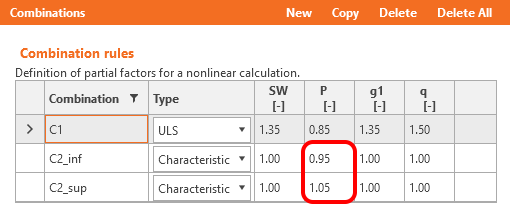
Leggere informazioni sull'implementazione di questi coefficienti nell'applicazione Beam in Come i coefficienti rinf e rsup vengono presi in considerazione per le verifiche allo SLE
Avete letto come utilizzare IDEA StatiCa Detail, un software di progettazione in calcestruzzo con cui è possibile, tra le altre cose, progettare travi in calcestruzzo precompresso con discontinuità. Ma non dimentichiamo IDEA StatiCa Beam, utilizzato per la progettazione di travi in calcestruzzo inclusa l'analisi dipendente dal tempo (TDA), e che abbiamo utilizzato per confrontare i risultati.
Download allegati
- BEAM model.ideaBeam (IDEABEAM, 959 kB)
- Transfer of prestressing stage.ideaDet (IDEADET, 13 kB)
- Superimposed dead load stage.ideaDet (IDEADET, 15 kB)
- End of design working life.ideaDet (IDEADET, 15 kB)