


Introduction
Au début de ce texte, définissons à quoi sert l'application. Dans la version actuelle, nous avons développé des outils et vérifié la solution uniquement pour l'ancrage de structures métalliques dans des blocs de béton armé simples.
Le texte suivant est divisé en deux parties : les limitations de l'application et de la méthode elle-même, et les limitations de l'import depuis IDEA StatiCa Connection.
Limitations de l'application
Béton armé
Le CSFM 3D n'est pas conçu pour le béton non armé ou le béton faiblement armé. Dans ce cas, le résultat du calcul peut conduire à des résultats trompeurs ou à une divergence du calcul non linéaire.
Vous pouvez en savoir plus dans Théorie.
La principale raison pour laquelle seuls les éléments en béton armé doivent être modélisés dans l'application est que la résistance à la traction du béton est négligeable. Toute contrainte de traction doit donc être reprise par le ferraillage.
La seconde raison est la suivante : dans IDEA StatiCa Detail 3D, la mécanique de la rupture n'est pas utilisée. Le modèle ne simule pas la propagation explicite des fissures, ni n'utilise les paramètres de mécanique de la rupture du béton (G_f, K_IC, forme de la surface de rupture). Le béton est modélisé comme un matériau ductile avec une branche plastique horizontale en compression – une fois la contrainte de compression limite atteinte, la contrainte reste constante et seules les déformations continuent d'augmenter jusqu'à une limite prescrite. Par conséquent, Detail 3D peut capturer la redistribution plastique des contraintes et des déformations dans les régions D, mais il ne modélise pas explicitement les mécanismes de rupture fragile régis par la mécanique de la rupture (par exemple, la rupture par cisaillement pur du béton non armé, la propagation instable d'une fissure dominante unique, etc.).
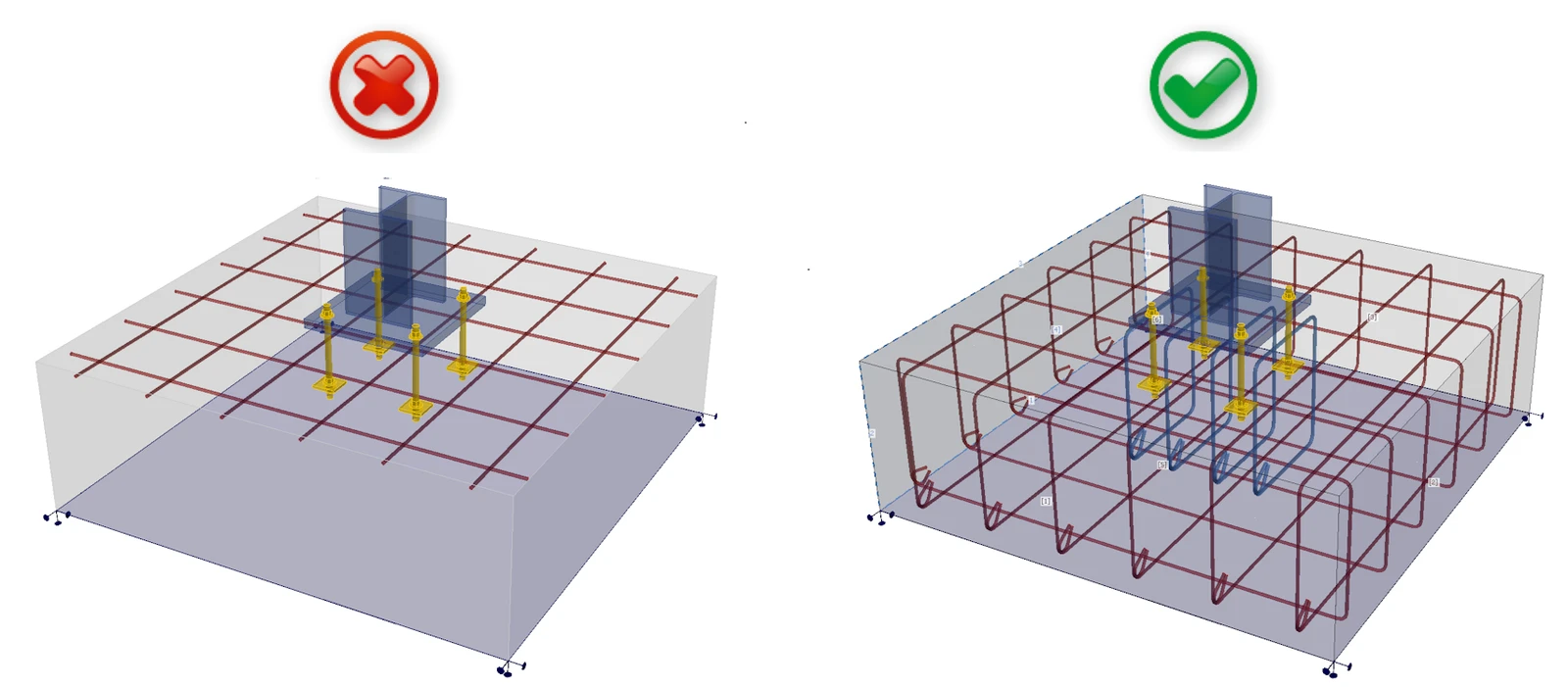
Pour résumer, vos modèles doivent respecter la définition du béton armé telle que présentée dans les normes internationales. Suivez les règles de ferraillage pour obtenir des résultats corrects.
État Limite Ultime
Tous les calculs et vérifications normatives sont implémentés pour l'ELU uniquement. La définition des matériaux et la méthode de calcul elle-même doivent être différentes pour l'ELS. Vous pouvez observer cette différence dans Detail 2D.
Adoucissement en compression
Tout d'abord, définissons ce qu'est l'adoucissement en compression : le béton en compression perd de la résistance et de la rigidité lorsqu'il est simultanément fortement fissuré en traction, c'est-à-dire lorsque d'importantes déformations de traction transversales sont présentes.
Dans les cas où la résistance est régie par une bielle comprimée (diagonale comprimée) traversant du béton fortement fissuré, Detail 3D a tendance à surestimer la capacité (c'est-à-dire à être légèrement non conservatif) si le résultat est interprété directement comme la capacité ultime réelle.
Pour ces raisons, le module 3D convient uniquement pour vérifier la résistance de l'ancrage dans des blocs de béton armé simples.
Bien qu'il soit possible de modéliser, par exemple, une semelle sur pieux en utilisant des appuis sur une petite surface, la vérification n'est pas fiable car l'effet d'adoucissement devient significatif, en particulier dans les problèmes liés au poinçonnement. La même situation peut se produire dans le cas d'une dalle mince avec un poteau placé dessus, et dans d'autres cas similaires.
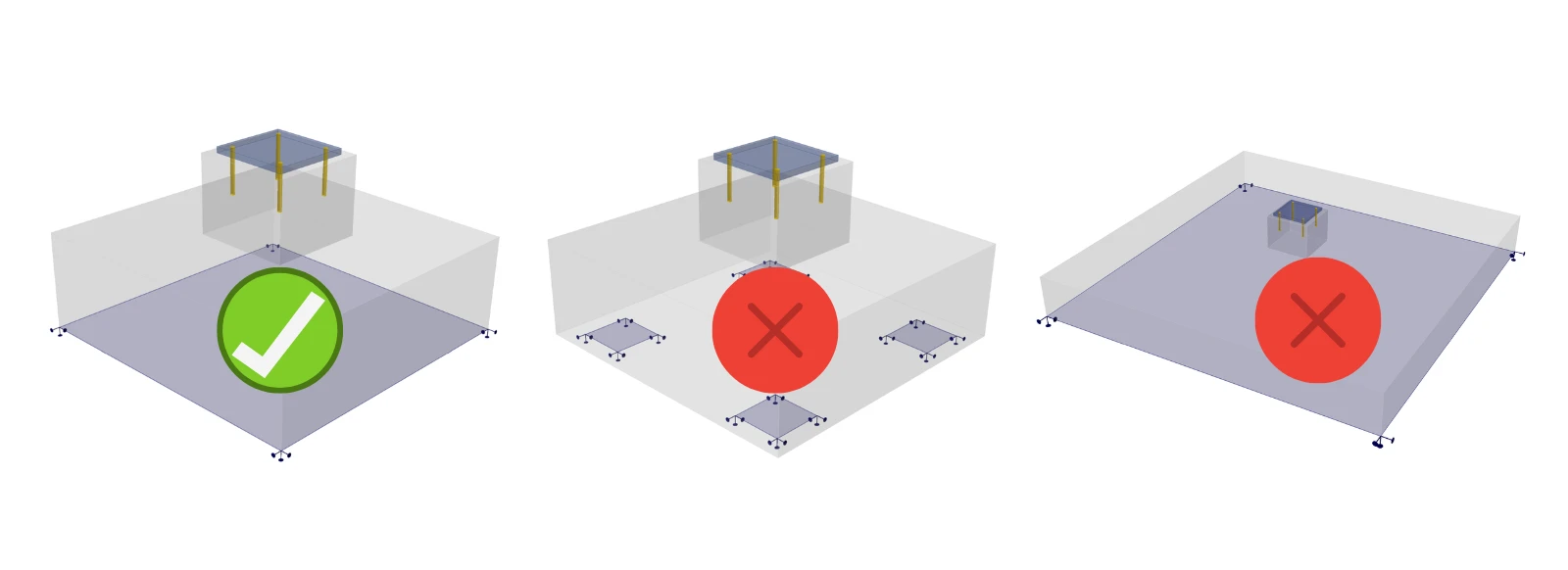
Pour ces situations, il est nécessaire d'implémenter l'adoucissement du béton, qui n'est actuellement disponible que dans le module 2D. Par conséquent, le module 3D ne peut être utilisé que pour vérifier les ruptures où cet effet n'a aucune influence.
Vérification de l'ancrage
L'élément d'ancrage est défini comme étant capable de transférer des efforts normaux de traction ou de compression ainsi que des efforts de cisaillement, en tenant également compte de la rigidité en flexion, comme décrit dans Théorie.
Nous prenons en charge les vérifications normatives selon les normes pertinentes (EN uniquement), c'est pourquoi IDEA StatiCa Detail peut être utilisé indépendamment pour l'évaluation de l'ancrage (ancrages, ferraillage, béton).
Codes implémentés : EN 1992-4, EN 1993-1-8, EN 1994-1-1
Pour vérifier les autres composants de l'assemblage (soudures, plaques, etc.), vous devez utiliser IDEA StatiCa Connection, où vous pouvez également effectuer la vérification complète de l'ancrage pour le béton non armé. L'ancrage dans Connection — avec les efforts appliqués — peut être exporté dans Detail pour un dimensionnement complémentaire du ferraillage.
Pour les normes ACI et australienne, les vérifications normatives des ancrages en cisaillement et en cisaillement combiné à la traction ne sont pas encore implémentées, il est donc toujours nécessaire d'utiliser les deux applications pour une vérification normative complète des ancrages.
Renversement
Si les charges saisies provoquent le renversement du modèle, le calcul se poursuivra jusqu'à la divergence ou jusqu'à ce qu'un critère soit atteint. Cela prend généralement beaucoup de temps et vous obtenez le résultat suivant :
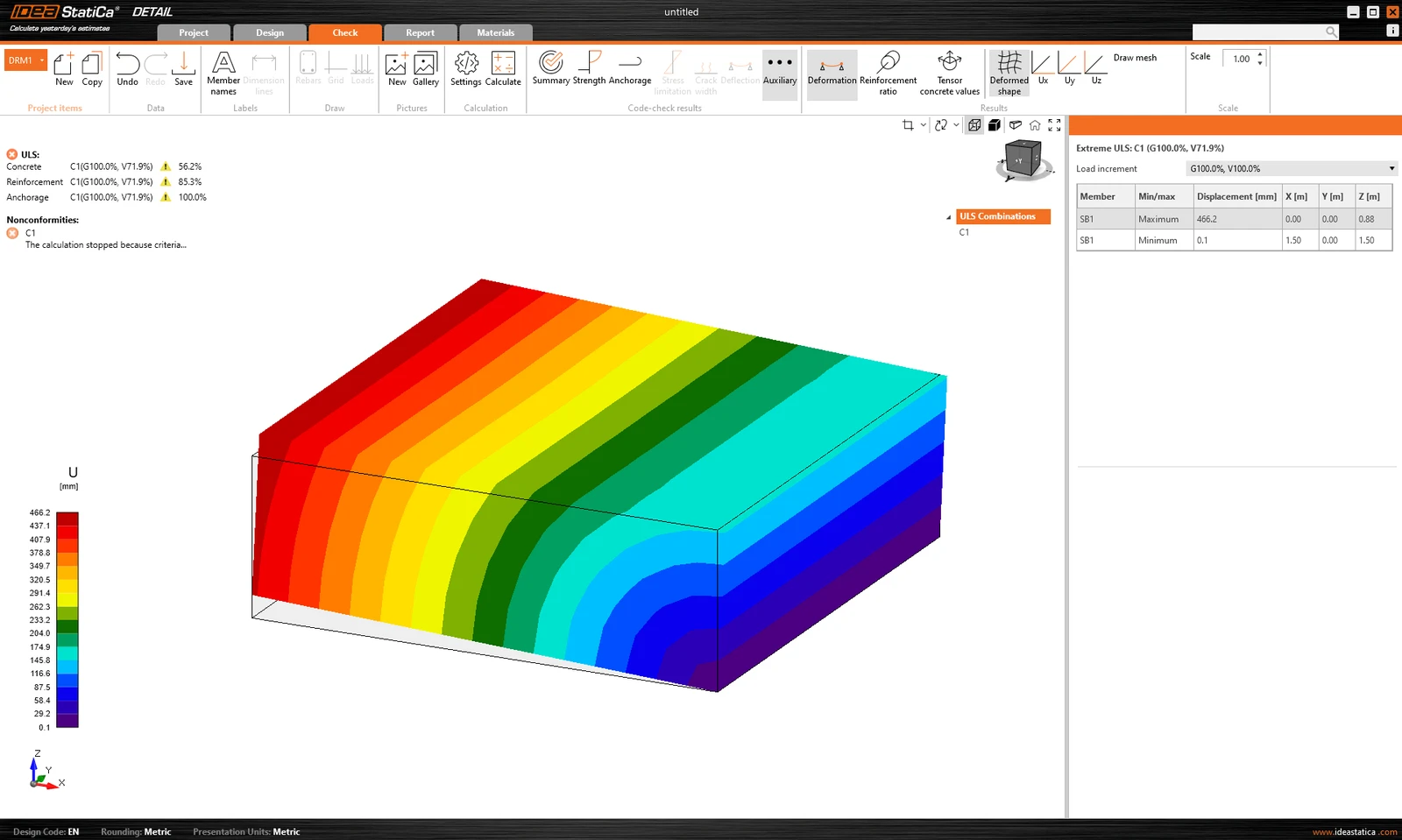
Le pourcentage de charge transférée est affiché. De plus, la déformation extrême est indiquée dans les résultats auxiliaires.
Solution de contournement : il est recommandé de calculer d'abord tout modèle avec le multiplicateur de la taille de maillage par défaut réglé sur une valeur élevée (4-5). Ce multiplicateur se trouve dans Paramètres -> Paramètres de maillage. Le calcul sera rapide et vous pourrez voir si le renversement est le problème ou non.
Il est nécessaire de vérifier si le poids propre du bloc de béton est inclus, car il peut empêcher le renversement du modèle. Notez que lors de l'import depuis l'application Connection, le poids propre n'est pas automatiquement intégré au modèle — voir le texte ci-dessous pour plus de détails.
Limitations de l'import depuis Connection
Contacts
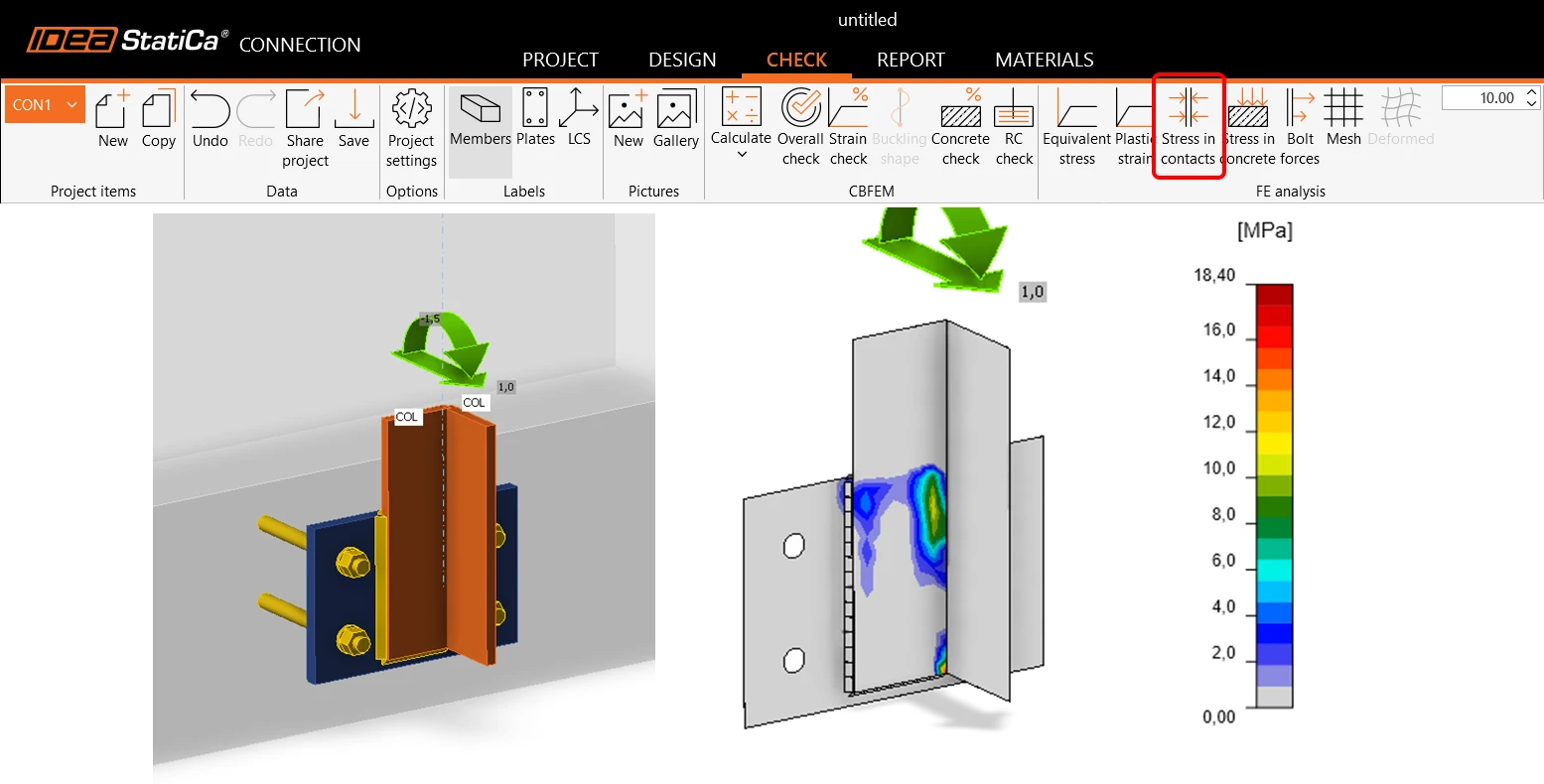
En général, l'import des efforts agissant sur la platine de base par contact avec une autre plaque métallique n'est pas pris en charge. Cela s'applique aux deux types de contacts : arête-surface et surface-surface. En savoir plus dans cet article.
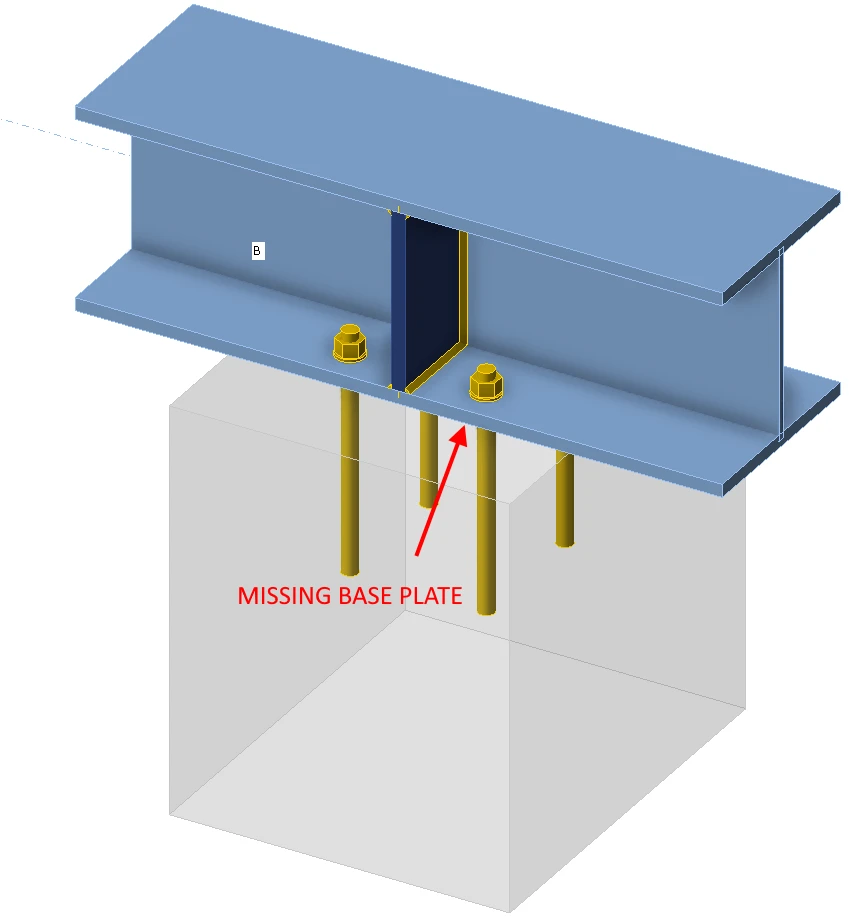
Ancrage par élément
Seuls les modèles ancrés via la platine de base peuvent être correctement importés dans l'application Detail. Pour les modèles où les éléments sont connectés directement aux blocs de béton, la plaque de connexion de l'élément avec les ancrages est importée sans charges.
Le poids propre n'est pas ajouté automatiquement
Le poids propre n'est pas automatiquement calculé/ajouté. Il doit être inclus manuellement dans le projet pour Detail. Cela peut principalement affecter la vérification de l'ancrage aux fondations, où le fait de ne pas tenir compte du poids propre pourrait entraîner le renversement de la fondation, comme mentionné dans le paragraphe ci-dessus.
Types d'ancrage non pris en charge pour l'export
Les ancrages avec crochet ne sont pas pris en charge dans Detail. Une rondelle sera utilisée à la place dans le fichier exporté.
La rondelle est modélisée comme un élément de coque directement attaché à la tige de l'ancrage, transférant la charge au béton exclusivement par contact en compression. La plaque elle-même est modélisée linéairement, sans plasticité, et n'est pas soumise à des vérifications de résistance. Étant donné que la tige a une adhérence nulle, la totalité de la charge est transférée au béton par l'intermédiaire de la rondelle. Vous trouverez plus d'informations sur les types d'ancrage dans l'article : Définition d'un ancrage unique.
Combinaisons non prises en charge pour les types d'ancrage
L'application Detail ne prend pas en charge la combinaison de goujons à tête ou de ferraillage avec d'autres types d'ancrage. Ces types d'ancrage ne seront pas inclus dans le résultat exporté. Vous trouverez plus d'informations sur les options de plaques dans l'article : Options des plaques d'ancrage.
Combinaison des charges importées et des charges saisies par l'utilisateur
Les charges importées et les charges saisies par l'utilisateur ne peuvent pas être combinées au sein d'un même modèle. Pour les raisons décrites dans Théorie. Les ancrages sont importés déconnectés des platines de base. Si vous créez un cas de charge défini par l'utilisateur, il est évident que la charge ne sera pas transférée correctement.
Solution de contournement : copiez l'élément de projet importé, supprimez toutes les charges importées, interconnectez tous les ancrages avec la platine de base, puis vous pourrez saisir votre cas de charge défini par l'utilisateur.
Plusieurs blocs de béton
Un seul bloc de béton est pris en charge dans Detail. Cependant, le bloc de béton peut être modifié à l'aide des opérations Volume négatif, Plan de coupe et Coupe. Il est ainsi possible de modéliser des formes plus complexes telles que des massifs, des extensions de semelles filantes, des ancrages à proximité d'ouvertures, etc.
Il est également possible d'importer deux blocs de béton indépendants depuis Connection, qui sont importés dans Detail sous forme de deux entités de modèle pouvant être modifiées ultérieurement à l'aide de l'opération de coupe.
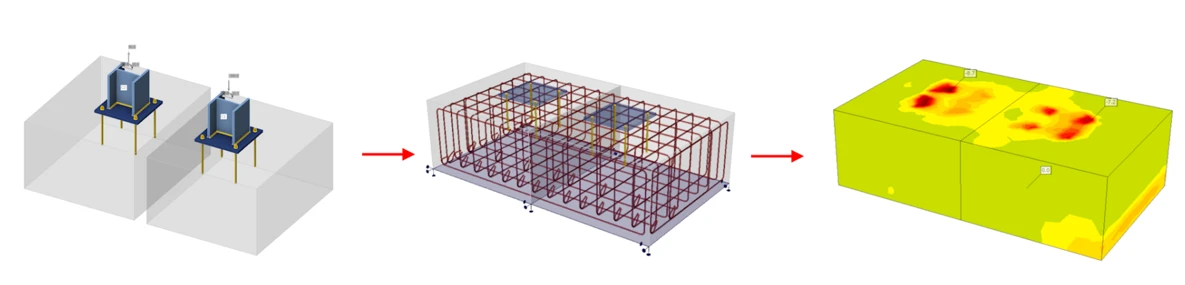
Plusieurs platines de base dans un même bloc
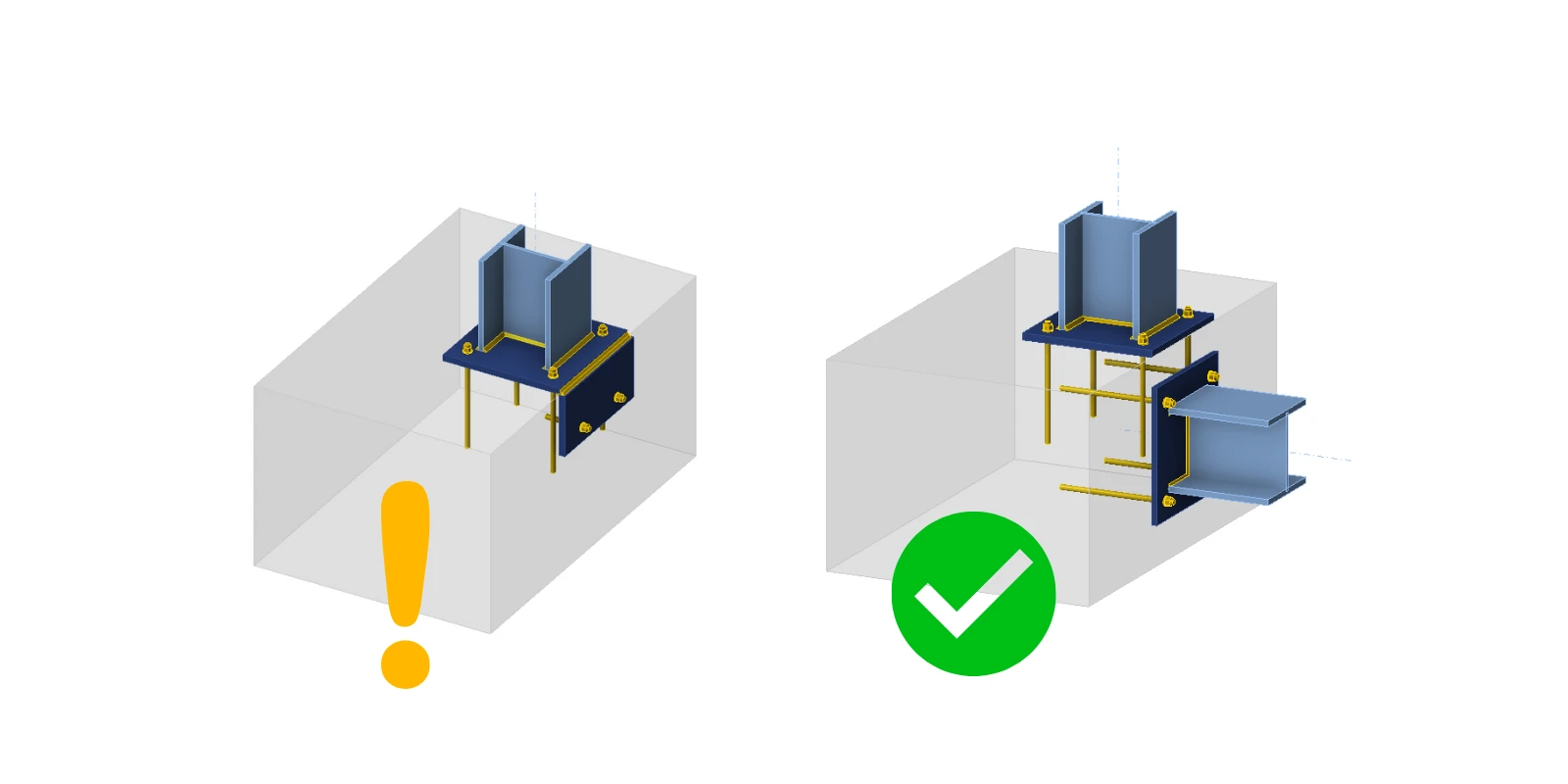
L'export de plusieurs platines de base dans un même bloc est pris en charge, bien qu'il ne soit pas recommandé d'importer ce que l'on appelle l'ancrage en bord de bloc.
Dans l'application Connection, le béton est modélisé de manière simplifiée à l'aide du modèle de sol de Winkler. En revanche, le modèle de la partie métallique au-dessus du bloc de béton est modélisé en détail, y compris la plasticité des matériaux. Pour une vérification plus détaillée du béton armé sous la platine de base, il est possible d'exporter la platine de base, les ancrages et les charges vers l'application Detail. Là, le béton est modélisé de manière plastique.
Les ancrages sont exportés déconnectés axialement, et la charge entre eux est remplacée par une paire d'efforts égaux mais opposés (précisément en raison du manque de rigidité de la partie métallique au-dessus de la platine de base). Par conséquent, il n'est pas possible que les efforts axiaux dans les ancrages changent si la couche de recouvrement dans le coin du bloc de béton devient plastique. De même, les soudures des platines de base sont exportées déconnectées, la liaison étant remplacée par des efforts égaux mais opposés. Par conséquent, il ne peut y avoir aucun changement de contrainte dans la soudure en cas de plastification du coin du béton.
Il s'ensuit qu'après l'export, bien que tous les efforts agissant sur les platines de base soient en équilibre, les conditions de déformation ne seront pas respectées.
Ceci s'applique à la version actuelle 25.1.2. Cela peut différer dans les versions précédentes, car nous travaillons progressivement à la suppression de ces limitations. Vous trouverez plus d'informations sur chaque version dans les notes de version.