


În versiunea actuală a IDEA StatiCa (verificați aici), oferim BIM links în aplicația Checkbot pentru diverse programe CAD și FEA. Pentru a rămâne la curent, putem întreține și oferi suport pentru aproximativ 2 dintre cele mai recente versiuni ale software-urilor conectate. Cu toate acestea, dacă aveți nevoie să creați un BIM link între cea mai recentă versiune de IDEA StatiCa și o versiune mai veche, nesuportată, a software-ului terță parte, acest lucru este încă posibil.
Rețineți că, în acest caz, nu oferim niciun suport tehnic și nu garantăm funcționarea corectă a BIM link-ului (de exemplu, importul corect al încărcărilor echilibrate).
BIM link-ul poate fi creat utilizând fișierele .bat corespunzătoare din folderul de instalare al IDEA StatiCa, în câțiva pași:
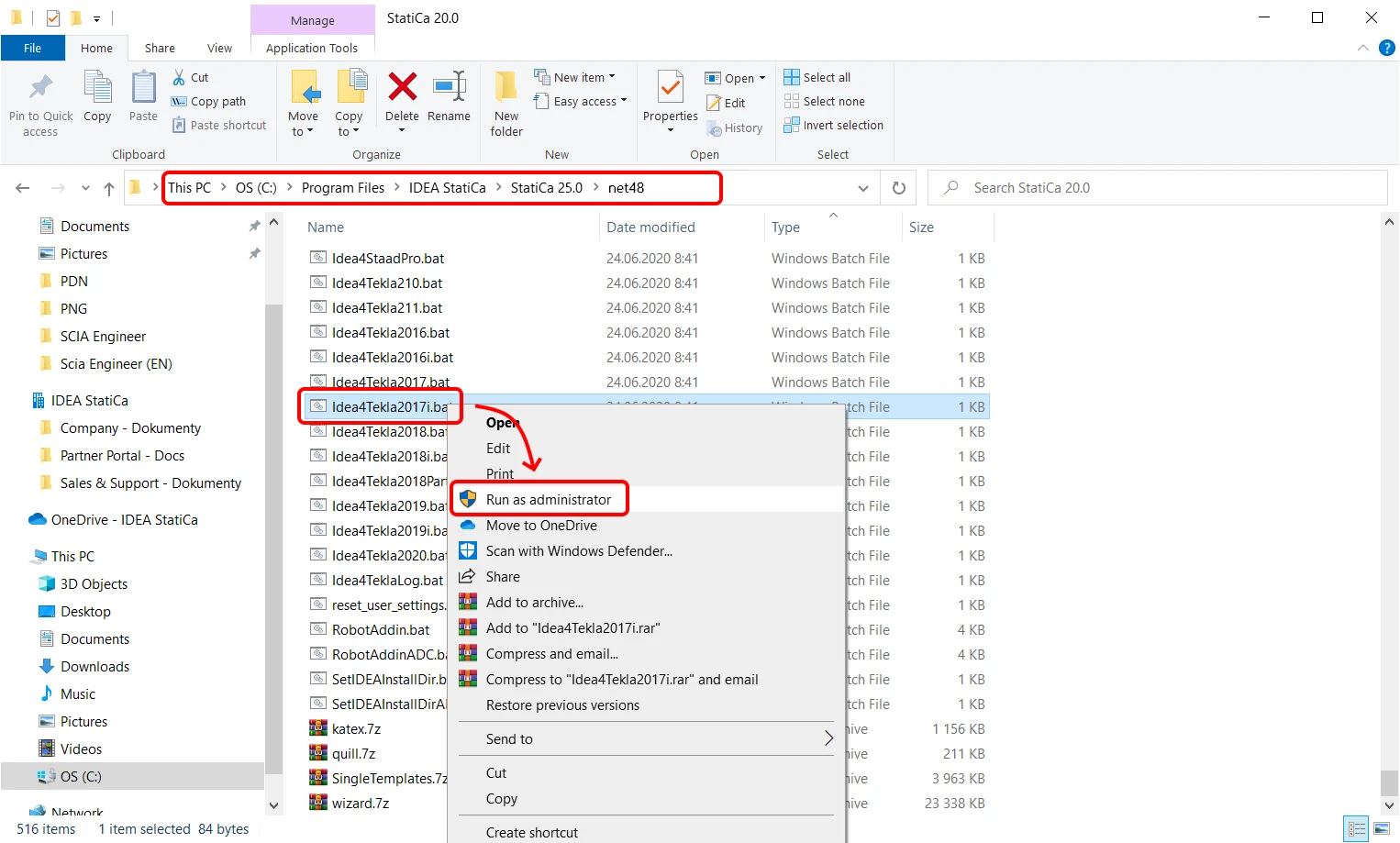
- Accesați folderul de instalare C:\Program Files\IDEA StatiCa\StatiCa XX.X\net48
(pentru IDEA StatiCa 24.1 și versiuni mai vechi C:\Program Files\IDEA StatiCa\StatiCa XX.X) - Găsiți fișierul .bat sau .exe corespunzător software-ului dumneavoastră:
Pentru Robot Structural Analysis, rulați RobotAddin.bat
Pentru Advance Steel, rulați Idea4AS2026.bat
Pentru Midas Civil NX, rulați IdeaMidasCivilNXPlugin.exe
Pentru Revit, rulați Idea4Revit2026.bat
Pentru RAM Structural System, rulați RamToIdeaPluginInstall.exe
Pentru RFEM, rulați Idea4RFEMNET6.bat sau Idea4RFEM.bat (pentru versiunea 5)
Pentru RSTAB, rulați Idea4RSTABNET6.bat sau Idea4RSTAB.bat (pentru versiunea 5)
Pentru SCIA Engineer, rulați SetIDEAInstallDir.bat
Pentru SDS2, rulați Idea4SDS22025.bat
Pentru STAAD.Pro, rulați Idea4StaadPro.bat
Pentru Tekla Structures, rulați Idea4Tekla2025.bat
Pentru AxisVM, rulați AxisVMLinkPluginInstaller.exe (C:\Program Files\IDEA StatiCa\StatiCa XX.X\net48)
Pentru Advance Design, rulați SetIDEAInstallDirAD.bat (C:\Program Files\IDEA StatiCa\StatiCa XX.X\net48) - Rulați fișierul din meniul contextual ca administrator
- Legătura dintre IDEA StatiCa și software-ul selectat este instalată
- Urmați instrucțiunile ulterioare privind modul de utilizare a legăturii într-un tutorial relevant (de exemplu Tekla Structures BIM link for connection design)
Rețineți că unele dintre BIM links către IDEA StatiCa sunt dezvoltate de terțe părți, utilizând API-ul public IDEA StatiCa (numit IOM). În acest caz, este recomandat să contactați dezvoltatorul respectiv. Cum verificați acest lucru? Accesați secțiunea BIM și găsiți informațiile relevante pentru fluxul dumneavoastră de lucru.